Wednesday, August 27, 2014

Pin It

Want an easy way to always start the websites you want open when you open your browser? Well this works with both Google Chrome and Firefox. I tried to test it with IE, but it kept crashing! And you wonder why I use the other two all the time?


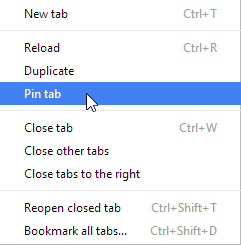
With a tab open to the website desired, like your email or maybe Facebook, simply right click on the tab and choose Pin tab.


The next time you open that browser a short tab will appear on the left side of the tab bar with that site open. Give it a little while to load.


Saturday, August 9, 2014

Disposable Email Address


Ever wish you could use an email address that did not cause you to get junk email? Well what you can do is create a Disposable Email Address for those sites you have to give an email address to. You make up the address and use it every time you sign up for something. Then the emails sent to that address will NOT end up in your normal email. Yes, you can check the disposable email inbox and see what was sent to you. And it is free.

Check it out at: http://www.mailinator.com/

Decide on a mailbox name and see if it is in use. Then use that address when asked for an email the next time and all those emails will go to your inbox at Mailinator. Cool.


Tuesday, August 5, 2014

Free Invoicing Program

Ever need to create an invoice? Here is a free and easy to use program to do just that. It is called FREE Express Invoice. There is an edition you can pay for, but the free one should  work fine for most of your needs.

Express Invoice Free Edition

Here is what the site says about its features:

Free Express Invoice Features: Create invoices, quotes and orders quickly and easily. * Automate recurring invoices. Standard reports such as accounting, sales person, unpaid invoices and more. Allows you to set up to three tax rates to select from when creating invoices. Regional format settings include currency symbol, decimal point display and paper size. Automatically send statements to customers with overdue payments.

Download it at http://express-invoice.en.softonic.com/

Saturday, August 2, 2014

A Replacement for XP

As we all know Windows XP is outdated and now unsupported by Microsoft. Came across a couple of operating systems that might be useful for you to revive an older and slower computer. It is not Windows and will not run your Windows software. If you still have games and other things you really like and they still work on your XP machine, just don't go on the Internet with it. Keep using it for as long as the hardware continues to work.

Check out these two:

Linux Lite and Zorin Lite. They are both Linux OS and look a lot, by design, like Windows XP. They come with all you need to surf the net, even Facebook and email, and do word processing, view YouTube and other videos. And work with pictures.


https://www.linuxliteos.com/ 


http://zorin-os.com/lite.html

To try them out you download the ISO file and in Windows 7 or 8, right-click the downloaded file and choose burn to CD/DVD. Put a blank DVD for Zorin or a blank CD-R in your drive and a bootable CD/DVD will be created.

To try it out, boot from the CD/DVD and you will run a live version without touching your hard drive. From there you can choose to install it on your hard drive either as a second OS leaving XP as it is or wiping out XP and installing the new OS. The later option will REMOVE ALL YOUR FILES so be careful if you have stuff you need.

You will be surprised at how fast each of them run on your old, slow PC. Oh, you do not need any anti-virus or malware checking software with Linux.
Wednesday, July 30, 2014

Check out the Raspberry PI

Interested in experimenting?

The Raspberry Pi is a credit-card sized computer that plugs into your TV and a keyboard. It is a capable little computer which can be used in electronics projects, and for many of the things that your desktop PC does, like spreadsheets, word-processing and games. It also plays high-definition video.

You can find them on Amazon in various forms from components to kits.

http://www.raspberrypi.org/ 

Wednesday, July 16, 2014

Mapping in Google Chrome

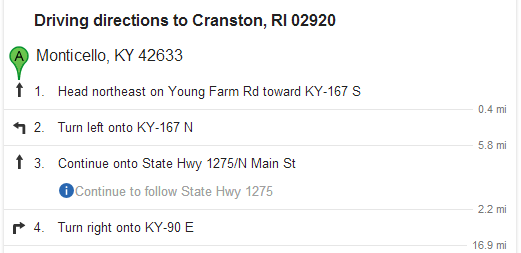
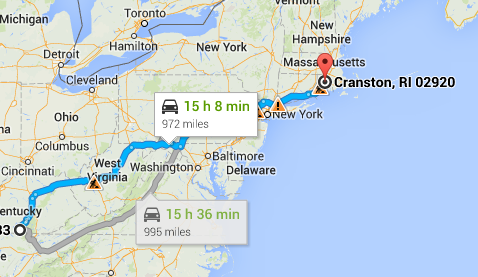
In checking for a route back to RI I discovered a neat shortcut in Google Chrome. Simply type "how far" and then the from and to locations, just the zip code will do. I typed "how far 42633 to 02920" (without the quotes) and here is what popped up:


Clicking on the down arrow under the above results in a step by step set of directions:


And click on the map and you get right to Google Maps and a drawing of the route:

Tuesday, July 1, 2014

Office talk at the General Meeting 7-1-2014

The meeting started off with a reading of the revised by-laws and a vote to pass them. So I did not get into as much actual demos of the office suites we talked about. But we did cover the similarities and differences of Microsoft, LibreOffice, AbiWord, Windows Live, and Google Docs.

There were lot's of good questions both in the open forum before the meeting and during the Office talk. The class notes contain links for many of the program we talked about.

When we think of Office, most of us think Microsoft. They have done a great job taking over the Office Suites by including their trial package on new computers  from many of the hardware vendors. It is probably the best suite out there, but it is also a costly one. The least expensive is the Home and Student edition at $139. But it does not include all the programs in the suite, only Word, Excel, and PowerPoint. Missing is the popular Publisher and Access programs and others. And you can only license it on ONE computer. If you have two computers in the household, you need to pay twice. You now rent their programs by signing up for Office 365.......

Click the Class Notes above to download the rest of the notes from tonight's talk.