Demonstrated a loud bluetooth speaker. It was the S5 Zealot. It is easy to pair up with a cell phone.
Polaroid 360° Motorized Rotating HDTV Amplified Antenna with Remote. An inexpensive rotatable TV antenna you can put in your attic.
http://tinyurl.com/h78gq85
New Lenovo $199 Windows 10 laptop/tablet. A low end but lightweight and useful laptop.
http://tinyurl.com/z9fbqau
Explorer++ is a free multi-tab file manager that features the same familiar interface as Windows Explorer, while introducing several enhancements and improvements for a much richer file browsing experience.
http://tinyurl.com/3nejp42
Email Checker is a simple tool for verifying an email address. The free version allows you to check up tp 5 address per day.
http://tinyurl.com/j4om3ql
Printing Postcards
https://www.canva.com/
Or you can use a template right in MS Word.
Sneak Peeks, Advanced Access, and Special Giveaways at instafreebie.com. Free ebooks for Kindle and other book readers delivered daily to your email.
http://tinyurl.com/z2y2jdg
Walmart savings catcher is an app for your cell phone that allows you to scan in your receipts. Once scanned, Walmart views all the local ads to see if you could have gotten each item cheaper elsewhere. If so, they give you the difference in a store credit.
Sam’s Club Scan and Go is available on Android or on your iPhone. It lets you scan the items as you place them in your basket. When you are done, click Pay and you get to avoid all the lines and walk right out.
Efax lets you receive and send a fax from your PC. Free up to 10 per month received. 30 day trial on the sending.
CamScanner is a great way to scan documents to your cell phone, edit them, and save them as PDFs or even editable documents.
Searching on the class blog is easy when you use the site parameter in your browser. Let’s say you want to look for the summaries that talk about using LibreOffice. If you just type LibreOffice into your browser, you will get thousands of results and probably nothing about the class summaries on the first few pages. Instead type the following:
LibreOffice site:dickevanstraining.blogspot.com
You are telling your browser that you want to search for LibreOffice, but only on pages contained in the site named dickevanstraining.blogspot.com.
Auto Forward emails when you have multiple email addresses. For example, I have my comcast email set to forward all emails to my Yahoo account. I do that by opening my comcast email page and setting the auto forward address to my yahoo address. All email servers allow you to do this.
To post email content on Facebook, simply select what you want to post on Facebook in the email and Copy it to the clipboard. Then go to Facebook and paste it into your post.
Use Blogger to create a free website or www.evanshosting.com for an easy to build low cost one.
Saving LibreOffice Documents by Default in Microsoft Office Formats
Choose Tools > Options > Load/Save > General.
In the Default file format and ODF settings area, first select a document type, then select the file type for saving. I suggest setting it for Microsoft Word 2007-2010 which will use the docx format,
Thursday, March 2, 2017

Friday, February 24, 2017
Class Summary 2-23-2017
Began with a discussion on folders. A folder is a container used to organize other folders and files within. Windows comes with some preset folders like Documents, Downloads, Pictures, and others. You may create additional folders inside or under any of them. Open the folder you wish to add a folder under.

Then either click New Folder in the ribbon, right-click in the folder and choose New > Folder, or just type Ctrl+Shift+N. A new folder will appear with the name new folder selected. Replace that temporary name with the name you want to give it.
We discussed the Downloads folder. When you receive an email with an attachment. The downloaded file ends up in your download folder. So do the pictures you download from Facebook or elsewhere. And the programs you download to install. So downloads generally ends up with a lot of junk you do not really need to hand on to. However, when you do download a picture or a file that you want, move it to a better place. Like pictures to your picture folder or documents to your document folder. You might even create a subfolder to better organize your stuff. Like a folder for trip to disney 12-2016 and place all your pictures from that trip in that folder. This makes it much easier to locate them later.
The question came up about placing emails in folder for easy access to the later. Years ago we had a program that came with Windows called Outlook Express or we worked in an office that used the paid for Outlook program. Those programs actually received our emails and placed them on our computers. We could then back them up or organize them as we wished. Today our emails are stored in the cloud at our email provider. Comcast emails are stored at comcast and we access them through the internet wherever we are. Same with gmail, yahoo, live, AOL, and others. The only way to “save” them on our computer is to print them as a PDF and store the resulting file.
When we get a new computer, we need to move data from one computer to another--from the old one to the new. I suggest an external hard drive be plugged into the old computer and the files and folders under your username be copied to it. Then plug the external into the new computer and copy them to the new. Programs cannot be moved from the old to the new. You will need to install them on the new. Locate your original installation media and key codes. There is a product called PCMover that will move some, but not all, programs. I have not used it, but it gets good reviews. It is not free.
Recuva is a free program from Piriform.com that will scan your hard drive and locate deleted files. Yes, the ones you deleted and then removed from the recycle bin.
https://fmovies.se/ is a site that lets you access free movies and TV shows. I have not used it, but one of our members recommend this.
I wrote a paper on the maintenance programs I use to keepy PC clead. Here is a link to that paper: http://www.rwevans.com/ComputerMaintenance.pdf
I installed and demonstrated Photo Clip 7 which is a paid for program that makes it incredibly easy to set your main subject against a new background! In the following example, the picture of the family is removed in only 3 steps and placed in front of a new background, resulting in a completely new image!
http://tinyurl.com/zg6fvhg
Then either click New Folder in the ribbon, right-click in the folder and choose New > Folder, or just type Ctrl+Shift+N. A new folder will appear with the name new folder selected. Replace that temporary name with the name you want to give it.
We discussed the Downloads folder. When you receive an email with an attachment. The downloaded file ends up in your download folder. So do the pictures you download from Facebook or elsewhere. And the programs you download to install. So downloads generally ends up with a lot of junk you do not really need to hand on to. However, when you do download a picture or a file that you want, move it to a better place. Like pictures to your picture folder or documents to your document folder. You might even create a subfolder to better organize your stuff. Like a folder for trip to disney 12-2016 and place all your pictures from that trip in that folder. This makes it much easier to locate them later.
The question came up about placing emails in folder for easy access to the later. Years ago we had a program that came with Windows called Outlook Express or we worked in an office that used the paid for Outlook program. Those programs actually received our emails and placed them on our computers. We could then back them up or organize them as we wished. Today our emails are stored in the cloud at our email provider. Comcast emails are stored at comcast and we access them through the internet wherever we are. Same with gmail, yahoo, live, AOL, and others. The only way to “save” them on our computer is to print them as a PDF and store the resulting file.
When we get a new computer, we need to move data from one computer to another--from the old one to the new. I suggest an external hard drive be plugged into the old computer and the files and folders under your username be copied to it. Then plug the external into the new computer and copy them to the new. Programs cannot be moved from the old to the new. You will need to install them on the new. Locate your original installation media and key codes. There is a product called PCMover that will move some, but not all, programs. I have not used it, but it gets good reviews. It is not free.
Recuva is a free program from Piriform.com that will scan your hard drive and locate deleted files. Yes, the ones you deleted and then removed from the recycle bin.
https://fmovies.se/ is a site that lets you access free movies and TV shows. I have not used it, but one of our members recommend this.
I wrote a paper on the maintenance programs I use to keepy PC clead. Here is a link to that paper: http://www.rwevans.com/ComputerMaintenance.pdf
I installed and demonstrated Photo Clip 7 which is a paid for program that makes it incredibly easy to set your main subject against a new background! In the following example, the picture of the family is removed in only 3 steps and placed in front of a new background, resulting in a completely new image!
http://tinyurl.com/zg6fvhg
Thursday, February 16, 2017
Class Summary 2-16-2017
One of our members was wearing her smartphone and everyone was interested in it. It is called a Smartphone Lanyard Necklace
http://tinyurl.com/hoejx49
Password Checker was something we talked about last year and harold mentioned it again in his January talk on passwords. Here is the link.
http://tinyurl.com/44x8csm
Find My Friends allows you to track someone by their cell phone. You need their permission.
http://tinyurl.com/k5j5eev
Filter Your News Feed by adding this neat applicaiton
http://tinyurl.com/69438nq
British TV streamed for $5 a month
www.acorn.tv
Yes, Kodi on Windows 10 is easy to do
www.Kodi.tv to download the installer and then a YouTube video that tells you how to a full featured addon
http://tinyurl.com/zp7uzf6
12 powerful websites that can replace your PC's desktop software. Great idea, but the links do not work yet.
http://tinyurl.com/j9t9zgj
Direct TV with no dish or boxes and a free Amazon Firestick
http://tinyurl.com/z2uoxdx
Build your own Simple and Free Website. To keep it active you have to log into it at least once a month
www.simdif.com
Verizon safety net is something I talked about last week and forgot to include. It takes over when you use up all your 4GLTE data on your cell phone dropping you down to 4G unlimited.
https://www.verizonwireless.com/news/article/2016/06/verizon-transforms-your-wireless-experience.html
Best Cell Phone Apps 2016 is an article with 50 interesting apps to try
http://tinyurl.com/zrucq37
Windows 10 Ads & Notifications shows you how to stop some of those annoying popups right in Window 10
http://tinyurl.com/hla6qmh
Set Up Acquaintances in Facebook so you avoid see most of their newsfeeds and can remove them from seeing your posts without unfriending them
http://tinyurl.com/jrs4ng2
The safest ways to lend someone your Android phone is to setup a guest account that you switch your phone to first. Then they do not have access to your apps and passwords.
http://tinyurl.com/j6v9q8k
http://tinyurl.com/hoejx49
Password Checker was something we talked about last year and harold mentioned it again in his January talk on passwords. Here is the link.
http://tinyurl.com/44x8csm
Find My Friends allows you to track someone by their cell phone. You need their permission.
http://tinyurl.com/k5j5eev
Filter Your News Feed by adding this neat applicaiton
http://tinyurl.com/69438nq
British TV streamed for $5 a month
www.acorn.tv
Yes, Kodi on Windows 10 is easy to do
www.Kodi.tv to download the installer and then a YouTube video that tells you how to a full featured addon
http://tinyurl.com/zp7uzf6
12 powerful websites that can replace your PC's desktop software. Great idea, but the links do not work yet.
http://tinyurl.com/j9t9zgj
Direct TV with no dish or boxes and a free Amazon Firestick
http://tinyurl.com/z2uoxdx
Build your own Simple and Free Website. To keep it active you have to log into it at least once a month
www.simdif.com
Verizon safety net is something I talked about last week and forgot to include. It takes over when you use up all your 4GLTE data on your cell phone dropping you down to 4G unlimited.
https://www.verizonwireless.com/news/article/2016/06/verizon-transforms-your-wireless-experience.html
Best Cell Phone Apps 2016 is an article with 50 interesting apps to try
http://tinyurl.com/zrucq37
Windows 10 Ads & Notifications shows you how to stop some of those annoying popups right in Window 10
http://tinyurl.com/hla6qmh
Set Up Acquaintances in Facebook so you avoid see most of their newsfeeds and can remove them from seeing your posts without unfriending them
http://tinyurl.com/jrs4ng2
The safest ways to lend someone your Android phone is to setup a guest account that you switch your phone to first. Then they do not have access to your apps and passwords.
http://tinyurl.com/j6v9q8k
Thursday, February 9, 2017
Class Summary 2-9-2017
Almost thirty signed in today. We spend the first hour or more talking about using other methods to get the shows we want to watch on TV rather than subscribing to a cable or provider for hundreds of channels we never look at.
Many of us pay big bucks to watch a few shows on our televisions. We either ahve a satellite or cable connection through some local service that feeds us hundreds of channels. Have we really looked at what we are watching? I will bet you are not looking at most of them and have just a few shows you follow plus local news channels.
If all you need are the local channels, get an antenna and plug it into the back of your TV where the cable from your current carrier plug in and go to Setup on your TV remote. Scan for channels and do not be surprised if you find 20-30 channel available right over the air. No cable connection needed at all.
Now don’t cancel all your services. You still need an internet connection, but that will be a lot lower cost than the bundle you now have. Now speed is nice, but you do not need the high speed line they may try to talk you into. You can stream movies at 6 mbps.
Phones are another topic, but if you have a cell phone why keep the in house phone? If it is part of your cable bundle, if the power goes out so does the phone. You cell phone will still work and you can charge it in you vehicle. I like my number, you say. You can port your existing number to your cell phone. There might be a small charge to do this, but you save that other bill every month.
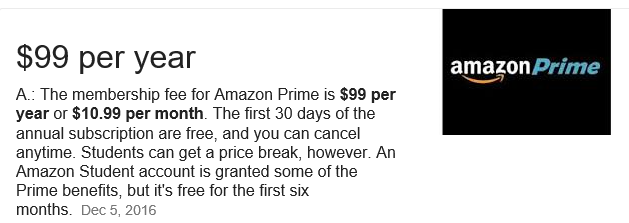
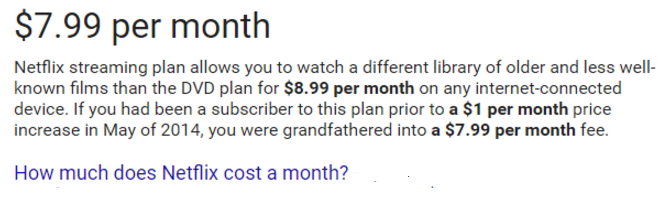
OK, the cable is cut. How do I get to watch my favorite shows? As long as you have an internet connection you can use one of the popular devices. We are going to look at the Roku ($30+) and FireStick ($40 with Alexa Voice). They allow access to a number of free streaming services and many pay for services as well. If you have an Amazon Prime account, you automatically have access to free movies and TV shows with either of these devices. I have used Netflix for years and can access it using my Roku or FireStick.

Add Kodi to the FireStick and you can watch any movie, TV show, Live TV, Sports, and more. Add you can add it free using one of the many YouTube videos out there that step you through the process. Now you have the best of both--you have local TV for free and all the movies and TV shows you ever want to watch, even live TV all for the cost of the stick.
Kodi can also be installed on your PC and your smartphone. Watch what you want when you want to watch it.
We touched on OneDrive, Google Docs, and Google Photos all of which we have been discussing each week. Look at prior class summaries for detail.
Demonstrated using speech to text while in Google Docs and in the Google search engine.
Was asked how to clean up a cell phone. I use CCleaner on my Android phone. It is not available for an iPhone, so use Battery Doctor on it.
What should I buy when getting a new PC? My suggestion is always to see what is on sale. All the major brands are good in my opinion--Dell, Acer, Asus, HP, and Toshiba. Look for a multi core machine with no less than 4gb for RAM and at least a 500gb hard drive. WiFi is a must. Many laptops do not come with DVD drives today. But don’t let that stop you because you can purchase an external one that plugs into a USB port for $20 or less.
If you are just planning on using it for internet access and email and Facebook, I suggest a Chromebook instead of a Windows 10 laptop. A Chromebook does not need an antivirus or any of the maintenance programs we suggest for a Windows PC.
You can find laptops for under $300 and Chromebooks for under $200. Check the local stores for deals--Staples, Best Buy, Walmart...
Many of us pay big bucks to watch a few shows on our televisions. We either ahve a satellite or cable connection through some local service that feeds us hundreds of channels. Have we really looked at what we are watching? I will bet you are not looking at most of them and have just a few shows you follow plus local news channels.
If all you need are the local channels, get an antenna and plug it into the back of your TV where the cable from your current carrier plug in and go to Setup on your TV remote. Scan for channels and do not be surprised if you find 20-30 channel available right over the air. No cable connection needed at all.
Now don’t cancel all your services. You still need an internet connection, but that will be a lot lower cost than the bundle you now have. Now speed is nice, but you do not need the high speed line they may try to talk you into. You can stream movies at 6 mbps.
Phones are another topic, but if you have a cell phone why keep the in house phone? If it is part of your cable bundle, if the power goes out so does the phone. You cell phone will still work and you can charge it in you vehicle. I like my number, you say. You can port your existing number to your cell phone. There might be a small charge to do this, but you save that other bill every month.
OK, the cable is cut. How do I get to watch my favorite shows? As long as you have an internet connection you can use one of the popular devices. We are going to look at the Roku ($30+) and FireStick ($40 with Alexa Voice). They allow access to a number of free streaming services and many pay for services as well. If you have an Amazon Prime account, you automatically have access to free movies and TV shows with either of these devices. I have used Netflix for years and can access it using my Roku or FireStick.
Add Kodi to the FireStick and you can watch any movie, TV show, Live TV, Sports, and more. Add you can add it free using one of the many YouTube videos out there that step you through the process. Now you have the best of both--you have local TV for free and all the movies and TV shows you ever want to watch, even live TV all for the cost of the stick.
Kodi can also be installed on your PC and your smartphone. Watch what you want when you want to watch it.
We touched on OneDrive, Google Docs, and Google Photos all of which we have been discussing each week. Look at prior class summaries for detail.
Demonstrated using speech to text while in Google Docs and in the Google search engine.
Was asked how to clean up a cell phone. I use CCleaner on my Android phone. It is not available for an iPhone, so use Battery Doctor on it.
What should I buy when getting a new PC? My suggestion is always to see what is on sale. All the major brands are good in my opinion--Dell, Acer, Asus, HP, and Toshiba. Look for a multi core machine with no less than 4gb for RAM and at least a 500gb hard drive. WiFi is a must. Many laptops do not come with DVD drives today. But don’t let that stop you because you can purchase an external one that plugs into a USB port for $20 or less.
If you are just planning on using it for internet access and email and Facebook, I suggest a Chromebook instead of a Windows 10 laptop. A Chromebook does not need an antivirus or any of the maintenance programs we suggest for a Windows PC.
You can find laptops for under $300 and Chromebooks for under $200. Check the local stores for deals--Staples, Best Buy, Walmart...
Thursday, February 2, 2017
Class Summary 2-2-2017
We began with a question about how to print the screen. Back in the days of DOS, we would press the Print Screen key on the keyboard and whatever was on the screen would be sent immediately to our printer. Today the same key takes the image on the screen and places a snapshot of it in the Windows clipboard. From there we can paste it into any other application, like the Paint program to change it and save it as an image file (JPG) or into a word processor as an image to include in a document. In Windows 10 holding down the windows key and pressing print screen will create an image file and save it in the Screenshots folder in your Pictures folder.
The Snipping Tool comes with Windows and using it your can draw a box around anything on your screen. When you release the mouse button what you boxed appears in the Snipping window. From there you can copy it, save it as an image file, and other options.
I have used MWsnap for years. And there is one on Ninite.com call Greenshot that does a nice job as well. And this one I found last week, but have not tried… Screeny is a powerful screen capture program for Windows
http://tinyurl.com/hjb7fzx
LibreOffice 5.3 ships with experimental Office-like Ribbon UI. This link takes you to the article we discussed in class about the new version. It includes an experimental “ribbon” bar similar to MS Office, but not called that. Details are in the article.
http://tinyurl.com/j2ubvga
Download LibreOffice 5.3
http://tinyurl.com/jj9r3nj
Windows 10 tip: Repair your Windows 10 installation. When you have a serious issue with Windows 10, it has it’s own repair capability by running a reset. This reinstalls Windows 10. But, it also removes all your non-Microsoft programs while keeping your data. Using a Windows 10 install CD which you can download from the web at no charge, you can upgrade your PC to the same version and keep all your programs and data. This article explains it.
http://tinyurl.com/zdsnbus
Spreadsheet Basics. There are a number of spreadsheet programs out there. The most used is probably MS Office Excel. As you know, that is not a free programs. Others include OpenOffice, LibreOffice, GNumeric, Google Docs, and more… The following link opens the white paper I used in class: http://tinyurl.com/hpeuezy and here is the link to the sheets we built today in class: http://tinyurl.com/zdbwops
The Snipping Tool comes with Windows and using it your can draw a box around anything on your screen. When you release the mouse button what you boxed appears in the Snipping window. From there you can copy it, save it as an image file, and other options.
I have used MWsnap for years. And there is one on Ninite.com call Greenshot that does a nice job as well. And this one I found last week, but have not tried… Screeny is a powerful screen capture program for Windows
http://tinyurl.com/hjb7fzx
LibreOffice 5.3 ships with experimental Office-like Ribbon UI. This link takes you to the article we discussed in class about the new version. It includes an experimental “ribbon” bar similar to MS Office, but not called that. Details are in the article.
http://tinyurl.com/j2ubvga
Download LibreOffice 5.3
http://tinyurl.com/jj9r3nj
Windows 10 tip: Repair your Windows 10 installation. When you have a serious issue with Windows 10, it has it’s own repair capability by running a reset. This reinstalls Windows 10. But, it also removes all your non-Microsoft programs while keeping your data. Using a Windows 10 install CD which you can download from the web at no charge, you can upgrade your PC to the same version and keep all your programs and data. This article explains it.
http://tinyurl.com/zdsnbus
Spreadsheet Basics. There are a number of spreadsheet programs out there. The most used is probably MS Office Excel. As you know, that is not a free programs. Others include OpenOffice, LibreOffice, GNumeric, Google Docs, and more… The following link opens the white paper I used in class: http://tinyurl.com/hpeuezy and here is the link to the sheets we built today in class: http://tinyurl.com/zdbwops
Friday, January 27, 2017
Class Summary 1-26-2017
We started the afternoon off discussing the “cloud”. We did go down a few deep rabbit holes as well, but here is a little on the cloud.
What is the Cloud
You know what a USB flash drive is. You can copy files to it and then take it with you. If you are at someone’s house you can plug your flash drive into their PC and access all the files you have saved on that flash drive. To maybe you use it to come back and forth from your other house.
Cloud drives are external drives where you can save your data just like you can with that flash drive you plug in and then remove to take with you. The difference is that your access to your cloud drive is through the Internet. To access your cloud drive you need to know the username and password you assigned to it.
On Windows 10 there is a folder called OneDrive. When you established your Microsoft account, you received your cloud drive from them. It has 5gb of free storage and automatically syncs the data in your OneDrive folder to your cloud drive. Access your drive by logging in to www.live.com. There you will see your OneDrive and a number of other free services like Word and Excel and more. Whatever you put into OneDrive will sync to your cloud and your OneDrive folder on your PC.
If you have a Google account, you have 15gb of free space. In addition you have access to Google Docs, a full office suite of applications and Google Photos. With Photos you have an unlimited amount of storage to your images and video. By installing the Google Photo app on your smartphone, every picture you take is automatically uploaded to your Google Drive.
www.Dropbox.com is another popular free cloud. It has 2gb of free space and you can update that for a reasonable fee to 1tb of space. You can upload any files to your dropbox and share them with others, if you wish. Either a file at a time or an entire folder of files. By installing the application on your PC you can sync all files in the DropBox folder on your PC to your cloud drive making it a great backup solution and allowing you to access the data on your home PC wherever you are at, even on your smartphone.
We discussed other cloud storage like Amazon Prime and others. They all give you easily accessible places to safely store your data. You just need the Internet.
Cut the Cable Bill.
Also touched on cutting the cable and reducing the size of that monthly “deal” for Internet, TV, and phone. Internet you you need, but not the very high speeds they are trying to convince you into. 6 mbps streams fine. I have 25 mbps from Comcast and pay less the $30 each month. I do not have TV or satellite or phone service from my provider. How can I get local TV channels and movies? I have a $10 set of rabbit ears I bought at Wal-Mart and can pick up all the local news channels and more for free.
I have a RoKu box and subscribe to Amazon Prime so I get free movies and TV shows both there and on Netflix. Each are less than $10 per month. You can also download the major networks as apps on your smartphone or tablet and watch live TV there for free.
There are many low cost ways to get a “home” phone using service like MagicJack, OOMA, Vonage, and others. At the most you will pay less than $20 per month and have all special features and free long distance--even into Canada and Mexico with some and low cost overseas.
Using Kodi, you can program your PC, Firestick, and other devices to see just about anything for free. So for less than $50 a month you can have the full “bundle” you are probably paying close to or over $200 for. One of the members warned us that some new TV’s are not coming with built in TV tuners, so you may not be able to put an antenna on them to get local channels. So if you are buying a new set make sure the set includes a tuner.
How to Use Windows 10’s “Quick Assist” to Remotely Troubleshoot a Friend’s PC. Easy to use and simple replacement for LogMeIn and TeamViewer.
http://tinyurl.com/z8tbo2f
Protect your PC against ransomware. This is another malware like cleanup that will help to prevent you from getting hit with ransomware.
http://tinyurl.com/hlyyp6w
There were many other questions and answers. I wish I could have remembered them all to include in these notes. If you think of one, please let me know and I will add something about it.
What is the Cloud
You know what a USB flash drive is. You can copy files to it and then take it with you. If you are at someone’s house you can plug your flash drive into their PC and access all the files you have saved on that flash drive. To maybe you use it to come back and forth from your other house.
Cloud drives are external drives where you can save your data just like you can with that flash drive you plug in and then remove to take with you. The difference is that your access to your cloud drive is through the Internet. To access your cloud drive you need to know the username and password you assigned to it.
On Windows 10 there is a folder called OneDrive. When you established your Microsoft account, you received your cloud drive from them. It has 5gb of free storage and automatically syncs the data in your OneDrive folder to your cloud drive. Access your drive by logging in to www.live.com. There you will see your OneDrive and a number of other free services like Word and Excel and more. Whatever you put into OneDrive will sync to your cloud and your OneDrive folder on your PC.
If you have a Google account, you have 15gb of free space. In addition you have access to Google Docs, a full office suite of applications and Google Photos. With Photos you have an unlimited amount of storage to your images and video. By installing the Google Photo app on your smartphone, every picture you take is automatically uploaded to your Google Drive.
www.Dropbox.com is another popular free cloud. It has 2gb of free space and you can update that for a reasonable fee to 1tb of space. You can upload any files to your dropbox and share them with others, if you wish. Either a file at a time or an entire folder of files. By installing the application on your PC you can sync all files in the DropBox folder on your PC to your cloud drive making it a great backup solution and allowing you to access the data on your home PC wherever you are at, even on your smartphone.
We discussed other cloud storage like Amazon Prime and others. They all give you easily accessible places to safely store your data. You just need the Internet.
Cut the Cable Bill.
Also touched on cutting the cable and reducing the size of that monthly “deal” for Internet, TV, and phone. Internet you you need, but not the very high speeds they are trying to convince you into. 6 mbps streams fine. I have 25 mbps from Comcast and pay less the $30 each month. I do not have TV or satellite or phone service from my provider. How can I get local TV channels and movies? I have a $10 set of rabbit ears I bought at Wal-Mart and can pick up all the local news channels and more for free.
I have a RoKu box and subscribe to Amazon Prime so I get free movies and TV shows both there and on Netflix. Each are less than $10 per month. You can also download the major networks as apps on your smartphone or tablet and watch live TV there for free.
There are many low cost ways to get a “home” phone using service like MagicJack, OOMA, Vonage, and others. At the most you will pay less than $20 per month and have all special features and free long distance--even into Canada and Mexico with some and low cost overseas.
Using Kodi, you can program your PC, Firestick, and other devices to see just about anything for free. So for less than $50 a month you can have the full “bundle” you are probably paying close to or over $200 for. One of the members warned us that some new TV’s are not coming with built in TV tuners, so you may not be able to put an antenna on them to get local channels. So if you are buying a new set make sure the set includes a tuner.
How to Use Windows 10’s “Quick Assist” to Remotely Troubleshoot a Friend’s PC. Easy to use and simple replacement for LogMeIn and TeamViewer.
http://tinyurl.com/z8tbo2f
Protect your PC against ransomware. This is another malware like cleanup that will help to prevent you from getting hit with ransomware.
http://tinyurl.com/hlyyp6w
There were many other questions and answers. I wish I could have remembered them all to include in these notes. If you think of one, please let me know and I will add something about it.
Thursday, January 19, 2017
Class Summary 1-19-2017
Word Processing
See slideshow http://tinyurl.com/jvcnt8t
And paper on basic word processing http://tinyurl.com/jsq2qku
Create a Word Cloud
A toy for generating “word clouds” from text that you provide. The clouds give greater prominence to words that appear more frequently in the source text.
ttp://tinyurl.com/os4k3oz
Image Resizer for Windows is a free, open source program for Microsoft Windows devices to resize images straight from Explorer.
http://tinyurl.com/hllhjwo
Create a word search puzzle or a crossword puzzle online for free
http://www.puzzle-maker.com/
How to receive money using PayPal
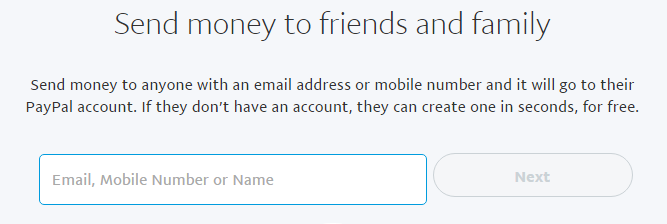
Your email address is the only thing somebody needs to send you money. They openn paypal.com and click Send. As soon as the payment has been credited to your PayPal account, we will notify you by email. You may then withdraw the funds to your bank account straight away or keep the money in your PayPal account for future online transactions.
Other ways to receive money: venmo.com and popmoney.com
See slideshow http://tinyurl.com/jvcnt8t
And paper on basic word processing http://tinyurl.com/jsq2qku
Create a Word Cloud
A toy for generating “word clouds” from text that you provide. The clouds give greater prominence to words that appear more frequently in the source text.
ttp://tinyurl.com/os4k3oz
Image Resizer for Windows is a free, open source program for Microsoft Windows devices to resize images straight from Explorer.
http://tinyurl.com/hllhjwo
Create a word search puzzle or a crossword puzzle online for free
http://www.puzzle-maker.com/
How to receive money using PayPal
Your email address is the only thing somebody needs to send you money. They openn paypal.com and click Send. As soon as the payment has been credited to your PayPal account, we will notify you by email. You may then withdraw the funds to your bank account straight away or keep the money in your PayPal account for future online transactions.
Other ways to receive money: venmo.com and popmoney.com
Subscribe to:
Posts (Atom)