Wednesday, December 18, 2019

Computer Club Notes 12-17-2019


Shortcuts
on the desktop contain an arrow in the lower-left corner. They are pointers to the actual file, in this case, the opening of the program Glary Utilities. Deleting the shortcut does NOT remove the program. Icons that do not have an arrow are actual files. Delete them and they are gone. Think of the shortcuts as sticky notes; they point to the location fo the actual file or program.
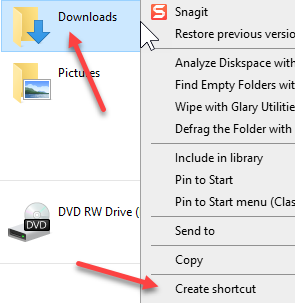

Create Shortcuts
Right-click on any file or folder and select create a shortcut. For example, right-click on the Downloads folder to place a shortcut on the desktop for quick access to it.


Check audio
When your speakers or microphone are not operating you might check the settings area by click Win+I > System > Sound
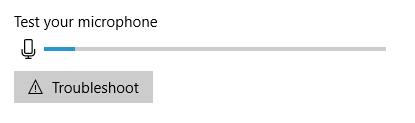
From there you can check the speakers, select other speakers, adjust sound levels, and check your microphone.

Convert HEIF to JPEG
Some of the newer cameras are creating .heif file instead of .jpg or .jpeg while many programs do not accept the new format. This is one online service that will convert the new format to the older one.
https://convertio.co/heif-jpg/

How to show multiple windows
The windows must be in restore size (NOT full screen). Point with your mouse at the title bar (top of the window) and drag the window to the far right. Then drag the other windows to the far left. You now see both windows side by side.
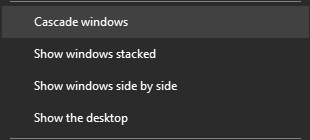


You can also right-click on the taskbar and select one of pop up options.

Set default search engine
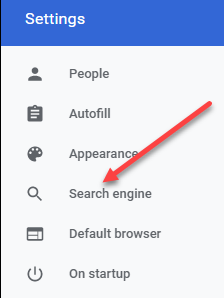


Each browser defaults to a particular search engine. For example, Chrome defaults to Google, Edge defaults to Bing, etc. In Chrome, click the menu button (3 dots), then choose Settings. From the list of items on the left, select a Search engine and choose the one you want as default. Work in a similar fashion in all browsers.

Eject CD drawer
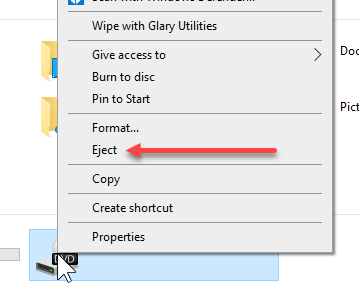

The button on the DVD/CD drawer is not always easy to press to open the drawer. Instead, open File Explorer (Win+E), then right-click on the icon for the DVD/CD under My PC. Choose Eject and the drawer will open.

Nomorobo



Just open www.nomorobo.com and follow the prompts. I have been using it for over a year and receive very ffew of those annoying calls.

Remove “people” from the taskbar


Right-click the taskbar and uncheck Show people…

https://www.ccappraiser.com/
To check the Charlotte County Appraiser site for data on anyone’s property and tax payment status. Click Record search > Real property and type in your search parameters. The less you enter the better. Last name first name with no comma.

Use Zillow.com to check on the value of any property in the USA.

Facebook
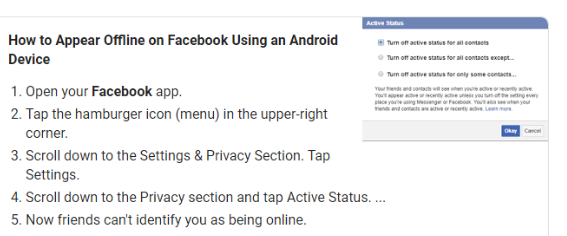
How to make oneself invisible… I did not know the answer so we Googled it. Here was what we found.

Windows Keyboard Shortcuts
Keyboard shortcuts greatly enhance your productivity and save you a whole lot of time. Instead of pointing and clicking with the touchpad or external mouse, you can keep your hands on the keyboard and simply press combinations of keys on to get things done.

We have talked about many of these and I use them every day. One I use often that is not on this list is Shift+Win+S which allows me to easily grab a piece of the screen and place it in the clipboard.
https://tinyurl.com/tdmkkdy

Phone Number Validator
Free phone validation--Is it a cell phone or is it a landline?

Validate phone numbers here to identify phone line type and possible phone company!

There are many other sites that do this exact same thing. When this one gives you the results it then asks if you want more details. If you say yes it scans all the public databases and then offers to show you the results for a fee.
https://tinyurl.com/saxrj7r

Thunderbolt 3 vs. USB-C
Newer laptops often come loaded with a port that accepts a reversible plug and supports very fast transfer speeds. Do you know what it is? If you guessed the Thunderbolt 3 or USB 3.1 port, you’re right, and therein lies the problem. Both data transfer protocols use the same connector, but their potential uses vary.

Essentially the coming new port will be sending data to another device at speeds up to 40GB/sec!
https://tinyurl.com/rvrxbh5

How To Create Your Own Internet Meme
An Internet meme, more commonly known as simply a meme ((/miːm/ MEEM) is a piece of media, traditionally combining image macros with a concept or catchphrase, which is spread from person to person via the Internet. Here is how to create your own.

These are the pictures with words added to them you see on Facebook.
https://tinyurl.com/wanp79c

Family Tree Now

Research your family tree and genealogy for free! If you want more details it will scan all public databases for a fee.
https://www.familytreenow.com/

Sunday, December 8, 2019

Computer Class Update 12-10-2019

We will be back in Florida on the 11th and will be at the club this coming Tuesday. It will be the only class until 2020 as Christmas Eve and New Year’s Eve both fall on a Tuesday. I will be at the club both days but the Cultural Center is closing early.

Here are a few things you might like before we get to the actual class dates.

Change Case In Google Docs
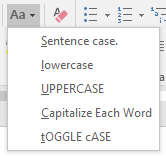
When writing I find the need to change the case of words or groups of words. This can be done one at a time but I have been used to being able to select a dropdown list in Word.


I would select the words and on the Home tab, in the Font group, and pull down the change case dropdown list. I was looking for a way to do it in Google Docs as this is my word processing program of choice now.


In your document, select the words you want to change.

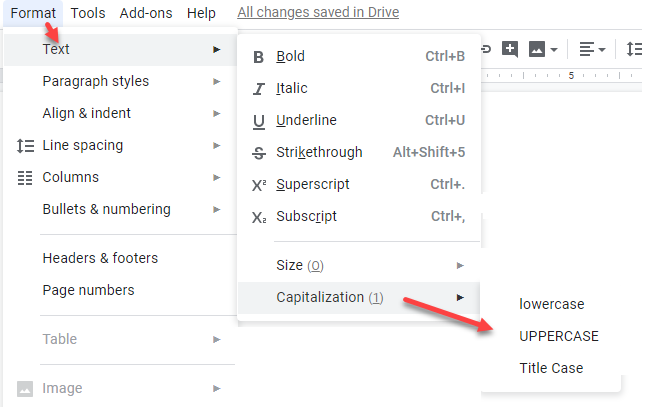
From the Format tab, choose Text > Capitalization and then choose one of three options--lower case, UPPER CASE, or Title Case.

This works great but there is an Add-on that gives you more options.


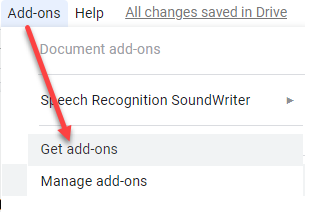
Select Add-ons > Get add-ons


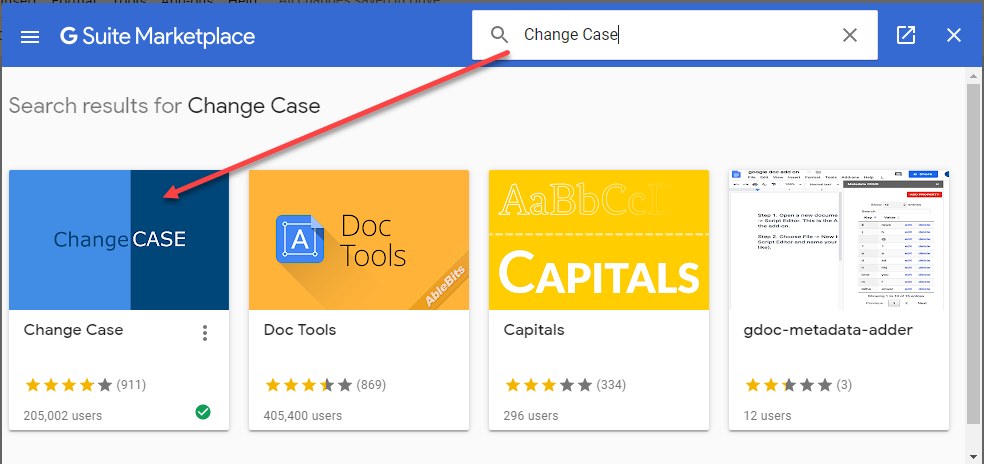
In the search box, type Change Case, then open the Change Case add-on to add it to your Google Docs Add-ons list.


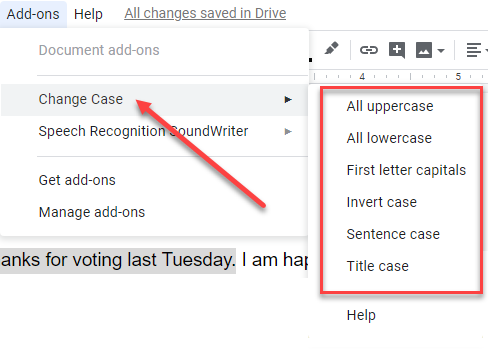
Select the words you want to change. From the Add-ons tab, click Change Case and then choose one of six options.

Although there is a way to change case in Google Docs from lower to upper to title case, there is no way to perform other case changes. I hope this add-on will prove useful to you as it has for me. Another tool for the toolbox

==========

Ways to Reuse an Old Router
If your ISP has sent you a new router, or you simply fancy upgrading your current router, you’ll run into a problem. What should you do with the old router?

If you don’t have an old router to use, grab one at the free table at the next general meeting might. These are some good ideas and some of you will find them useful. I especially like using an old router to extend the range of my WiFi and for a unique WiFi SSID for guests to use at my house.
https://tinyurl.com/ya53n9ub

==========

How to Download Anything on the Web for Free
There are lots of useful things online that aren’t easy to download. Photos, music, videos, maps, and other exciting content don’t come with a download button. It’s also possible they’re no longer free or they may be gone from the web altogether.

There are some good ideas in this article. Check out what looks useful to you. And these are not the only places for free stuff on the web.
https://tinyurl.com/ybrakl2w

==========

Online Media Cropper
Croppio is the easiest way to crop and cut media files online. Upload a file or drag and drop it into the upload box, set the desired area and then download it for free. This is a simple free online tool, there is no need to install any additional software to your computer because you already have the right of the box an online media cropper. And it does lots more…

There are many ways and we have discussed a number of them to edit and crop and resize images. This one looks pretty good and it is all online.
https://croppio.com/


Friday, December 6, 2019

Computer Class Update 12-6-2019

Thanks for voting last Tuesday. I am happy to be still on the board of directors and very happy to have Grover continuing as our club president.

Sherri and I are leaving on the 10th, to head back to Florida. We will be glad to return to the warmer temperatures and to all our friends and family in the Port Charlotte area.


It was Sherri’s birthday last Friday and she purchased a truck from her birth father that had been her grandfathers. It is a 1963 Chevy C10 truck. It needs a lot of work and will be a project for a few years to come for us--mostly her. It will stay at our Kentucky home.

I taught a technology class last week here in Monticello at the pubic library. In addition, I have worked on a number of computers here and over the phone/internet as you can imagine. Be glad to get back to my “Tuesdays” at the club and the other places I volunteer and teach.

Here are a few things I thought you might like to check out.

Caps Lock Warning
By Dick Evans, www.rwevans.com

Have you ever pressed the Caps Lock key instead of Shift and found yourself typing in all caps? This has happened many a time for me. This little trick that I have been using for a long time adds a tone when you press it and a different tone when you press it again. It is very easy to setup.

As far back as Windows 95, if I remember correctly, I have used Toggle Keys to warn me when I have pressed the Caps Lock key on and The Num Lock key off. It is a feature that has been available through many operating system upgrades but little is said about it.

I used to get to it in the Control Panel > Ease of access… Now it is accessed in Windows 10 by pressing Win+I to open Windows Settings.


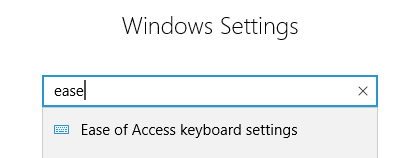
In the search box, type ease and then click the first result, Ease of Access keyboard settings.


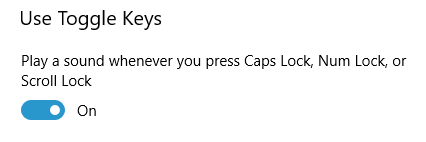
Scroll down to locate Use Toggle Keys and turn on the Play a sound… option.

Now, whenever you tap the Caps Lock key or the Num Lock key. A high pitch warns you that the key has been turned on; low pitch off.

--------------------------------------------------------------------------------------------------

Fake Email Generator
By Dick Evans, www.rwevans.com

How often are we required to enter an email address before getting into a site or maybe to download a white paper or an ebook? We think nothing of it, just a door to go through to obtain what we were going after.

Then we start getting all kinds of unwanted emails. This site allows you to create a fake email address that really works. Use the fake address when you sign up for something. You can check back and read the emails you are getting at the fake address and if you decide you really want them, change the fake address to your real one for that site.
http://www.fakemailgenerator.com/


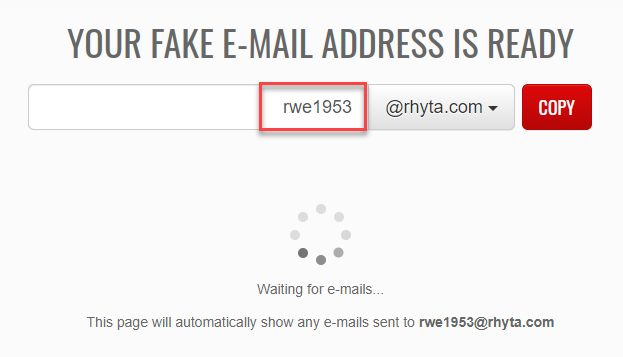
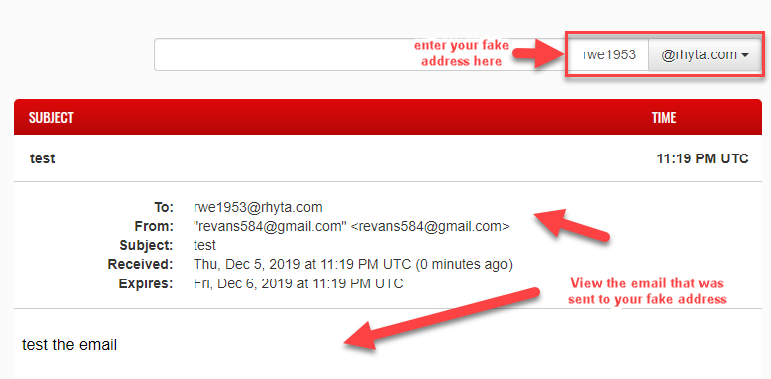
As soon as you access the site, you are shown an email address generated by the site. You may change the name to whatever you want. I changed it to rwe1953.


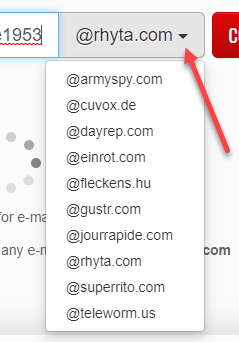
You may pull down the arrow to choose a different domain that may be closer to your location from the drop-down list. You cannot make one up.

Once you have settled on the address press COPY to place the entire address to the clipboard.

Send an email to that address to verify it actually works.


The email you sent appears in the Fake Mail site.

Anyone that knows your temporary email address can access the emails sent to that address. However, email addresses are automatically deactivated 24 hours after the last time someone has checked for mail at that address.

Email sent to inactive email addresses is automatically rejected. To keep your email address active, visit Fake Mail Generator at least once every 24 hours. Any email received by an active email address will be stored for 24 hours. After 24 hours it will be permanently deleted.

-------------------------------------------

The 12 Best TV Antennas of 2019
If you live in an area with poor signal reception but don’t have the will or means to install an outdoor antenna you should look into installing an Antenna with an amplifier that broadens the reception range to 50 miles.

I have not tried the ones listed in this article but have used a $9.99 set of rabbit ears (remember them?) here in Port Charlotte to receive over 20 channels. That coupled with Netflix gets me all I need.
https://tinyurl.com/t7vjxck

-------------------------------------------------

Gmail Keyboard Shortcuts
Learning how to use Gmail shortcuts can save you a lot of time and boost your overall email productivity. Here are the 30 best Gmail shortcuts for 2019 broken down by category.

I like shortcuts, as you have probably seen in my many demonstrations. You don’t need to use them all but might find some very useful.
https://tinyurl.com/unst2x6

--------------------------------------------------

Understanding Wi-Fi
Wi-Fi is a wireless networking protocol that allows devices to communicate without direct cable connections. It's technically an industry term that represents a type of wireless local area network protocol based on the 802.11 IEEE network standard.

This is a subject many are confused by. I hope this article answers a few questions. WiFi is here to stay for a while and a better understanding of it may quite some frustrations.
https://tinyurl.com/y9u5m6wf

Monday, December 2, 2019

Computer Club Update 12-2-2019

Another week away and very cold. In the low 30’s this morning. We are visiting friends in Cadiz, KY for a couple of days. Our dog, Lady Evans, is with us. We are about five hours west of our home in Monticello, KY. Even though we see some cooler weather in Port Charlotte, we still envy you and will be happy to return to warmth next week.

Remember the general meeting might tomorrow evening. 6:00 pm for the election of officers and board members. 7:00 pm for the party! Please cast your vote for me as a board member. If I were present I would cast my vote for Grover as president. He has done a great job and I would like to see him continue.

Here are a few of the articles I have been reading you might be interested in. Give some a try and let me know how they work for you. Remember you can find all my articles on Dave’s at http://tinyurl.com/DCT-evans

How To Clear Google Chrome Download History
I’m betting that all us have download something from the internet before; a game, software, image or even video. Did you know that your browser saves those downloads in a separate History? Yep, there is a download history page that you might want to take a look at. This is something I clear out on my Google browser all the time.

Note: This history cleaning does occur with CCleaner
https://tinyurl.com/wwvokwb

The Best Three Antivirus Apps for Windows
Offered pre-installed on all Windows 8.1 and Windows 10 devices, Microsoft’s Windows Defender has remained a top security product, offering nearly the same protection as the leading third-party solutions.

Note: The only one I use is Windows Security (AKA Defender)
https://tinyurl.com/qlp6kb9

AdwCleaner 8.0.0 is out
Malwarebytes released AdwCleaner 8.0.0, a free tool to remove adware and potentially unwanted programs, from Windows devices on November 26, 2019. AdwCleaner 8 supports Windows 7, Windows 8.1 and Windows 10 officially. The new version can be downloaded from the developer website and run without installation after the download.

Note: I use this in addition to the maintenance trio we use
https://tinyurl.com/uoducbu

How to access Advanced Options
If you wanted to access the advanced boot options in Windows 7, all you had to do was press F8 on the keyboard during boot to load the boot menu.

Note: I use Shift+Restart and have written an article on it on Dave’s
https://tinyurl.com/vvgcqgz

How to upgrade to Windows 10 from Windows 7
You can upgrade Windows 7 to Windows 10 using the in-place upgrade option without losing your files, instead of having to wipe out your device clean. You can perform this task using the Media Creation Tool, which is not only available for Windows 7, but also for devices running Windows 8.1.

Note: If you really like 7, keep it. See my article on Dave’s
https://tinyurl.com/yxaho52n

Tuesday, November 26, 2019

Computer Club Extras 11-27-2019


First I would like to wish all of you a Happy Thanksgiving. Sherri and I have been busy here in Monticello Kentucky but I am missing your smiling faces at the classes. We are also missing the warmer weather. LOL

Upgrade From Windows 7
We have been wondering if it was still possible to upgrade Windows 7 to 10 with the latest 1909 version.

I had an opportunity to upgrade a Windows 7 computer to 1909 the other day. The upgrade went great leaving all of their programs, user information etc. intact. I just booted to 7 And logged in with their username and password. I inserted the windows 1909 installation CD and double-clicked on setup. When I got to the point to choose, I chose to upgrade and also clicked on “I don't have a product key”. Since the computer was already activated running Windows 7 when the installation finished Windows 10 automatically activated.

So if you're still running Windows 7 it is still possible to do a full upgrade at no charge to windows 10 1909.

I have been busy writing a number of new articles for DCT. You might want to check them out.
Http://tinyurl.com/DCT-evans

Here are a few new articles I have been reading. Perhaps they may interest you also…

A look at the email forwarding service AnonAddyAnonAddy is an open-source email forwarding service designed to protect an Internet user's email addresses from spam and other unwanted emails. Most Internet users use one or a handful of email addresses on the Internet. They use these to sign-up for services, do their online shopping, communication, and any other activity that requires an email address (and those that don't require an email but allow emails to be added to accounts).
https://tinyurl.com/sf6kp2m

9 Awesome Free Printable Board Games
If you’re on the lookout for a new hobby you’ve probably considered exploring the world of printable board games and printable card games. And it turns out that it’s both easy and free to make your own games.
https://tinyurl.com/w5vf7bh

CloudConvert
I needed a way to convert a photo saved in the new HEIC format to JPG. This website did a quick job of the conversion. Check it out as it converts many different formats. It is free for 25 conversion minutes per day and files up to 1 GB in size.
https://cloudconvert.com/heic-to-jpg

iPhone Storage Full?
How to Create Free Space on iOS. The usual culprits are photos, 4K videos, games, and other digital hoarding habits. You can’t upgrade an iPhone’s storage. That leaves you with three choices—buy a bigger phone, get more cloud storage, or create free space on your iPhone. The first two don’t work if you want to free up space right now. So let’s look at the ways to free up storage space with a bit of iOS jugglery.
https://tinyurl.com/wsttxbl

7 Uses for a USB Stick You Didn’t Know About
We’ve all used USB sticks to transport files between computers and back up our files, but there are other cool things you can do with a USB stick. You can use one to lock and unlock your computer—just like in the movies. You can also use a USB flash drive to quickly connect to a wireless network on all your PCs, increase your computer’s performance, or even run a web server—directly from the USB stick itself.
https://tinyurl.com/y5tcbvxt


Thursday, November 21, 2019

Computer Club Update 11-20-2019

We are safely in Monticello, KY and I will be doing a class at the library here on December 4th. Even though we won't have another class at the club until we get back, I thought I would send you some stuff I have collected. I hope you find some of it useful additions to your toolbox.

Please let me know what you tried and how it worked for you.

I have also sent a half dozen articles for Daves Computer Tips, so please check them out as well. https://davescomputertips.com/author/dick-evans/

$50 a Month Home Internet With No Data Caps
T-Mobile has announced that it is offering home internet service to certain existing customers around the country for $50 a month with no annual contract and no data caps. As of now, the service is a pilot and by invitation only, but that could change at any time. To get the $50 offer you must sign up for autopay, but the wireless giant promises that there are no hidden fees and no hardware costs. T-Mobile says it expects download speeds to be around 50 Mbps.
https://tinyurl.com/vxhyrwa

Brave Browser 1.0
The new and first final version of the Chromium-based web browser -- the same core that Google Chrome, Opera, Vivaldi, and the new Microsoft Edge browser, as well as hundreds of other browsers, use -- can now be downloaded for Windows, Mac OS X, Linux, and the mobile operating systems Android and iOS.
https://tinyurl.com/tb6tcr4

How to upgrade to Windows 10 version 1909
Microsoft published a blog post on the official Windows Experience blog in which Windows Servicing and Delivery Director of Program Management John Cable explained how customers get the update. The explanation suggests that system administrators may run a manual search for updates on devices so that the new version of Windows 10 is returned.
https://tinyurl.com/tefujml

Increase Your Hard Drive Performance on Windows
You can speed up a hard disk using HDD optimization apps; a few different tools are available. In this article, we’re going to look at which utilities can improve the speed and efficiency of a hard disk. Keep reading to learn more.
https://tinyurl.com/y5gshxpq

6 Google Tricks When You Have No Idea What to Search For
Despite spending millions of dollars on fancy algorithms, Google Search can sometimes be a fickle beast. You know that the information you’re looking for is out there, but no matter what search terms you enter, you can’t find a suitable result.
https://tinyurl.com/vlkuln4

Wednesday, November 13, 2019

Computer Club Class Notes 11-12-2019

Good class yesterday and the last one for 2019. Holidays coming and Sherri and I will be away for Thanksgiving. Then the last two Tuesdays are the day before Christmas and New Years--Cultural Center closes at 2. Then the next Tuesday is the General Meeting for January! So our next class will be on January 14th.

Speaking of the General Meeting, December 3rd is the date. It will be our annual Christmas get together. Bring a dish! And it is the election of officers. Please cast your vote for me, Dick Evans, as a Director again. AND please cast your vote for our President, Grover Mudd. He has done a fabulous job as President and I would like to see him continue. THANKS!

Here are the notes from class as I remember them:

PRINTER TIPNever turn off your inkjet printer. When you do the ink in the printhead is drained to a spittoon so it does not remain on the print head. When you turn your printer back on, fresh ink goes from the cartridges to the print head.

SHUTDOWN TIPWhen faced with weird system problems that may be caused by a buggy driver or other low-level software issues, the problem might persist after shutting down your PC and booting it back up. This is because clicking “Shut Down” on your Windows 10 PC, Windows doesn’t fully shut down. It hibernates the kernel, saving its state so it can boot faster. If you’re experiencing computer problems and need to reset that state, you’ll need to restart your PC instead.

You can also perform a full shut down by pressing and holding the Shift key on your keyboard while you click the “Shut Down” option in Windows. This works whether you’re clicking the option in the Start menu, on the sign-in screen, or on the screen that appears after you press Ctrl+Alt+Delete.

By the way, If your PC can successfully get to the Windows login screen when you start it up the easiest way to get to the recovery environment is to hold down the Shift key while clicking Restart (either right on the sign-in screen or from the Start menu if you successfully logged in).

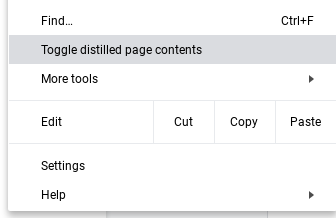
Chrome DistillerOne feature in Chrome I did not know about is the distiller or reader feature which will open the page you are viewing in a new tab without all the added graphics and fonts. Here is how to find it.


You turn it on by clicking the menu, then toggle the feature on or off while you are on the page to be distilled. Distilling removes most of the graphics on the page leaving text and some images.

If the feature toggle does not appear, do the following:

1. Open Google Chrome.

2. Copy and paste the link below into the address bar of Chrome, and press Enter. chrome://flags/#enable-reader-mode

3. Select Enabled or Disabled (default) for what you want in the Enable Reader Mode flag drop-down menu.

4. Click/tap on the RELAUNCH NOW button at the bottom to apply.

Desktop Shortcuts for WebsiteSee https://davescomputertips.com/elderly-computing-tip/


Gasbuddy.com is a website that shows the current prices of gas everywhere in the country. Enter your zip code and it lists the prices for the closest stations. Use it on your smartphone and it knows your location. Just tap the picture of the pump in the middle of the screen and it takes you to the stations near where you are located. Great while on the road to find the stations coming up soon on the highway and how much their gas is.

Live TVHere are the links to the websites providing free TV

Stream2watch.ws for TV and live sports

Pluto.tv for hundreds of stations in a TV guide format

UStvnow.com TV for US Military and US citizens abroad

DochubDocHub is an online PDF annotator and document signing platform. DocHub lets users add text, draw, add signatures and make document templates. DocHub can integrate with Dropbox, Google Drive, Gmail and Box accounts.
https://dochub.com/

Email STRIPPER is a free program for cleaning the ">" and other formatting characters out of your emails. I have been using it for years. You copy the text out of an email and paste it into emailstripper. Click Strip it!. All the junk is removed and it is ready to click Paste to copy it to the clipboard and then paste the cleaned text into the email you want to send. Also, remember to get rid of the list of other people's email addresses so you do not include them in yours.
http://tinyurl.com/jxl6cbo

Free Online CoursesLook at KHAN Academy. It is a full-fledged online school. And it is free. Just sign up and start learning. Tons of subjects.

How to Perform a Reverse Image SearchReverse image search lets you search the web for an image rather than a word or phrase. It’s primarily used to find the original source or perhaps a larger copy of an image, but it has lots of other handy uses. You could take an image you found on Pinterest to identify products — from dresses to desk lamps — in the photo. You could take a photo of a flower, and a reverse image search could tell you what kind of flower it was. A standard text search can’t do that. And fortunately, image searches are pretty simple to do.
https://tinyurl.com/y52z6zt7

County Records for Charlotte County Florida can also be viewed online. A simple record search of just your last name or just your street name works best.
http://ccappraiser.com

TinyURLMany in attendance were unaware of the Tinyurl site. Often we have to send someone a link to a website we have found. We know we can grab the URL to that page in the Address bar and copy it to the clipboard. Then we can paste it into an email or even a Facebook message to them. However, the address may be many lines long and a tough item to type for them. Instead, we turn that long URL into a manageable one using Tinyurl. Then we send the shortened link to our friend. It is easy to enter the tiny version. This is what makes opening the Hangout link for our weekly meetings--tinyurl.com/DickEvans