Tuesday, March 10, 2020

Computer Club Notes 3-10-2020

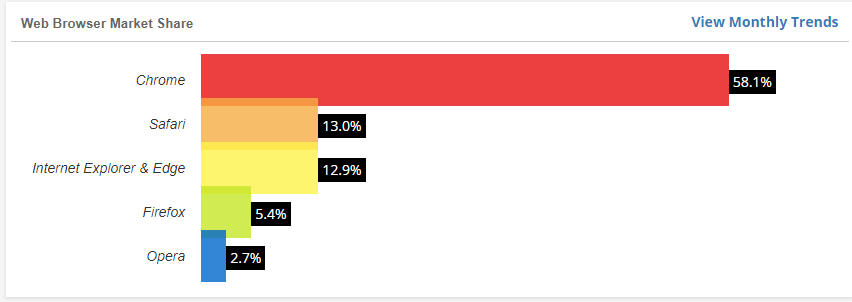
Current Browser Stats

https://tinyurl.com/zk7er8v

What You Need to Know About the New Microsoft Edge Browser
Are you using Windows 10? If so, Microsoft is about to install a new browser on your PC via Windows Update. The new browser is still called Microsoft Edge, but it’s based on the same code as Google Chrome.

If you are still using Internet Explorer, it is time to move on. It has not been supported for a while and many websites will not work on it.
https://tinyurl.com/vlnqytr

Brave Most Private Browser
Are you concerned about your web browser sending data back to the company that created it? A new study, Web Browser Privacy: What Do Browsers Say When They Phone Home?, looked at the six popular desktop web browsers Google Chrome, Mozilla Firefox, Microsoft Edge (Chromium-based), Apple Safari, Brave, and Yandex, to uncover what these browsers send back to the mothership.

Speaking of private, duckduckgo is a good search engine that also does not use your information.
https://tinyurl.com/voyrw4n
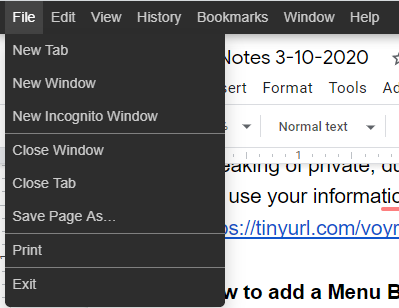


How to add a Menu Bar

The Menu Bar, once a given for any desktop web browser, has been removed from the majority of web browsers. Some, Firefox or Vivaldi, still support a menu bar but even these need to be configured to display the toolbar permanently in the browser. Firefox users may use the Alt-key to display the menu bar at any time.
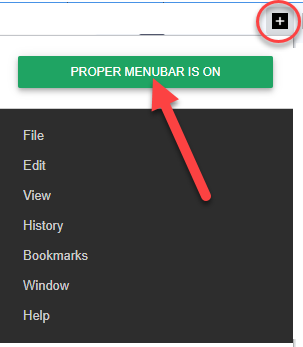


The + in the upper right of the browser lets you turn the menu on and off
https://tinyurl.com/uowfn4e

2020 Cord Cutting Guide
Cable and satellite monthly bills keep creeping up, but thanks to new technology and tons of streaming services, there are lots of cable TV alternatives out there.

And we again looked at ustvgo.tv to watch live TV free.
https://tinyurl.com/wc9udnn

YouTube Downloader
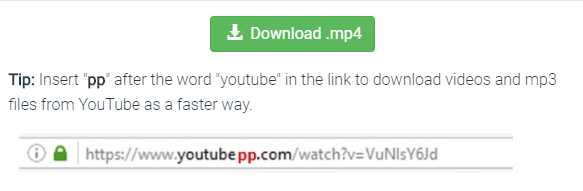

Very simple. You can also go to https://www.y2mate.com and paste in the URL from the video on YouTube

TinyURL is a URL shortening web service, which provides short aliases for redirection of long URLs. Kevin Gilbertson, a web developer, launched the service in January 2002 as a way to post links in newsgroup postings which frequently had long, cumbersome addresses.
http://tinyurl.com

Wise Care 365
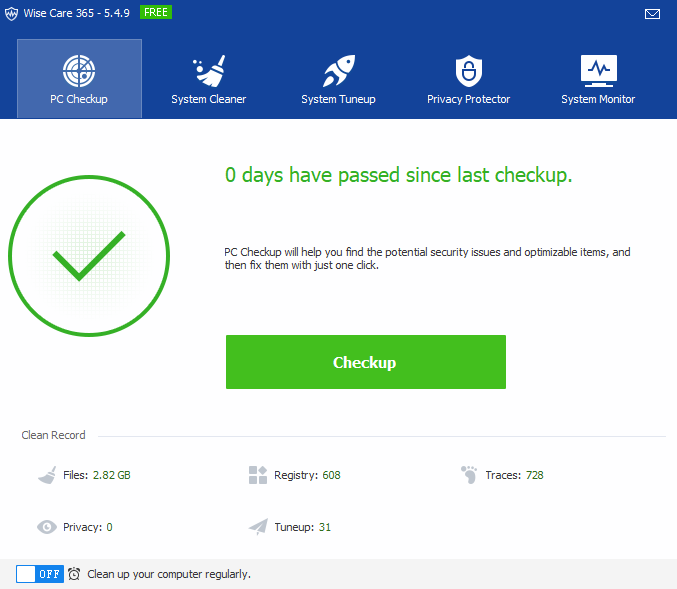
This does all Wise Disk Cleaner does and more. Cleans registry and junk files from your PCs. Protects your privacy and will make your PCs more secure. It provides a better option of optimizing and accelerating your computer!

Removes invalid Windows registry entries, easily back up and restore Windows registry.

Cleans Windows temporary files, clean browsers (IE, Edge, Google Chrome, Mozilla Firefox, Opera, Safari, etc.) caches, download history, browsing history, Cookies, passwords. Wise Care 365 can also clean invalid shortcuts, recent use traces, useless files created by other applications.

Scans the whole system to clean files with specific extensions.
https://tinyurl.com/yd9g6zj2

How do I use screen mirroring
When you want to display content from your phone or tablet on a nearby TV, you may be able to use screen mirroring. This feature allows you to replicate (or “mirror”) the screen of your compatible Android™ or Windows® device wirelessly onto your TV screen. With screen mirroring, you can send web pages, videos, photos, music, and more to your compatible Roku® streaming player or Roku TV™. In other words, whatever you see and do on your mobile device appears on your TV.

Most current generation Roku streaming players and Roku TVs support screen mirroring with notable exceptions listed below. To find the model of your Roku device, go to Settings > System > About
https://tinyurl.com/y232zwg8


Wednesday, February 26, 2020

Computer Club Notes 2-25-2020

Custom Templates
A member had a good question about how to create custom templates in Google Docs. We poked around for a little while and could not easily find out how. We were able to find an article with step by step instructions on do it but did not have time in class to finish.
https://tinyurl.com/tkeshbn

Convert PDF to an Image
This free PDF to JPG online converter is the simplest way to convert PDF to JPG. Nothing to download and to install, the whole process takes place online. It converts your PDF to produce high quality JPGs.
Pdf2jpg.net

Recover Deleted Photos
So you’ve deleted a precious picture from your phone. Or worse, you broke or reset your device and lost them all. Now you need to know how to recover deleted photos from an Android phone.
https://tinyurl.com/reqrj6n

I recommend using Google Photos to back up your photos to the cloud as you take photos from your cell phone. Then if you lose them from your phone you will still have them in the cloud.

Here is an article I wrote on photos: https://davescomputertips.com/where-are-my-photos/

To locate deleted pictures or any file on your hard drive or even flash drives get a copy of Recuva from Piriform

How do I use screen mirroring
When you want to display content from your phone or tablet on a nearby TV, you may be able to use screen mirroring. This feature allows you to replicate (or “mirror”) the screen of your compatible Android™ or Windows® device wirelessly onto your TV screen. With screen mirroring, you can send web pages, videos, photos, music, and more to your compatible Roku® streaming player or Roku TV™. In other words, whatever you see and do on your mobile device appears on your TV.

Most current generation Roku streaming players and Roku TVs support screen mirroring with notable exceptions listed below. To find the model of your Roku device, go to Settings > System > About
https://tinyurl.com/y232zwg8
How To Watch TV By Channel
The Links below are to articles explaining how to watch each channel through various TV streaming services. Click on any of the TV channels below and learn how to watch each channel online.
https://tinyurl.com/ukurnko and ustvgo.tv


Xtra-PC
Turn your old, outdated, slow PC into a like-new PC. Why invest in a new computer when you can transform your old computer into a like-new one for under $25 to $80 (depending on which Xtra-PC model you choose);
https://www.xtra-pc.com/

SlideBox - Slide Scanner
Photomyne's new memory preservation app for scanning photo slides. The app itself is rather simple, but we'd like you to consider the following tips to achieve the best possible scanning results and to make sure you're having fun while using the app.
https://tinyurl.com/r3tt2kx

Email Deletes
When you delete an email using a web-based email such as Gmail or Yahoo, all the mail is on their server in the cloud. What resides on your computer are the last ones you looked at. If you delete an email from your phone and then go to your PC, that email may still appear because it is in the cache for that browser. Refresh the screen or instruct it to look for new mail and the deleted ones are gone.

The trash folder contains the email you deleted and is purged automatically of anything older than 30 days. What you delete by hand from the trash folder is gone right away. However, the emails still reside in their backup files so don’t think they are totally gone.

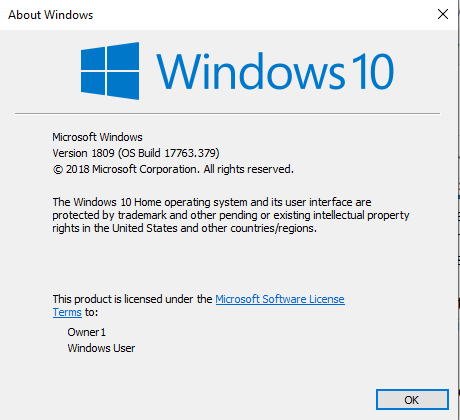
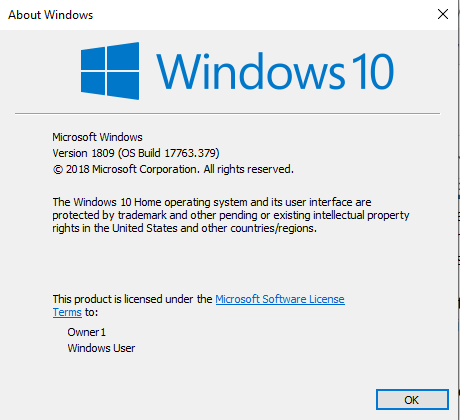
What version of Windows 10 do I have?


Win+R and type WINVER and press Enter

File Manager Preview


When you are in File Manager (the file folder on the taskbar), press Alt+P and a preview window will open to the right of the file names. As you click to an image a preview will appear to the right. Alt+P to turn it off. It will also preview other files such as documents, PDFs, Spreadsheets and others.


Wednesday, February 19, 2020

Computer Club Notes 2-18-2020


Alternative Clicking
It gets confusing when thinking about clicking. Is it right-click or left-click or even center-click? When do I double-click and when single?
https://tinyurl.com/w9qvuom

Maintenance Programs
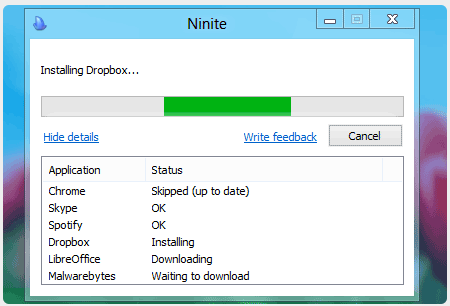
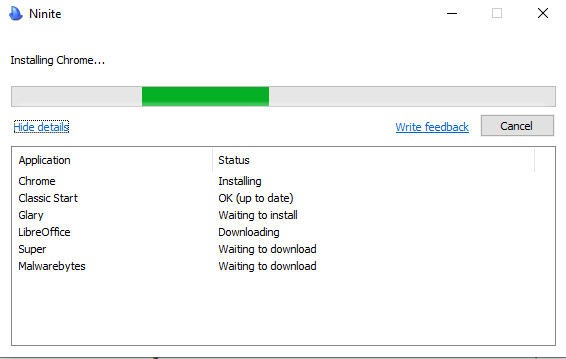
The three maintenance programs being loaded on machine here at the club include Wise Disk Cleaner, SuperAntispyware, and MalwareBytes. We are no longer using CCleaner. And some of us are using Glary Utilities. All but Wise are available on Ninite. We suggest running these about once a week to keep your computer clean.

How To Use Wise Disk Cleaner
I have used CCleaner for many years to clean the temporary and other files that are no longer necessary. I have also used it to clean the Registry stripping off unneeded entries. However, many articles have appeared recently about issues with CCleaner that have made me think about looking for an alternative. One that I use on a regular basis is Glary Utilities and it is simple to use as long as you don’t get down into the details. Wise Disk Cleaner is a quick download and installation. You can even get it as a portable file to use from a flash drive. I installed it on my computer with an icon on the Desktop.
https://tinyurl.com/vatjmal

Glary Utilities
Glary is easy to use and with one click you can clean out the junk. If you want more tools they are available, too. Use the following link to get your copy of GU.
http://tinyurl.com/y8z35ovz


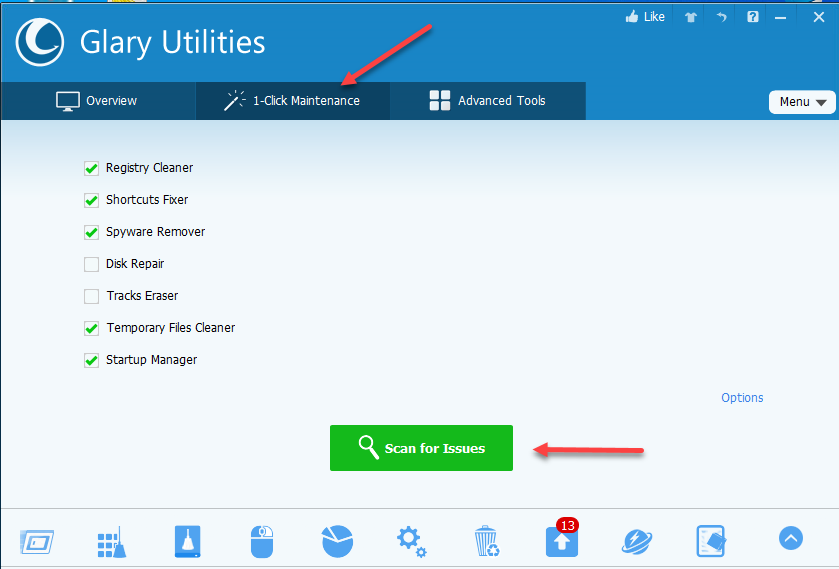
There are three tabs along the top. 1-Click Maintenance is where you want to start. The checkmarks indicate the processes that will be used to clean your computer. Disk Repair and Track Eraser are unchecked.

Click Scan for Issues


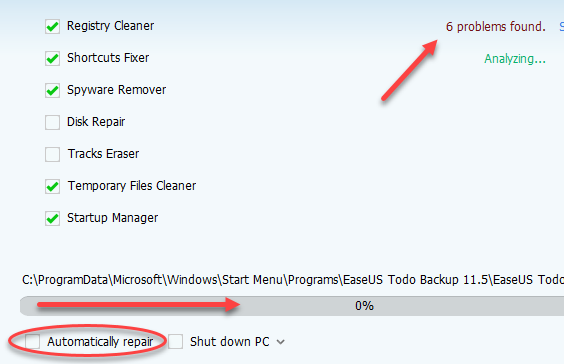
One at a time each of the checked items is processed. Problems are indicated and a progress bar shows where each step is in the process. When the analysis is completed, click Repair Problems to fix any issue found. If you place a checkmark in the box to the left of Automatically repair the fix will automatically continue after the analysis is done.

Where Are My Photos?
My Cell Phone is used for all my picture taking. As a result of that, I have thousands of pictures. I use the Google Photos App so every photo I take is automatically uploaded to the Google Cloud where I can access them from any device and all my pictures are stored for free as well.
https://tinyurl.com/wj7r5z2

How To Use Ninite Installer
In my opinion, Ninite is the safest site to install programs from. When you open Ninite you are presented with a list of programs to select from. You check the ones you want– the ones I picked here are Chrome, Malwarebytes, SUPERAntiSpyware, Revo, and Glary. They are programs I use to maintain my computer. Ninite does not download any of the programs you have checked. It downloads a tiny installer program to your computer which contains a list of the programs you checked.
https://tinyurl.com/y54zh8rm

Build a free website in 10 minutes
WebStarts is everything you need to create and maintain your very own website. Traditionally websites are written in HTML code, that code is stored on a server, and a domain is pointed to it. The process of setting up a traditional website is tedious, technical, and expensive. If you don't know how to code you might hire a web developer. Next, you need to purchase server space. Finally, you need to register a domain. It's a hassle to manage three different bills and three different companies. The whole process is so confusing it leaves a lot of people wondering how to make a website at all.

The site we built can be found at http://dickevans584.webstarts.com/

If I would like my own domain like dickevans584.com I can purchase it at Webstart on my account page. The domain name and a hosting package are about $75 annually. If I had my own domain name already I can point it to my free subdomain at no charge.

Please use the link below to build your own site for free
https://tinyurl.com/vkd6wrd

TinyUrl
Are you tired of posting URLs in emails only to have it break when sent causing the recipient to have to cut and paste it back together? Then you've come to the right place. By entering in a URL in the text field, we will create a tiny URL that will not break in email postings and never expires.
https://tinyurl.com/w9qvuom

Free Streaming Service with Classic TV
The TVS Television Network, the fourth oldest commercial TV network, founded in 1960, has announced the launch of 12 free streaming channels available currently on www.watchyour.tv. TVS has produced and syndicated many news, sports, and entertainment television programs to the national TV audience. The new streaming video service will have classic TV programs and movies 24 hours a day. While all of the classic programming is of a vintage nature, TVS plans an aggressive slate of new programs that capture the historic nature of television. TVS plans to bring in 500 new shows per year.
https://tinyurl.com/utxzabc

Another Service we looked at is www.ustvgo.tv and it lists all the stations you might want to access. As you click on each one it describes the various ways you can access the station.

TiVo
Yes, you can record shows off live TV suing an Antenna. A TiVo DVR serves a function similar to that of a videocassette recorder (VCR), in that both allow a TV viewer to record programming for viewing at a later time, known as time shifting. Unlike a videocassette recorder, which uses removable magnetic tape cartridges, a TiVo DVR stores TV programs on an internal hard drive, much like a computer.
https://www.tivo.com/

Antennaweb.org
Discover how many FREE over-the-air channels are available from your local television broadcasters. Enter your address or zip code to find how many channels you can receive using an antenna. This helps you to point your TV antenna in the right direction.
https://tinyurl.com/rzezwt4

Stocard


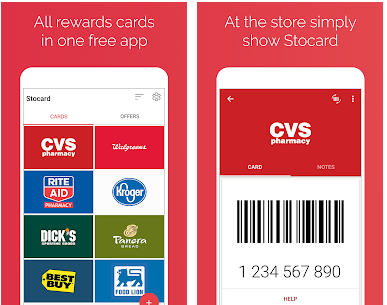
Move those pesky keychain rewards cards to your cell phone. Click the card and a screen displays the bar code to use at checkout. Works on iPhone and Android. Get it in your app/play store.

Saturday, February 15, 2020

Computer Club Class Notes 2-11-2020

Tablet Cleaner Apps
Routine maintenance is not a necessity in Android, but it surely is a good idea to brush up your Android phone from time to time to boost performance, enhance battery life, and get rid of junk files. That’s what Android cleaners are for. But do these Android cleaning applications really work?
https://tinyurl.com/sw2y2pk

Change Default Search Engine
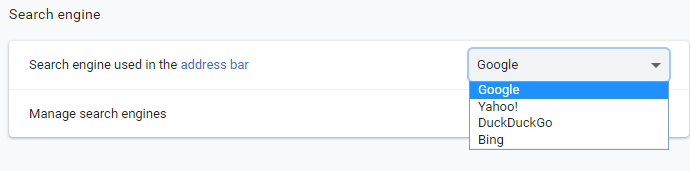
All browsers have a default search engine that is activated when you type something into its address bar. Edge has Bing, Chrome has Google, etc. To change the default in Chrome, select the menu (three dots in the upper right) and select Settings. On the left, choose default browser.

Using the pulldown, choose the new default.

Wise vs CCleaner


Wise Disk Cleaner Is Like CCleaner, But Better. For many CCleaner has been the go-to tool for freeing up drive space for years. And while it does the job well, it never hurts to be on the lookout for better programs. Take Wise Disk Cleaner — it not only does much of what CCleaner can do but goes the extra mile in a lot of ways.

How To Use Wise Disk Cleaner https://tinyurl.com/vatjmal

Wise Disk Cleaner Review https://tinyurl.com/sjwuk67

Send a Facebook picture in an email
Locate the picture on Facebook in the timeline or in someone’s post
Left-click on the pictures to open it
Right-click on the new picture and “save image as” saving it and remember where you saved it
Compose a new email and attached the saved file

Bookmark Bar: Ctrl+Shift+B will turn it on-off in most browsers

Display two windows
Point to the title bar (top of the window) and drag the window all the way past the right side. Then drag the second window the same way but to the left. You can change the size of either window.


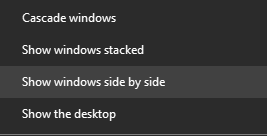
Alternatively, right-click the taskbar and choose Show windows side by side

Bookmark Sidebar


In Firefox there is a bookmark sidebar that can be opened showing all bookmarks. This option is available in Chrome with an extension called bookmark sidebar. I set mine to show on the left when I move my mouse to the left side and left-click. Moving back to the right closes the bar.

Fix Windows problems with Troubleshooter
If you find that your Windows 10/8/7 computer is facing some hardware or device issues or problems, you can run the Hardware and Devices Troubleshooter. This automated troubleshooter will try to identify and then resolve the issues that it finds.
https://tinyurl.com/uhdno3x

Thursday, January 23, 2020

Computer Club Class Notes 1-21-2020

Edge Chromium Browser Launches
Microsoft is officially launching its new Edge Chromium browser today across both Windows and macOS. A stable version of the browser is now available for everyone to download, just over a year after the software maker revealed its plans to switch to Chromium. Microsoft is initially targeting Edge at enterprise users of Windows and macOS, but consumers will be able to manually download and install it, too.

We downloaded and installed it during class and it worked well; a lot like Chrome and Brave.
https://tinyurl.com/wlldfcs

Google Chrome will support Windows 7 until at least July 2021
Microsoft will end support for its Windows 7 operating system next week on January 14, 2020. The last Patch Day for Windows 7 will provide users with a last round of security updates before support ends.
https://tinyurl.com/vmuofz2

Windows 7 Upgrade
Here is an article I wrote on moving from 7 to 10
https://davescomputertips.com/windows-7-death-knell-thoughts/

Is CCleaner Safe?
Some Windows software has become so ingrained into PC users’ minds that we don’t think twice to recommend them. Unfortunately, this leads to major issues when a popular tool goes rogue. That’s exactly what’s happened with CCleaner. Once everyone’s favorite Windows maintenance utility, its increasingly shady behavior means that you should now leave it in the dust.
https://tinyurl.com/yc2j7b6z

Some Windows software has become so ingrained into PC users’ minds that we don’t think twice to recommend them. Unfortunately, this leads to major issues when a popular tool goes rogue. That’s exactly what’s happened with CCleaner. Once everyone’s favorite Windows maintenance utility, its increasingly shady behavior means that you should now leave it in the dust.


We are testing out Wise Disk Cleaner. It look like a good alternative to CCleaner. I think Glary is also a good alternative and is part of Ninite.
https://tinyurl.com/yc2j7b6z

9 Best Free Microsoft Office Alternatives
Here are several free Microsoft Office alternatives that contain similar versions of Microsoft Word, Excel, PowerPoint, and Access. Many of the Microsoft Office free alternatives listed below open, edit, and create Office documents. Although they don't have all the cool Office features, many get close.
https://tinyurl.com/rf5yrx3 

I use Google Docs for most of my word processing. I do use MS Word since I own a copy and I can access Word on my Microsoft account on the web using my OneDrive. There are mini-versions of all the Office applications available there for free.

What about WordPad? It is free as it comes with Windows. It is useful for most of what iI use Word for and is very quick to open. The only downside is that it does not include a spell checker. Enter tinySpell. This is a very small spell checker that adds the capability to WordPad among other applications.

LibreOffice vs OpenOffice
In a battle between OpenOffice versus LibreOffice, which office software suite would win? They're both 100% free and are great alternatives to MS Office, but which one will bring home the productivity title for you or your organization?
https://tinyurl.com/vmju8q6

Notes is a simple and free note-taking application for Windows
Sometimes, we may need a quick way to write down something. Notes is a simple and free note-taking application for Windows that can be used for that.

This was an interesting article but we downloaded and installed it during class. It seemed very difficult to use.
https://tinyurl.com/r5bhwms


Simple Sticky Notes
We reminisced about the sticky notes that came with Vista. So we did a Google search and found one. It was easy to install and works just like the one we remembered. It adds yellow (or whatever color you choose) notes to the desktop. You can resize them and type whatever you need right on them!
https://www.simplestickynotes.com/download/

Sticky Notes

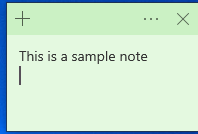
Then I found that a similar application is built into Windows! To find the application in Windows 10, click on your start button and type in sticky notes. If you do not have a place to type then Win+Q will show the place to type. Select the Sticky Notes option. Right-click the entry in your start menu and select Pin to taskbar so you can open the program directly from your desktop.

Informed Delivery
I demonstrated how I receive an email from the USPS each morning showing me what mail to expect that day. Here is the site to access to set that up for you.
https://tinyurl.com/seh3vpo

Backup Review
I have written an article on backing up using EaseUS. You can download the application from the club site at www.cccgc.info and read the article at:
https://davescomputertips.com/how-to-lets-talk-backups/


Tuesday, January 14, 2020

Computer Club Notes 1-14-2020

What version of Windows 10 do I have?


Win+R and type WINVER and press Enter

If you have Windows 7 or 8 or 8.1, you can still upgrade to Windows 10 for free. Head over to the Download Windows 10 page and attempt the upgrade.


Click Download tool now

Install and run the Media Creation Tool


Open the tool and select Upgrade this PC now
Follow the steps


Ninite

Ninite is the safest site to install programs from. When you open ninite.com you are presented with a list of programs to select from. You check the ones you want and then click the Get Installer button. That does not download any of the programs you have checked, it downloads a tiny program to your computer with a list of the programs you checked.


When you run that installer program it looks over each program selected to see if you have it already installed on your computer. If not, it downloads and installs it. If you already have the program it compares the version on your computer to the available one. If the one you have is already the latest, it does nothing with that program. If the one you have is older, the latest is downloaded and installed for you.

The next time you want to check to see if you have the latest updates you do not have to go to ninite and start over. If you still have the installer program on your computer, just double-click it.

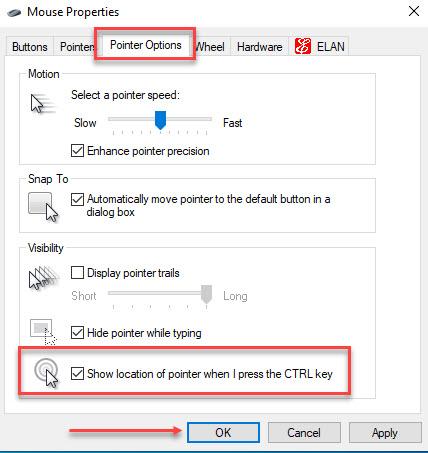
Mouse Adjustments


Win+I > Devices


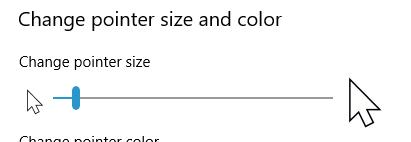
Mouse > Adjust mouse & cursor size


Drag to change the size


Click Additional mouse options


Mouse locator
Ever have trouble locating the mouse? It is there somewhere but you can’t see it. One simple switch and hitting the ctrl key will display flashing circles around the pointer.

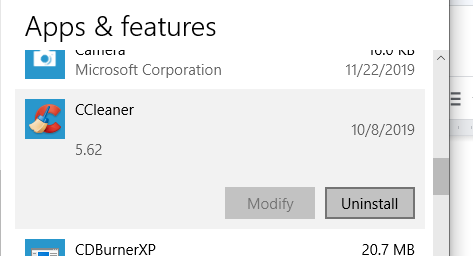
Uninstalling a Program
We got into this because I was talking about not having antivirus programs on your Windows 10 PC. Windows comes with Windows Security which includes a great antivirus called Defender. To remove the antivirus that came with your PC:

Win+I > Apps and give it time to display all the apps on your PC. Scroll down and locate the one to uninstall.


Click on it and then choose Uninstall

Office Alternatives

Microsoft includes a free trial to Office 365 with every Windows 10 install. There are many other “office” programs to use instead and at no charge.

At live.com you can use an online version of Microsoft Office at no charge. It saves the files in OneDrive, the Microsoft Cloud.

Google Docs saves its files in the Google Cloud and it is free at docs.google.com

OpenOffice and LibreOffice and WPS are all office suites that are free and can be installed on your computer. They do not use the cloud.

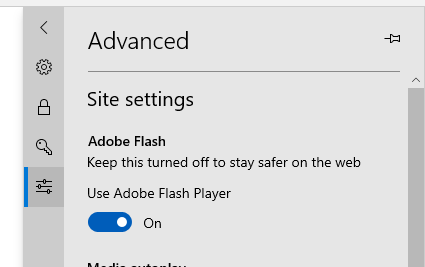
Flash in Edge
Edge has a Flash component built-in. Turn it off to deactivate it.


Click Settings.

Click View advanced settings. It is on the left

Click the switch beneath Use Adobe Flash Player so that it turns Off.

Google Keep
Google Keep is what I use to keep our shopping list. We each can make entries on our cell phone and use it at the market to get all we want instead of getting there and trying to remember what we need.

Shift+Ctrl+B
Turns on and off the bookmark bar on the browser

Shift+Win+S
Lets you draw a box around an item on the screen and save it to the clipboard

Win+V
Displays the contents of the clipboard


Saturday, December 28, 2019

Computer Clubs Notes 12-28-2019

Have a Happy and Safe 
New Years Eve

There will be no class this Tuesday as the Cultural Center is closing the doors at 2:00 pm. I will be at the club from 10-2 if you have any needs. The following Tuesday is the General Meeting and I will be leading the Open Forum at 6:00 pm and will have a presentation for the meeting. I will be at the club from 10-2, then back for the 6:00 pm meeting. Hope to see you there.

Here are some articles I thought useful for you all. Let me know if there is anything particular you would like me to cover at the Open Forum at the General Meeting.

Clean up Your Windows Desktop
Simplifying the desktop contents frees up operating memory, reduces the time and frequency the hard drive is used and improves the response of your computer to programs you open and things you do. The simple act of cleaning the desktop makes your computer run faster.

I have seen some desktops so full you could not put something else on them! Better empty of all but the recycle bin. This article gives some thoughts on it and I will be talking about this at the General Meeting next week.
https://tinyurl.com/y2ozz3ks

Get the Most Out of Your Roku
You finally worked out which Roku to buy, and set up the basics: Netflix, Amazon, and whatever other services you’re subscribed to. What next? Here are the first things we’d do after getting a new Roku; give them a shot.

Some may have gotten one of these for Christmas. They are easy to use and work great. I have been using a Roku for years now. Most of my channels are free with the exception of Netflix and Prime. Netflix is where we find ourselves most of the time and it is about $12/mo. Prime is part of the Amazon Prime package.
https://tinyurl.com/ya8ejfgt

How to Scan Documents With Your Phone or Tablet
Updated features in iOS and Google Drive allow you to scan documents for free with your phone or tablet. How does it work? A program or app performs the scan using your camera and, in many cases, converts it into a PDF automatically. This guide will show you how to do it, whether you own an Apple or Android device.

I usually just take a picture of the document but this article shows some other ways to get a “scan” right from your phone.
https://tinyurl.com/ujbzqzs

Run Malwarebytes Alongside Your Antivirus
Running antivirus is still important, but these days the really active threats are from spyware, adware, crapware, and the worst of all: ransomware. That’s where Malwarebytes comes in. Malwarebytes not only protects your computer from malware but does a better job of cleaning up an infected computer than anything else on the market.

As you know Malwarebytes is one of the tools I suggest you run along with CCleaner, Supereantispyeare, and Glary Utilities. For antivirus, I opt for the one the is part of Windows 10--Windows Security (AKA Defender)
https://tinyurl.com/wnjvr99

How to Physically Clean Your Laptop
When was the last time you cleaned your laptop? Yeah, we thought so. This simple computer maintenance task doesn't just get rid of accumulated dirt and dust--it keeps your laptop running in tip-top shape.

A good article on what you should and shouldn’t use to clean the keyboard and the screen. I find a wide paintbrush is useful for getting dust and whatever our between the keys. My thought is that a clean laptop runs better than a dirty one.
https://tinyurl.com/rx3g2rb