Wednesday, September 18, 2019

Computer Club Notes 9-17-2019

Another good afternoon both online with those away and those who joined us live at the club. We had a number of questions and conversations before getting to look at the items I had bulleted in my email.

Desktop Shortcuts for Website
See https://davescomputertips.com/elderly-computing-tip/

Some shortcuts we used today:
F11 while in a browser removes the top lines like the address bar and shortcut bar to give more room for the page itself. F11 to toggle back

Win+D hides all open windows so you can see the desktop. Win+D to toggle the windows back.

Win+I opens the Settings window

Copy/Move
Getting files/folders off a device plugged into your PC--USB flash drive, camera, SD card, CD, audio recorder, etc. The device will open in File Manager and look like a disk drive with floders and files. To move that data off the external device onto your PC, left-drag the file or folder to wherever you want it to reside on your PC. Since the from device is external, left -drag will copy the data. It will end up on your PC and still remain on your device. If you are moving from one area on a device (PC or external) to another area on the same device, left-drag will move it. If you right-drag instead of left, an options menu will pop up asking what you want to do--move, copy, create a shortcut.

Ctrl+C to copy what is selected

Ctlr+X to copy what is selected and remove the selected item

Ctrl+V to paste the last thing selected

Ctrl+Z to undo the last action

Ctrl+Y to redo the last action

Win+V to scroll through the clipboard

About Defragging
Defrag is a way to put fragmented files back together on the hard drive. It speeds up access to files and frees up available space on the drive. Windows 10 does a defrag when the system is idle. However, you may run it on your own. I like the Defrag that is in Glary. CCleaner has one as well. To access the one in Windows: Win+I > type “defrag” and click to open the Optimize Drives window.

Photo Size
When you take a picture the size of the file depends on the quality of the image. An outdoor photo generally is larger than one with less light. The size is also determined by the pixel size your camera is designed to create. Most cell phones make about a 15 MP image. This creates a file size of 2-3 MB. When you send this by email you should resize the image so it does not take such a long time to send. Some email carriers have a limit on the total size of attachments.

When you upload or use the Google Photos app on your cell phone, your images will upload in their original size and you will be charged for space on Google Drive. If you select to allow Google to reduce the size of the image, you will not be charged. The size they reduce it to is still quite large. But if you download an image from Photos and compare it to the original you will see the difference.

The conclusion of our discussion was that is we have pictures that we want to retain the high quality in, keep them in a folder on your hard drive or even in OneDrive as it does not reduce the size/quality of the images.

Capture Video Playing On The PC
We did not find this during class. With Windows 10 you can capture your screen for later playback using these steps.

Switch to Settings>Gaming>Game DVR.
Set up your audio and video quality settings.
When you're ready to record, open the Game Bar with Win+G.
Click “yes, this a game”
Record your screen capture video.
Find your video in Videos>Captures.

Try it out and let me know how it works… Here is a good article about it:

Windows 10 has a built-in free screen recorder
You've very probably been using Windows 10 for a long time now, but that doesn't mean that you've discovered everything it has to offer. The operating system is packed with features, but there are some that are hidden away to the extent that they could be considered secrets.
https://tinyurl.com/y55oj853

How to create a Bootable Linux CD
First, you need to download the ISO file for the version of Linux you want to create a boot disk from. Here is a link to downloading the latest Mint ISO:
https://linuxmint.com/download.php

Be sure to choose the version for your PC, 32 or 64 bit. Now that you have it on your PC (probably in Downloads) you need to burn it to a CD.

Insert a blank DVD into your Optical drive. You may see a popup window asking you what to do with the Disc, close the window as you do not need it.

Locate the ISO image then Right-Click and select 'Burn disc image'.

Check 'Verify disc after burning' and click 'Burn'.

Take the burned DVD and boot from it. You will see a live session of that Linux OS running in RAM not having any effect on your Windows OS or your hard drive.

How To Start Word In Safe Mode
Even though it is highly unusual to encounter stability issues with Microsoft Word, it does happen on occasion. If Word is not starting properly, you can start it in Safe Mode to try to sort out what the problem may be.

We did not get into this as nobody in the class was actually using Word. If you are, check it out. It might become useful to you in the future.
http://tinyurl.com/yyxsfkt8

How to disable Google Chrome Software Reporter Tool
Software Reporter Tool is a Google Chrome standalone process that monitors your Chrome install and reports if any add-ons are interfering with the normal functioning of the browser. The tool isn’t connected to the web but mainly used by the browser to recognize programs that may conflict with it. It’s visible as a 54Kb executable named “software_reporter_tool.exe“. If you face a high CPU usage for this process or if you frequently see a message Google Chrome Software Reporter Tool has stopped working; you might want to disable or remove it. Here is how you can do it.

This is something that could slow down processing. It does require some technical ease so not everyone should attempt some of these changes.
https://tinyurl.com/y3h3a5uy

Alternative Web Browsers
Using a less-popular web browser can offer benefits not found in the more commonly used software, such as greater customization and privacy.

I use Brave and am very happy with it. If I find a web site that will not work right in Brave or another browser I use Edge. Yes, I know Edge. Web sites are generally created to use Edge because it is the one that comes with Windows.

This article shows you a number of other browsers, each with its own special features. Check them out and you might find one just for you.
https://tinyurl.com/yydhqdn8

How to Import an Old Email Account Into GmailIf you recently switched to Gmail, but want to import all your old emails into your account, Google makes it a breeze. Automatically transfer messages and contacts from one email address to the other within minutes.

My advice is to NOT use the email that your service provider supplied you. Ie: @comcast.net, @embarqmail.com. I use @yahoo.com and @gmail.com.

My provider is Comcast so I do have an email address with them. One feature in all email providers is to allow your email to be forwarded to another email address. I forward all others to my Yahoo account.

If you decide to move to another state you will have to get a new provider. Or you may just want to switch. Your new provider will assign you a new email address. If you have an internet email such as Gmail all you have to do is forward your new email to the Gmail account. Nothing changes with your email. All your contacts still know you at your Gmail address.

If you had a provider email address like an @comcast.net you would have to let all your contacts know the new email address because when you cancel that Comcast account you will not be able to receive emails there any more.

This article shows how you can use a new feature in Gmail to transfer your email including your contacts and the actual emails from your old account to your Gmail account. You don’t lose anything. You will still have to inform your contacts of the move. Do NOT cancel the old account until you have made the transfer.
https://tinyurl.com/y49555tx

Tab Notes lets you write and save notes in Firefox and ChromeType something in the page, it doesn't get simpler than this. You can use it to create as many notes as you want. To add a new note, click on the hamburger menu icon on the left to bring up the sidebar, and then select the "Plus" button. And since it works in the browser, it uses the default spell-check tool of the browser.

This is an extension that makes a notepad available to you. What you type is saved as you type. This makes it easy to take notes as you are in your browser. I use a website called notepad.pw and have that tab open at all times,
https://tinyurl.com/y6f58yz4

Tuesday, September 10, 2019

Computer Club Class Notes 9-10-2019

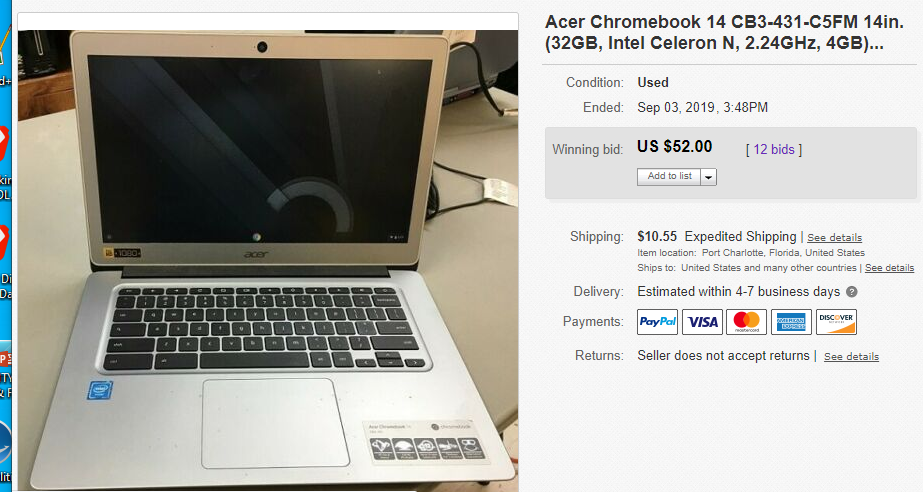
Last time we met we saw how to place an item for sale on eBay. It was a Chromebook that was working with an external keyboard as many of the keys on the device were non-working. We posted it as such on a seven-day auction. It was a slow start but the item sold for $52 in the last hour of bidding.


I was asked which backup program I prefer -- Macrium or EaseUS. I like them both but find EaseUS to use; fewer clicks to use it. Both work equally as good. I have written two articles about backing up and restoring using EaseUS.
Backup https://tinyurl.com/y5zvphmf
Restore https://tinyurl.com/y35lxqex

The file created is a compressed file that can only be opened with the program that created it. To do so requires you have the program that created it installed. Then you can double click the image file and view its contents.

Free HTML/WYSIWYG Online Editor
This tool was designed to make you extremely fast and efficient in HTML Editing. It's not for creating complete websites, therefore it does not create HTML head and body tags, but the body content only. The Web Editor is intended for all people who are in need of formatted HTML in their applications, websites or web content management systems (CMS). HTML5 Editor was designed to simplify the process of creating attractive web pages that render correctly in various browsers. It also helps to find and correct errors in your HTML markup so basically it's impossible to write wrong code with this tool.

I showed how you can right-click on a web page and view the source programming code written in HTML. Past it into this program and you can edit the page in WYSIWYG on the right and/or HTML code on the left. Use this tool not to borrow someone else's website but to create short blocks of code to give style to what is otherwise just text.
https://html5-editor.net/

AI Image Enlarger
AI Image Enlarger is a free software program for Windows and Mac devices, and an online service, that you may use to turn low definition photos and images into high definition ones. AI Image Enlarger promises that its upscaling technology produces high-quality results that preserve the quality of the source image.

We could not find the download page. The two we did look at did not work all that well. If you have some success please let us know.
https://tinyurl.com/yxlxyj9j

First Look at Malwarebytes 4
Malwarebytes, the maker of the security application Malwarebytes, released the first beta version of the upcoming major release Malwarebytes 4 to the public.

This was just information. It is in Beta now but be warned that something new and different looking is coming soon.
https://tinyurl.com/y3ttw3s9

Why Is My Machine Slowing Down?Perhaps when you purchased it, your computer ran like a champ and quickly did everything you needed. Now … well, not so much. Perhaps it takes forever to boot. Or starting applications is slower than molasses. Or maybe the machine just acts sluggish when you try to use it for just about anything. Regardless of the specifics, the underlying theme is simple: it’s slow.

Lots of good ideas, most of which we have discussed in the past. Here are some of my ideas.

All of a sudden going very slow, even stalling? Turn the PC off even if you have to hard stop it by holding down the power button until it shuts off. Restart and see if it is still slow. How full is your hard drive? How much memory do you have? 4 GB or more should be plenty. How old is your machine? If you have brought it from XP all the way to 10 it might be time to look for a new one; they are not very expensive. Even an old Vista or 7 might be slow.


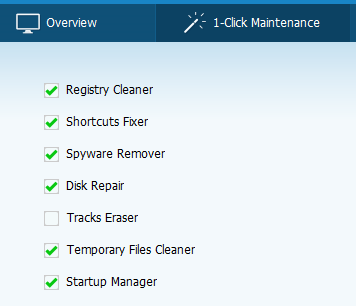
Using Glary in 1-click Maintenance, check Disk Repair so it checks the hard drive for problems. If it finds any it will attempt to fix on the next re-boot.
https://tinyurl.com/y3kl7mb5

Windows Event Viewer
The Windows Event Viewer shows a log of application and system messages, including errors, information messages, and warnings. It’s a useful tool for troubleshooting all kinds of different Windows problems. As a rule of thumb, assuming your PC is working properly, you can pretty much ignore the errors and warnings that appear in the Event Viewer. That said, it’s worth having a basic working knowledge of the tool, and knowing when it can be useful to you.

This is more for the geek amongst us. Windows logs everything and this is a way to peek at those logs.
https://tinyurl.com/ybjuegaj

How to perform a secure disk wipe with Windows 10's Format command
Windows 10's Format command comes with a special parameter that essentially wipes a hard disk. It was easy to do and worked like a charm. I figured other folks should know about this handy feature, so let's take a closer look.

We use special wiping programs to totally clear a hard drive but with Windows 10 we can now do that wipe in Windows.
https://tinyurl.com/yb84f4n6

Larry recorded today's session. If you would like to hear it:
https://tinyurl.com/y69fucwt


Wednesday, August 28, 2019

Computer Club Class Notes 8-27-2019

Set up your computer to automatically sign in


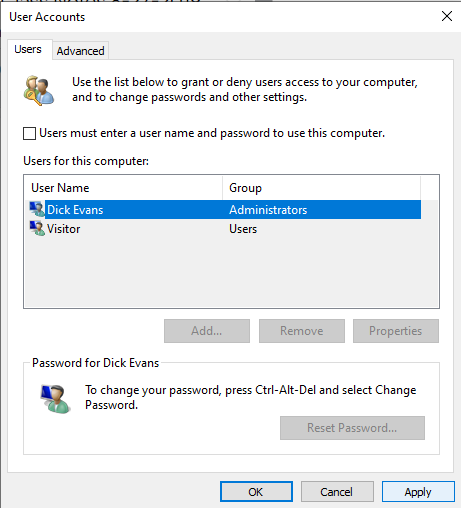
Win+R and type NETPLWIZ, then click OK. This will bring up the User Accounts dialog box. Uncheck the “Users must enter…” box, then click Apply.


Enter and confirm your Password, then click OK and OK. The next time you boot, you will not be prompted for a password.

Speaking of passwords, write it down somewhere. Even though you will be signed right in, there will be times you will need to know the password. Even if you switch to using a 4-digit PIN, you will still need your password.

Saving Pictures from Facebook


Find the picture on someone’s post or in their photos. Click the picture and on the next screen right-click and choose Save image as. I let all mine go to my Downloads folder. Now that it is on your computer you can print it, email it to someone, post in on your page, message it to someone…

When you upload a picture to your Facebook page you can place it a post or upload it to an album you have already created or create a new album.

Selling items online
There are many ways to sell things online. It all depends on how much you have to sell, if it is an online business you want to start, or just an item from time to time. I have used eBay to sell items and have been successfully doing it. It is an auction site meaning you place the item on eBay and people bid on it. Highest bid gets the item. You can say what the minimum amount you will take and you can even set a “buy now” amount. Another site is etsy.com.

Etsy is a global online marketplace, where people come together to make, sell, buy, and collect unique items. You post the item and set the price. Those interested in buying your item at that price will contact you. It is even easier is Facebook Marketplace.

www.facebook.com/Marketplace‎ Easy and Fast Way to Connect Buyers and Sellers. Find What You Want. Get Deals & Sell Faster. You post the item and the price and your local area Facebook users get to see it and communicate with you on Facebook Private Message to negotiate the price and arrange to meet to deliver it.

Next we gave a quick demonstration of using eBay to purchase things and to check the value of things. There have been a few classes in the past about eBay and selling things on it. Check back in the class notes for those handouts. We also talked about using PayPal and that you do not need an account to pay for something using it. When you give them your credit card or bank account information it stays at PayPal. The person you are buying from never see it. They get their money from PayPal.

Then we actually posted something, an Acer Chromebook that has a bad keyboard. Here is the post:


And the link to view it: http://ebay.us/XYc9Mq?cmpnId=5338273189

One person has already made an offer to buy it for $25. I will wait until the end of the auction to let them have it.

Lots of help on eBay website
https://tinyurl.com/y2qasgc7

Wednesday, August 21, 2019

Computer Club Class Notes 8-20-2019

We covered over an hour of topics before we got to the agenda. Good discussions and great questions. Here are some of the items we discussed.

PDF
A PDF is a Portable Document File and can be generated by choosing the printer “Microsoft Print to PDF”. That will generate a file that can be sent to anyone with any type of computer device and they can read it. In Windows 10, Microsoft Edge can read PDFs. Adobe Acrobat had been the free PDF reader of choice for many for years.

Image Resize
When we take a digital picture it ends up as a 1-5 MB file. Try to email that to someone and it could be larger than permitted with your email carrier. Use an image resizer to create a new and smaller image to send to others. Here is one we talked about back in May:

Faststone image resizer
FastStone Photo Resizer is an image converter and renaming tool that intends to enable users to convert, rename, resize, crop, rotate, change color depth, add text and watermarks to images in a quick and easy batch mode. Drag and Drop mouse operation is well supported. FastStone Photo Resizer makes quick work of batches of digital snapshot!
http://tinyurl.com/yxaj2u75

Grammarly is an extension that corrects your spell in your grammar on the fly. Does a good job.
https://tinyurl.com/y3mc9h9t

Google Cloud
Remember a cloud is hard drive storage at a location away from your location. It is accessed using the internet. The data stored is encrypted so only you can access it.

Windows 10 has OneDrive, a 5 gb cloud
Google comes with 15gb
Google Photos provides unlimited photo storage
Dropbox comes with 2gb
And there are many more out there. In every case you can purchase more space for a reasonable cost.

For pictures I use Google Photos. It is unlimited and with the app on my cell phone every picture I take is automatically sent to the Google Cloud. If you have a free google account (gMail) you have the Google Drive (drive.google.com).

Google Docs
If you have a Google account, you have 15 gb of storage in their cloud and have access at drive.google.com. All your Google data is stored here. Your gMail, your Google Photos, and anything else you upload to the “drive”. If you are storing your photos or movies or Google documents, the storage is free. If you are uploading non-Google files they use your 15 gb of free space. If you run out, you can purchase more space at a reasonable monthly fee.

I use Google Docs and Spreadsheets for most of my writing. Not only is it available on my PC, but also on my cell phone and Chromebook and LinuxMint computer, and at anyone else’s computer. Access is on the web and all files are stored there. Sharing files with others is a simple as clicking Share and sending them the link. They can view but not change or I can set it to allow their comments or even to modify the file.

How to enable Ransomware Protection
Windows Defender has been gaining a foothold steadily for the past few years. But there is one flaw in the antivirus that ships with Windows 10. The option for Ransomware Protection is disabled by default even though it is available as a native option since the release of Windows 10 version 1709.

One of our members noted that a number of valid programs were flagged as ransomware. He had to go in and make them exceptions. From that point on all worked fine. Here is what he had to say:

“You should try the Ransomware Protection. I did and found it a pain in the butt. I just turned it back on the other day when Harold emailed about it. It immediately blocked Outlook in Office. Unfortunately, many routine programs get blocked. Not that hard to make exceptions but still a pain. Talk to the class about it but be aware of the false positives. Some are Windows system files if that makes any sense. Why would they get blocked? “
https://tinyurl.com/yywomfut


System Information
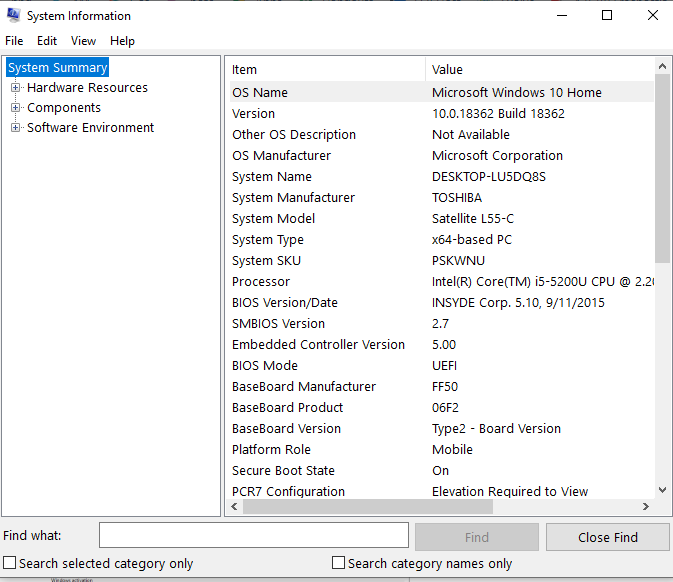
System software DescriptionSystem Information is a system profiler included with Microsoft Windows that displays diagnostic and troubleshooting information related to the operating system, hardware and software.

Win+R > msinfo32


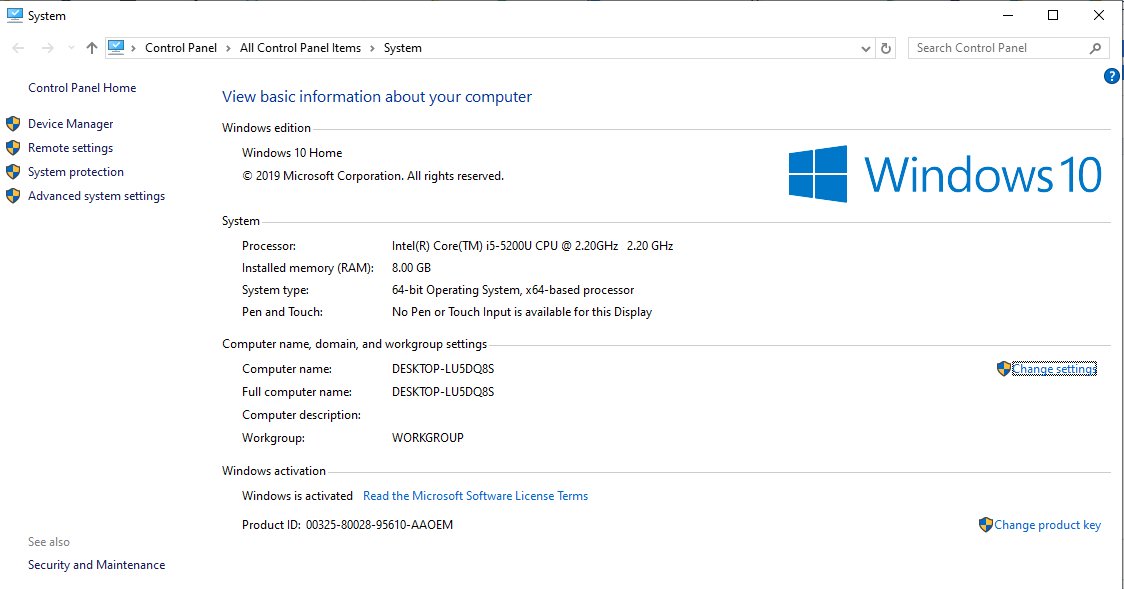
Win+Pause

How to fix 100% disk usage in Windows
High disk usage can be tricky to fix, but here are the common reasons why it happens and how you can solve it and make Windows responsive again. There are several things that can cause 100% disk usage in Windows, and it can be a tricky problem to solve. But help is at hand: here are all the common reasons why it happens and how you can fix it.

This article outlines some ways the author has found. The first says to restart. Better to shutdown and restart; this reloads everything. Use task manager (Shift+Ctrl+Esc) to see what applications are taking the most disk usage. Something is running and it may be just a bad hard drive.
https://tinyurl.com/y566vhqu

100% Disk Usage in Windows 10 Fixed With 14 Tricks
Got 100% disk usage in Windows 10? So your computer is hanging and freezing. Same old Windows, right? Except you’re using a brand-new Windows 10 device; you’ve only had it a few days. So just what is going on?

This is a much better article on the 100% issue. Here are some of the suggestions it addresses:
  • Check disk performance with chkdisk
  • Check your anti-virus/malware software
  • Disable Windows search
  • Disable Superfetch service
  • Time to disable Flash
  • Is Windows Update causing 100% disk usage?
Neither article mentions is to disable the background apps from running and disabling things in Startup.
https://tinyurl.com/y5k5bhhe

Emsisoft Emergency Kit is a free portable antivirus
This has been around for a long time and ranks high in troubleshooting arsenals.The emergency kit is available for Windows 7 through Windows 10.The download has a size of 326 Megabyte sand comes as a self-extracting installer; it does not need to be installed but is extracted to a location when you execute it. You may then run the program from that location, even if it is on a USB drive.

Download at https://www.bleepingcomputer.com/download/emsisoft-emergency-kit/. Run it and have the installation go to your flash drive. Then it can be run at anytime from the flash drive.
https://tinyurl.com/y6qvmyle

Malwarebytes releases AdwCleaner 7.4
Malwarebytes, maker of the security solution of the same name, released a new version of the company's AdwCleaner program this week. AdwCleaner is a standalone free program designed to detect and remove adware and other unwanted software programs from Windows machines.

This one actually finds things MalwareBytes misses. Worth running from time to time.
https://tinyurl.com/y64bjvyh

Friday, August 16, 2019

Computer Club Notes 8-13-2019

Club Favorites
At each general meeting George demonstrates a program or website that is useful. You can find the ones he has shown us on our club website at cccgc.info. Find the link on the right side:

Click 3 Favorites to see the list since this January. At the August meeting he showed us a site that gives us access to over three million manuals. We keyed in the model number for an audio recorder one of our members had with him and instantly had the 300+ page manual for it.

Preview the new CCleaner BrowserWe know that CCleaner users like to keep junk under control, stay private, and get things done fast. That's why we've built a safer browser that puts you in control of your digital footprint and stops browsing cluttering up your PC.

We installed it and found it to be similar to Google Chrome and Brave. Did not see anything bad about it all. Give it a try and see what you think.
https://tinyurl.com/y4xnee9p

An image editor you'll LOVE! or so we thought...Looked like a neat program. It used to be around as a free application. Now it is free to try, but the require your credit card so we did not give it an actual trial. Watched a demo of it that looked good--gave us a few new “Tech terms” like "tad", "easy pizy", and "smidge"
https://tinyurl.com/y35sv859

Free PicMonkey Alternative. Ribbet is a 100% online photo editor like PicMonkey, and best of all it's free. Apply sophisticated effects, stickers, frames, fonts, borders and more in seconds and without any training or classes.
https://www.ribbet.com/photo-editor-like-picmonkey

What Is a VPN?
VPN software creates an encrypted connection (often referred to as a tunnel) between your computer and a server controlled by the VPN company, and then passes all network activity through that protected tunnel. This way, your online activities are hidden from everyone—including your ISP, which is now allowed to sell your anonymized information.

Think of it this way: If you drive out of your garage, someone can follow your car and track where you went, how long you were there, and when you returned home. We call that stalking. Using a VPN service is like driving into a closed parking garage, switching to a different car, and then driving out. Anyone following your original car now has no idea where you went after entering the garage. A VPN service keeps the stalkers at bay.
https://tinyurl.com/y4h2t2w3

What is a VPN connection, what does it do, and how do you set one up?
You may have heard the term VPN used more and more frequently in recent years. VPN stands for Virtual Private Network, a VPN serves several purposes, including making online activities more secure. For that reason alone, we recommend that everyone use a VPN.
https://tinyurl.com/y6f3j5zn

Do I need a VPN?
Get more from the Internet—especially privacy, anonymity and safety—by using a VPN before you do anything online! Who doesn't love the Internet? It delivers information, answers, entertainment and connections to you, on demand, in seconds. From anywhere and at any time from our desktop computers, laptops, smartphone and tablets. It's a life-saver for students of all ages, moms, businesses, organizations...everyone.

But the Internet is not perfect. It has some built-in flaws that make you vulnerable when you're online. You should know that, because hackers, government and other snoopers and advertisers take full advantage of it.

A VPN changes that for you!
But you can make the Internet safer, more secure and definitely more private with the help of a VPN...a virtual private network. Don't you want to go on the Internet without being tracked, monitored, and identified...without your knowledge? In today's world, that freedom is getting harder to find.

A VPN...described.
As long as your router is secured and your Wi-Fi is using something like a WPA or WPA2 password, then by and large, you probably don't need a VPN at home. Most VPN services are tailored for the traveler who is regularly using open and untrustworthy hotspots and other internet connections on the road.

Here's a quick, helpful definition...and about all you need to know about a VPN.

A VPN is a service that you sign up for online for a small monthly charge

Once you have an account, your VPN service should be "on" when you're online

A VPN, in action, takes your Internet connection and makes it more secure, helps you stay anonymous and helps you get around blocks and access censored sites.

The key to a VPN is that it lends you a temporary IP address and hides your true IP address from every website or email you connect with

It's Virtual...because it's as if you have a private connection directly to any website or another computer you connect to.

It's Private...because all your website visits and online activity is between you and the websites you visit.

It's a Network...because you're using a special network of VPN servers that covers the entire globe.

Your IP address is a behind-the-scenes number your Internet provider assigns your computer that allows you to go anywhere on the Internet. It's something like the house number on your home.

That's the good news. The somewhat "bad" news is that your IP address also gives away your computing location, at home or on the road. That bothers a lot of computer users.
https://tinyurl.com/y4hrw4r2

Backing Up
Our computers are reliable until they are not. Eventually the hard disk drive will fail and when it does you are out of luck unless you have been making backups. So me of you may be copying important files down to flash drives but I have not found that to be true with most. Backing up is on the things to do list but always gets pushed down by our busy life. Who knew being retired would be so filled with stuff to do? It is really easy to do. Install the software (Link on the club site) and run it. Once you have started the backup go watch television or go out for dinner. When you get back it will be all done. Here is a link to the recent article I wrote on using EaseUS.
https://davescomputertips.com/how-to-lets-talk-backups/

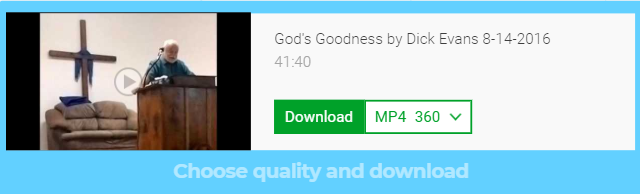
Downloading a video from YouTube.
  1. Open the video on YouTube
  2. Ctrl+L to access the URL
  3. Left Arrow and then right arrow over to just before the letter Y
  4. Type SS and hit enter


Click Download…with low quality (it’s free)


Click Free download…


Click Download and watch the video… or


Click the three dots


Click Download


Choose a location to save the file and its name

You now have the full video on your computer


Tuesday, July 30, 2019

Computer Club Class Notes 7-30-2019

We did not get to discuss what a VPN is and will get to it next time we meet. Next week is the General Meeting so our open forum will be held from 6-7 pm. Beginner class is from 5-7. Hope to see you all there. Come with questions for me.

I know we discussed a lot and I do not remember all the topics we hit on. Here are a few...

What does gmail archive do?Unlike Outlook, when you Archive a message in Gmail, the message is hidden from your Inbox view. So in effect, archiving lets you tidy up your inbox by moving messages from your inbox into your All Mail label, so you don't have to delete anything.

What computer should I buy?
Most of our users have Windows and most of them Windows 10. When it is time to purchase a new one, what should you look for? The first question I ask is what do you use your computer for? If all your work revolves around the Internet, perhaps a Chromebook would work well for you. If you have some specialized software you regularly use then another Windows 10 one may be called for. You might even look to a Linux based computer.

A Windows based machine needs regular maintenance and an active anti-virus program running all the time. I use Windows Defender (will be renamed soon to Microsoft Defender). The Chromebook and the Linux machines do not need antivirus or other maintenance programs. They are great for surfing the web, doing word processing and spreadsheet work, and running any web based apps like your banking and , getting into you medical providers. etc.

Keyboard shortcuts in Windows
Here it is, a full list of keyboard shortcuts from Microsoft for Windows 7, 8.1, and 10
https://tinyurl.com/znjwvqu

OneDrive sync problems on Windows 10When you're facing syncing issues with OneDrive, it's likely to be a problem with the desktop client, and in this guide, we'll show you the steps to troubleshoot and fix the problem.

OneDrive needs you to sign in with your Microsoft Account. If you do not have one, create one. OneDrive comes with Windows 10. Whatever you place in your OneDrive folder (Folders and File) automatically goes into your cloud storage in your Microsoft account. Add or change a file in OneDrive on your computer and it is updated in your OneDrive in the cloud. You get 5 GB of space in OneDrive for free. For $1.99 a month you can increase that to 50 GB. If you choose to go for Office 365, you get 1 TB for free.
http://tinyurl.com/y4evgeoz

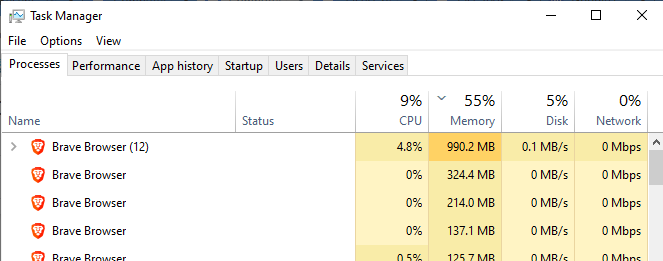
You’re Slowing Down Your PCSWhile all computers slow down over time, in many cases, your own behavior can cause your computer to run slowly. Here are common mistakes that will slow your machine down to a crawl, and how to stop making them. You can see the problems by looking at performance in the Task Manager. Right-click on the taskbar and choose task manager.


If you don’t see this multi-tabbed view, in the lower left of the smaller view, click More details.

A slow computer probably shows Disk usage at 100% or perhaps Memory at 100%. If this is the case you need to have your computer looked at.
https://tinyurl.com/y3xs7g2y

CCleaner may install CCleaner BrowserCCleaner, the popular Windows file cleaning software, may install the web browser CCleaner Browser as part of the installation process if users are not careful. Watch the check boxes that appear on the install screen for CCleaner. Uncheck them or you will install more than just CCleaner. If you do you can just uninstall them. The programs CCleaner piggybacks are not malware, just programs you do not need.
https://tinyurl.com/yyxg5c9e 


Tuesday, July 23, 2019

Computer Club Class Notes 7-23-2019


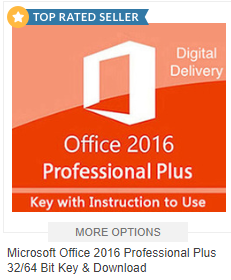
Bonanza.com for good buys on lots of stuff including Microsoft Office and Windows. Here is what they say: “Experience has proven to us that listening to our sellers' feedback is the best opportunity we have to consistently improve our product. That's why we've developed various tools over the years to make online selling easy. Our business relies on making successful sellers, so it's not a coincidence that the tools we offer can be customized to fit our sellers' needs.”
https://tinyurl.com/y3kd6qg5


Linux vs Windows
Linux does not need a powerful machine to run swiftly. An older XP computer will work well. Needs little hard disk space and minimal memory depending on the distro you use. I like Linux Mint and Lubuntu. No need for any antivirus or anti malware programs. They come with Firefox and sometime Chromium and some kind of “office” capability like LibreOffice. There are no weekly updates or six month replacement versions. They just work. But they only run software designed for Linux, and there are many out there.

Easy to try as you first download the ISO file and burn a boot CD.

Boot from that CD and your version of Linux runs completely in memory without touching your hard drive.

Once you are sure you will like it, click the icon to install it alongside your current OS or have it wipe your drive and install as a stand alone OS.

CCleaner Browser
CCleaner Browser is a web browser with built-in security and privacy features to keep you safe online. It comes packed with all the tools you need to manage your online privacy, identity, and personal data. You can download CCleaner Browser at:
www.ccleaner.com/ccleaner/browser

Paint 3D replaces MS Paint, a decades favorite of Windows users It is a built-in creative application that comes free with Windows 10*. It is designed to be simple yet powerful by allowing you to create professional or fun creative projects by easily combining 2D and 3D tools. The best part is that you don’t need any design experience – Paint 3D can be used by anyone. Its approachable interface makes it easy to customize existing 3D models from our built-in 3D library or create 3D designs from scratch.
https://tinyurl.com/y6tn68sd

Instagram is a free, online photo-sharing application and social network platform that was acquired by Facebook in 2012. Instagram allows users to edit and upload photos and short videos through a mobile app. ... Users also have the option of making their profile private, so that only their followers can view their posts.
https://tinyurl.com/yyk4ls25

Blogger is a blog-publishing service that allows multi-user blogs with time-stamped entries. It was developed by Pyra Labs, which was bought by Google in 2003. The blogs are hosted by Google and generally accessed from a subdomain of blogspot.com. I use blogger for our club page at http://evanstraining.blogspot.com It makes an easy way to create and maintain a personal and business web site.
https://tinyurl.com/y26razxq

Other ways to get yourself on the Web at little or no cost include About.me, Web Starts, and GoDaddy.

Quick Removal new default
Quick removal is the safer option as it ensures that devices can be disconnected from the Windows PC directly. Better performance improves performance but requires that users need to use the "Safely remove hardware" option before they unplug external storage devices. Failure to do so may lead to data loss
https://tinyurl.com/yynek995 https://tinyurl.com/y5utqm4t

Unchecky
Installers often try to sneak additional programs as a natural part of the installation. Unchecky warns you when you try to accept a potentially unwanted offer, which makes it less likely to be accepted accidentally.
https://tinyurl.com/jlkdwxa

What is a personal cloud?
loud Storage (PCS) is a local network-attached storage (NAS) device that lets users store data, photos, music, videos and other files and is optimized for media streaming. PCS devices are a way for home users to experience the advantages of high-capacity, cloud-based storage without losing control of their data. Users can access content on their PCS device from multiple computers using a web browser, while mobile apps provide access from iOS and Android devices. Files can be shared without using a public cloud service.
https://tinyurl.com/y5nnygg5