Wednesday, March 20, 2019

Computer Class Notes for 3-19-2019

CCleaner
We all use CCleaner to clean the junk out of our hard drives and to clean the registry. I have been reading articles about cleaning the registry and the general consensus seems to be that it has no effect on the speed of the computer. I read that when Windows boots the entire registry is loaded into RAM which negates the need to defrag it or even clean it up. I have never had a problem using the registry cleaner in CCleaner, but some have indicated issues with windows after cleaning it. I have seen performance improvement when the cleaning finds hundreds of issues, but that is when it has not been cleaned in years of use.
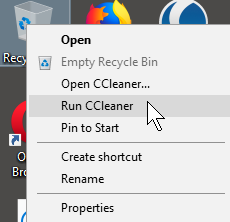


There is a shortcut to cleaning the junk--right-click on the recycle bin and choose Run CCleaner. That does the cleaning in the background and you will notice a spinning CCleaner icon in the lower right of the taskbar.

ScamFoo
In looking into the possibility that a too good to be true website selling cheap laptops we came across scamfoo.com which reports as to the validity of a website. When we entered the URL for the questionable site it reported that this was not a safe site.

RANDOM.ORG offers true random numbers to anyone on the Internet. The randomness comes from atmospheric noise, which for many purposes is better than the pseudo-random number algorithms typically used in computer programs. People use RANDOM.ORG for holding drawings, lotteries and sweepstakes, to drive online games, for scientific applications and for art and music.
https://tinyurl.com/kt26b7

Keep A Portable Ubuntu Installation With You Wherever You Go
Having a PC in your pocket is a massive advantage. But how can it be done easily? The answer, of course, is via a USB stick. With a version of Ubuntu installed on your USB stick, you’ll have access to the web, to your favorite files and folders… all without the pain of lagging a laptop around.
https://tinyurl.com/yxcuxomp

Paint Dot Net
Originally intended as a free replacement for the Microsoft Paint software that comes with Windows, it has grown into a powerful yet simple image and photo editor tool. It has been compared to other digital photo editing software packages such as Adobe® Photoshop®, Corel® Paint Shop Pro®, Microsoft Photo Editor, and The GIMP.
https://www.getpaint.net/index.html

Program Switcher
Switch one program with another! For example, anytime you perform any action that would normally start Microsoft Paint, you can switch this program with Paint.NET, so that it starts instead! It is incredibly useful after major Windows 10 updates which reset file associations back to defaults; with Program Switcher you can always force your preferred program to run instead of Microsoft’s default program!
https://tinyurl.com/yxvtu2d8

SurveyMonkey is an online survey development cloud-based software as a service company, founded in 1999 by Ryan Finley. SurveyMonkey provides free, customizable surveys, as well as a suite of paid back-end programs that include data analysis, sample selection, bias elimination, and data representation tools.Wikipedia
https://tinyurl.com/a7u4ar

Write-Caching
Write Caching, if enabled, sends disk write-requests to computer memory (RAM) instead of directly to the much slower hard disk drive (HDD). This frees up applications from having to wait for the drive to finish its work before moving on to other tasks. This option is why we need to safely remove our USB devices before unplugging them.
http://tinyurl.com/y3crfktn

How to use the new Snip & Sketch
Beginning with version 1809, Windows 10 offers an expanded range of screen capture options. You can save the full screen, the active window, or a rectangular selection to a file or to the Clipboard for reuse in another app. Here's how the new tools work.
http://tinyurl.com/yxlcf5tf

Notepad Online
Perfect for quick, secure note taking. It was designed for simplicity, security, and speed. It loads immediately into a blank notepad and anything you type is instantly encrypted and saved. — You can add a password on any note and share it securely.
http://www.notepad.pw

The 10 Minute Mail lets you create a temporary email address. Why? You just want to download that delicious recipe and they want your email address. You know what they want it for--to send you junk mail. Instead of using your real one, create a temporary one and use it. They may want to have you confirm your email and this lets you read any emails sent to it. If you need 10 more minutes, you can add it--again and again.

Easy Screen Capture
With 1803 we were given an easy way to capture a screen by pressing Win+Shift+S. Draw a box around what you want to capture and release the mouse. Your image is in the clipboard.

With 1809 the clipboard is no longer a one time clip. Win+V will open the clipboard where you can view every item that has been copied since the last reboot or since you cleared the clipboard.

Daves computer tips is an online blog with many computer tips, as the name implies… I am now writing some articles for them. Check my latest article at https://tinyurl.com/yynegsp6 and please leave a comment on my articles. Thanks.

Tuesday, March 12, 2019

Class Notes 3-12-2019

The Best Google Docs Add-Ons
Google Docs add-ons work similarly to how a browser extension works. They are a third-party app that you install to Google Docs to gain additional features. Some add-ons increase productivity (like proofreading tools) and some add more extensive capabilities (like allowing teachers to integrate grades into students papers). https://tinyurl.com/ya6h8xuq

To Display WiFi Network Password:
Win + R and type ncpa.cpl in the run box, then hit the enter key. Locate the wireless network adapter and then:
Right-click > Status > Wireless properties > Security > Show characters


Free online learning
https://edu.gcfglobal.org/en/topics/computers/

Google Keep
Google Keep is what I use to keep our shopping list. We each can make entries on our cell phone and use it at the market to get all we want instead of getting there and trying to remember what we need.

Daves computer tips
is an online blog with many computer tips, as the name implies… I am now writing some articles for them. Check them out at https://davescomputertips.com/
Classic Shell f
ound at classicshell.net and in Ninite gives you a start menu on Windows 10 that has the appearance of XP, Vista, or 7.


Ninite
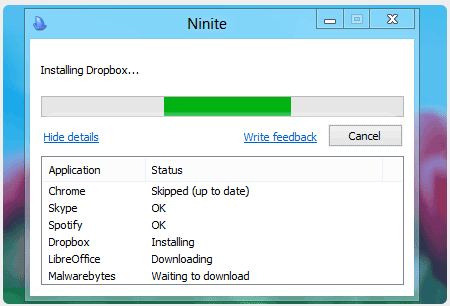
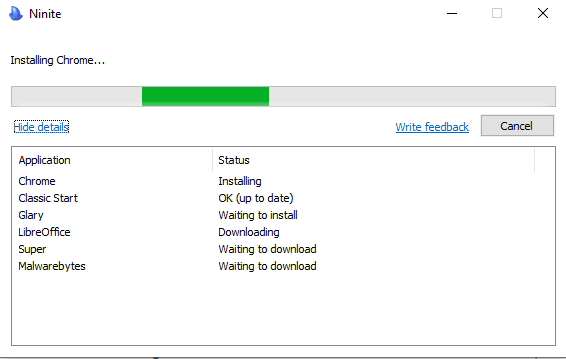
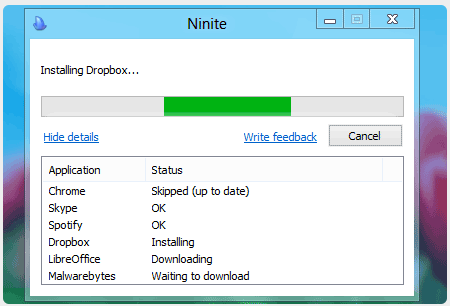
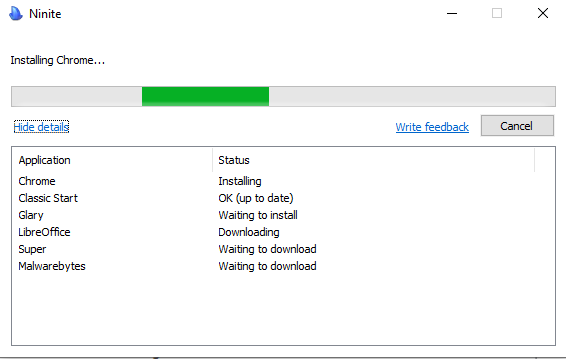
Ninite is the safest site to install programs from. When you open ninite.com you are presented with a list of program to select from. You check the ones you want and then click the Get Installer button. That does not download any of the programs you have checked, it downloads a tiny program to your computer with a list of the programs you checked.


When you run that installer program it looks over each program selected to see if you have it already installed on your computer. If not, it downloads and installs it. If you already have the program it compares the version on your computer to the available one. If the one you have is already the latest, it does nothing with that program. If the one you have is older, the latest is downloaded and installed for you.

The next time you want to check to see if you have the latest updates you do not have to go to ninite and start over. If you still have the installer program on your computer, just double-click it.

Check installed programs
When you install a new program off the internet, check the list of installed programs to be sure nothing else was install on the same date as what installed. Remove any surprise installs. I use Glary or CCleaner to look at the installed programs by date installed to accomplish this and to remove the offending software.

Magnifier is very useful and easy to use in Windows 10
Win+Plus enlarges
Win+Minus reduces
Move the mouse left, right, up, and down to see other areas of the screen
Win+Esc Cancels the magnifier

Router to Wifi Repeater
Use that old router to act as a repeater to get a good WiFi signal all over your house.
http://tinyurl.com/y6ynb4dn

Radio on the Internet
I Heart Radio gives you the ability to listen to your home town, or any other town, radio station. All your favorite music, radio and podcasts, all free.
https://tinyurl.com/zfk6w8k
Download from YouTube
Yes, you can download the videos on YouTube to watch them later without internet access.
1. Locate the video on YouTube
2. Locate its URL in the address bar
http://www.youtube.com/xxxxxxxx
3. Add ss before youtube and hit the Enter key
http://www.ssyoutube.com/xxxxxxxx
4. On the next page, part way down the page locate the offer to download video in browser and click the link
5. Click Download and the video will be downloaded to your Download folder

USB speeds
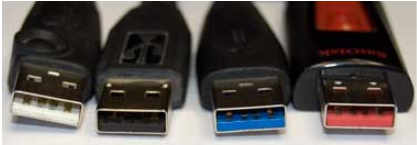
USB speed and colors
USB 1.1 1.5 mb/s white
USB 2.0 60 mb/s black
USB 3.0 625 mb/s blue
USB 3.1 1,210 mb/s red*
*Orange: the connector does not power off during sleep or standby mode.

No More Mozy
Mozy was bought out by Carbonite. It is not free. If you have data on Mozy it will be removed as of April 15, 2019. I have moved to IDrive for my daily backup. You get 5gb for free and it has a number of other features as well. I will be experimenting and report back to you soon.

Tuesday, February 26, 2019

Class Notes for 2-26-2019

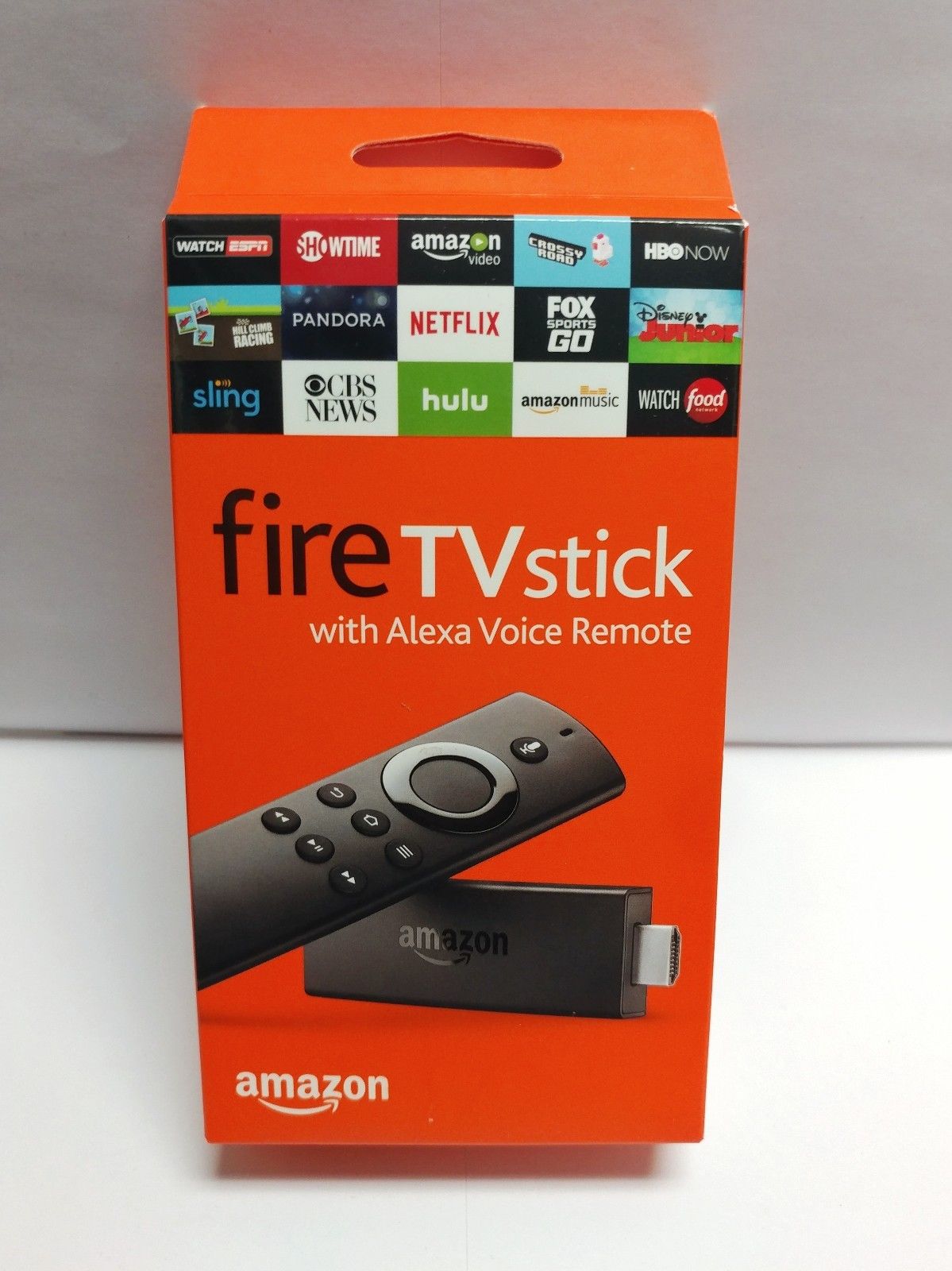
Demonstration of setting up an Amazon Firestick


We started with a new box and walked through every step to set up the firestick and to establish a new Amazon account.

Last week we looked at the Roku box. This is similar in that they give you a menu of many movies and tv shows to watch. And channels to log in to like Netflix and others that require a monthly fee. No fee except to purchase it for the firestick.

If you have a smart TV and just want to get Netlfix and Amazon Prime and Hulu and others that cone built in to the TV, you do not need the firestick or Roku. Your TV does the work.

More on “cutting the cable”
You are not dumping your provider. You are opting out of the telephone and cable package. All you need is the internet and it does not have to be very high speed. Don’t get sold on the need for 100-150 mbps that the cable company says you have to have. I have found that 3-5 mbps streams. Our 4g cell phones can be used as a hotspot at about 5 mbps.

Get a TV antenna for from $10-$50 and plug it into the back of your TV. Go to settings on the TV and scan for TV channels. In this area you will find 30 or more local channels that are free.

Add the firestick or Roku and you have all the movie channels and seasons of TV shows to watch. And music and many other channels to add for free. There is one call pluto.tv that gives you free TV. You can try that out for free on your computer.

Your biggest bill will be your internet and the monthly fee for Netflix and whatever else you subscribe to that is not totally free. Try it.

Eyesight Issues
Win+Plus Turn on
Win+Esc Turn off

This start the magnifier for anyone with sight problems. Try it. It is self explanatory.

The Best Portable Apps That Require No Installation
This runs through a list of apps you can put on a flash drive for use anywhere. Some of my facvortes are on the list--Notepad+, emailstripper, libreoffice, and more
https://tinyurl.com/ybz965np

Useful Links from the past
This list was found in an old disk drive and some may no longer work. Give them a try.
http://monticello.rwevans.net/links.htm

What to Do if You Drop Your Android in Water
The first thing everyone tells you to do is to stuff your phone in a jar of rice. However, stuffing your phone in a jar of rice is more likely to accidentally stuff rice grains into your phone than it is to aid the phone's drying process. Rice is not a drying agent. Do not use rice.
https://tinyurl.com/y3uo4fmv

Tuesday, February 19, 2019

Computer Club Summary 2-19-2019

Live demonstration of hooking up a Roku box took us about an hour to cover all the questions. Here is a link to Roku.com so you can check them out. You can buy from them or at any of the retails stores locally or on Amazon.


Use Wordle to create a graphic of words. I downloaded the program to my PC and it works great.

As mentioned in the last few classes, I have been using the Brave browser and the search engine duckduckgo. Check their pages for the benefits. I have found them fast and secure.

Have you got a locked iDevice (iPhone, ipad…) and can’t figure out how to unlock it or even to factory reset it to give to someone else? Check Dr.fone. It is a downloadable program from your PC to unlock any iDevice. Not free.

Review the 10 Minute Mail that George demonstrated at the last meeting. Lets you create a temporary email address. Why? You just want to download that delicious recipe and they want your email address. You know what they want it for--to send you junk mail. Instead of using your real one, create a temporary one and use it. They may want to have you confirm your email and this lets you read any emails sent to it. If you need 10 more minutes, you can add it--again and again.

Review the .new links that was explained in the Bytes for February. Simply stated, to create a new document in Google Docs, type doc.new into your address bar and you are taken to a new document in google docs. Spreed.new for a new worksheet. Re-read the article for details.

Have I Been PWNED?
There have been many corporations that have been hacked over the last few years and email addresses have been exposed; sometimes passwords also. This site has a database of all email addresses that have been taken. Type in your address and find out if you have been pwned. If you have, you might want to change your password.
https://tinyurl.com/y2jwd9sq

Windows 10 Icon Spacing
Right-click on your desktop and change the size of the icons--small, medium, and large. But that does not change the spacing between them. This article shows you how to make that adjustment. Beware, this is a little technical.
https://tinyurl.com/y5nt76rx

How to Use the Chrome Cleanup Tool
As the article says “Once available as a standalone program, the Chrome Cleanup tool is now a part of the actual browser itself and can detect and remove harmful software along with restoring hijacked settings back to their original state. If you are experiencing undesirable symptoms such as intrusive pop-up ads and unexpected web pages appearing, your search engine and homepage being redirected to services and sites that you've never heard of before or just general slowness in your browser, then you should first check for and remove any unwanted programs.”
https://tinyurl.com/y5g4dewd

New Tool Tells You if Your Password Has Been HackedGoogle Password Checkup functions as a helpful second layer of security, telling you when your passwords have been compromised, and reminding you to change them before it’s too late.
https://tinyurl.com/yy7glrbe

Tuesday, February 12, 2019

Computer Club Notes 2-12-2019

SSD?
The cost of Solid State Drives has dropped to affordable prices. 500gb drives are available for less than $100. They are proving to be more reliable than hard disk drives with an expectation of many years of service. They are quiet, easy to install, and much faster than hard drives. The speed gain for the upgrade will be much greater than what you gained by increasing the amount of memory. If you have not increased RAM to at least 4 gb, you might want to do that at the same time.

SSDs are all 2.5” in size and exactly the same size as laptop drives. So the replacement in a laptop is pretty easy. You might need a YouTube video to see how to locate and remove the old drive on your laptop. If you have a desktop with an IDE hard drive, you will not find an SSD in that format. If the motherboard has SATA connection you probably can install the SSD, but more than likely will need a bracket to hold the 2.5” drive. Here is one for less than $5: https://tinyurl.com/y3yln98x

Generate Random Text
Using MS Word, I demonstrated how to generate some random text using a website called http://www.lipsum.com/. You do not need to have Word. It just generates as much text as you need so you can copy and paste it into whatever program you to use it for.

In Word you can just type =RAND() or =RAND(p,s) p for number of paragraphs and s for number of sentences in each paragraph. Leave them out and it auto generates 5,3. The text comes from the help screens in Word.

Download your Google data
Google has a lot of information based on all the Google sites you visit. You can download that data to your own computer easily. This article tells how.
https://tinyurl.com/hjs6x9u

Windows 10 version 1809 rollout is here
As we talked last month, 1809 is working and starting to automatically roll out to all users. I have installed it without a hiccup on three of my machines at home as well. In a few weeks we will be looking at 1903. More on it as we get closer to the actual download date which is unknown at this time.


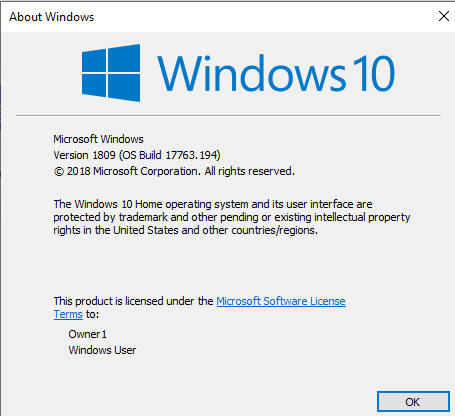
To check which version of windows you have installed press Win + R, type Winver, press Enter. The latest is 1809. 1803 is ok. Just wait for 1809 to come down on its own. If your machine does not line up with the requirements for 1809 it will not be updated. Some issues with certain processors and video chips.

How to pin to taskbar. On the desktop right- click the icon you want to place on the taskbar. Select pin to taskbar. Or you can just drag the icon to the taskbar. To pace it on the Start Menu, right click and choose Pin to Start.

What cloud?
We talked about the various “clouds” out there for us to use. Remember a cloud is hard drive storage at a location away from your location. It is accessed using the internet. The data stored is encrypted so only you can access it.
  • Windows 10 has OneDrive, a 5 gb cloud
  • Google comes with 15gb
  • Google Photos provides unlimited photo storage
  • Dropbox comes with 2gb
  • Amazon Prime comes with 5gb
  • Amazon Prime Photos provides unlimited photo storage
And there are many more out there

In every case you can purchase more space for a reasonable cost.

I use OneDrive. I found it the easiest. I just save files in my OneDrive folder and Microsoft saves a copy in its cloud. You will need a free Microsoft Account to access it.

For pictures I use Google Photos. It is unlimited and with the app on my cell phone every picture I take is automatically sent to the Google Cloud. If you have a free google account (gMail) you have the Google Drive (drive.google.com).


Ninite
Ninite is the safest site to install programs from. When you open ninite.com you are presented with a list of program to select from. You check the ones you want and then click the Get Installer button. That does not download any of the programs you have checked, it downloads a tiny program to your computer with a list of the programs you checked.


When you run that installer program it looks over each program selected to see if you have it already installed on your computer. If not, it downloads and installs it. If you already have the program it compares the version on your computer to the available one. If the one you have is already the latest, it does nothing with that program. If the one you have is older, the latest is downloaded and installed for you.

The next time you want to check to see if you have the latest updates you do not have to go to ninite and start over. If you still have the installer program on your computer, just double-click it.

Easy Screen Capture
With 1803 we were given an easy way to capture a screen by pressing Win+Shift+S. Draw a box around what you want to capture and release the mouse. Your image is in the clipboard.

With 1809 the clipboard is no longer a one time clip. Win+V will open the clipboard where you can view every item that has been copied since the last reboot or since you cleared the clipboard.


Stop Background Tasks in Chrome
Menu > Settings > Advanced > System > Continue running background… turn the switch off.

In addition to my own research, I want to give thanks to Harold at the Club, Ghacks, AskLeo, TomsHardware, DavesComputerTips and others for the useful ideas we take a look at each week.

Wednesday, January 30, 2019

Class Summary 1-29-2019

We discussed how to add a Chrome extension.

Open Chrome


Click the menu button (upper right three vertical dots)

More tools > Extensions


Click the Extensions Main Menu (three horizontal lines)


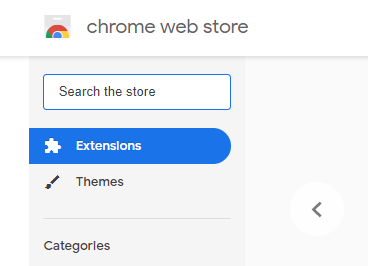
Click Open Chrome Web Store


Search the store for the extension you are seeking and the Add to Chrome

Alternatives To Microsoft Word

Word was not always the top choice among word processors. WordStar is a word processor application that had a dominant market share during the early- to mid-1980s. Then Microsoft Word came on the scene and was delivered free to everyone purchasing a new PC.

Today we have many other options. We will look at a few.

OpenOffice / LibreOffice are the same but different. This article will give you some history and details: https://tinyurl.com/zsagq8d

We will looked at the simple with Jarte, Abiword, and the Office look-a-like in WPS. Then we checked out Google Drive.

If you have a Google account, you have 15 gb of storage in their cloud and have access at drive.google.com. All your Google data is stored here. Your gMail, your Google Photos, and anything else you upload to the “drive”. If you are storing your photos or movies or Google documents, the storage is free. If you are uploading non-Google files they use your 15 gb of free space. If you run out, you can purchase more space at a reasonable monthly fee.

I use Google Docs and Spreadsheets for most of my writing. Not only is it available on my PC, but also on my cell phone and Chromebook and LinuxMint computer, and at anyone else’s computer. Access is on the web and all files are stored there. Sharing files with others is a simple as clicking Share and sending them the link. They can view but not change or I can set it to allow their comments or even to modify the file.

We covered many questions regarding the various office programs. If you have any questions, feel free to email me.

Wednesday, January 23, 2019

Class Notes 1-22-2019

Slow Computer
What can be done about a slow computer? Over time every computer slows down the result of many layers of stuff added over time. Exactly what I cannot say. The first answer many will give is to add more memory. For Windows 10 it seems to like no less than 2 gb and the more the better. Older computers may not allow more than 1-2 gb max. Running the maintenance programs helps a lot (CCleaner, Malwarebytes, Superantispyware). The best way is to backup all your data and reload a fresh operating system. This totally cleans your system and lets you start fresh. Now it will be running at top speed. Restore your data and install any software that did not come with Windows. Still runs slow? You might want to check out Linux Mint as a replacement OS.

Keyboard shortcuts in Windows
Keyboard shortcuts are keys or combinations of keys that provide an alternative way to do something that you’d typically do with a mouse.
http://tinyurl.com/znjwvqu

How to block endscreen video recommendations on YouTube
Sometimes, or even all the time, you may prefer not to receive video suggestions. Maybe, because you are watching YouTube with minors and don't want them exposed to suggestions that are inappropriate or make them want to watch more videos on the site. We looked at this article but did not get to understand enough to try blocking. If you get it to go, let me know...
https://tinyurl.com/yat73vgy

7 Useful Ways to Reuse an Old Router
This article has some good suggestions on using that old router. How to repurpose it as a switch, a second WiFi channel, a WiFi extender and more.
https://tinyurl.com/ya53n9ub

SlingTV
Had the opportunity to see Sling TV in action. It is just like having cable or dish, but nowhere as costly. You pick how many channels and pay based on the group you choose. And then there are addons for you to pick in either to add certain channels. All in all a lot less than what you have now. Try it free for 15 days.

In addition you can use PlutoTV for free. If you have a Roku or Firestick you can add the channel. Many other channels are available on either of those devices--some free and some subscription.


DuckDuckGo
We started as the search engine that doesn’t track you, and have grown to become a privacy company that protects you no matter where you go on Internet.

DuckDuckGo is the Internet privacy company that lets you take control of your information, without any tradeoffs. We believe the internet shouldn't feel so creepy, and getting the privacy you deserve online should be as simple as closing the blinds.
https://duckduckgo.com/

How to Clear Your Google Search History
Ctrl+H will open your search history. Every event is logged and you can return to each one. Or you can remove them all.
https://tinyurl.com/yddefv65


Burning an ISO file in Windows 10
It used to be that to burn an ISO file you had to us a 3rd party program like imgburn or cdburnerxp. Not any more. Locate the image (ISO file) and right-click. At the top of the list of options find. Burn Image. If that option is not available click send to and choose File Explorer. Set the default for ISO files to File Explorer to have it available every time..

How do I know what version of Windows?
7, 8, 8.1, 10? They told us 10 would be the end. No more Windows. Now we just have versions of 10. The current version is 1809. 18 stands for the year, 2018. 09 is the month scheduled for release, September. So, you may have 10, but are you at the current version? To find out, press Win+R, type WINVER, and press Enter, A Window will appear with the version you are using. If that is not 1809, Win+I > Update and Security > Check for Updates to get the latest.

How to Add a Password
If your computer was originally set up without a password to startup, this is how to add one. Win+I > Accounts > Sign-In Options > Password, then click Change.

In addition to my own research, I want to give thanks to Harold at the Club, Ghacks.net Newsletter, AskLeo, tomshardware, TechConnect, and DavesComputerTips.com for the useful ideas we take a look at each week.