Saturday, January 30, 2021

Computer Class Notes 1-28-2021

View Class Video: https://tinyurl.com/y3jxbmhs

Read Class Notes: https://tinyurl.com/yykmgklx

Facebook
When listing something On the Facebook marketplace, how do you place a tag with the price on each item? I believe you can only have a price on the single image you post.

Paint
teach us about the "paint program" in windows 10, I did some stuff with it, I think it is a very nice program if someone knows how to use it properly, I took a picture did some decor writing on it, could be used for a B-card or other personalized stuff but it looked like for me it was always a few second moving videos, how does someone get a still picture with some writing or drawing on it and send it on via e-mail or maybe you know of some additional tricks you could teach us about the paint program in Windows 10?

Friday, January 22, 2021

Computer Class Notes 1-21-2021

View video: https://tinyurl.com/yx9ja38j

View notes: https://tinyurl.com/y4tuda86

Why PayPal
Even I did use "Pay Pal" before and it did work for me, but please can you tell us the benefit of using Pay Pal vs. your own bank account (or charge card) for payment? And what the proper procedure is to operate Pay Pal correctly, whether it is receiving payment or making a payment. I do have an account with "app Pay Pal" but no Pay Pal Bank account with $ in it as such.

PayPal guarantees you are satisfied or you will get the product. You can set up two-factor authorization--2FA.

Friday, January 15, 2021

Computer Class Notes 1-14-2021

View video here: https://tinyurl.com/y6ylx2w6

Notes: https://tinyurl.com/y3urflkg

Reveal Link   
When there is a link on a page and you place your mouse over it, it opens info about the link. Sometimes so large that you really can’t see what you want without opening the link. Is there a way to have that info not open?

Yes, right-click on the link and "Copy link address". That puts it in the clipboard and then you can paste it somewhere you can read it all... like notepad

Also when you mouse over a link a message might popup that explains what the link is all about. As far as I know, you cannot turn this feature off.

Printing The Screen
Is there a Windows 10 screen capture tool that then allows you to print the screen? How do you print the screen?

The Snipping Tool will allow you to take a picture of the entire screen, the windows on top, or get to draw a box around what you want to save. You can also arrive at the same place using Win+Shift+S.

Windows+PrtScrn will save an image of the screen(s) in a file in the Screenshots folder in the Picture folder.

Thursday, January 7, 2021

Computer Class Notes 1-7-2021


Birthday Calendar
Import friend’s birthdays from Facebook to your favorite calendar. The generated calendar file can be saved in the CSV` format. The resulting file will open in a spreadsheet program and show the name and the month/day birthdate of ALL your friends.
https://tinyurl.com/y5tfogbx

You’re Being Warned About Windows 10 End of Service
Windows 10 warns when it's coming to "end of service", but what does that mean if Windows 10 is always being updated?

To see what version of Window 10 you are using:

Win+R, type WINVER and press the Enter key

If you are running 20H2 you are current. 2004 is fine but you should upgrade to the latest soon. 1909 or earlier may work but you are missing a number of important updates.
https://askleo.com/windows-10-end-of-service/

Friday, January 1, 2021

Computer Class Notes 12-31-2020

View the video here… https://tinyurl.com/yy4br4g5 

Direct link to the current “Bytes” https://tinyurl.com/yc6qvxbe

Open and read the current schedule regarding the “move”

EaseUS reminds me when I need to Backup
Often EaseUS tells me there is New Version Available. Is it advisable to download the New Version EaseUS and make a New Rescue Disk or Flash Drive every time a New Version EaseUS is Available?

It is a good idea to stay current with the latest version. However, the current version you have been using is not broken so you can still rely on it. As far as the Emergency Disk, the one yu created last will still work with the new version and if you create a new one, it will still be able to restore from an older version backup set.


Thursday, December 24, 2020

Computer Class Notes 12-24-2020

View the class at: https://tinyurl.com/yazhgxk7 


Messenger Rooms
Facebook Messenger Rooms, also known as Messenger Rooms, is a video conferencing feature of Facebook Messenger. It allows users to add up to 50 people at a time. Messenger Rooms does not require a Facebook account. (from Wikipedia)
https://www.messenger.com/rooms

Send or Share
The choices in Facebook as to SEND or SHARE has to do with the settings. As I understand it, in settings, change so only friends can see what you post and then the available options for others will be to SEND and not SHARE.

How to Pause Updates on Windows 10
Windows 10 automatically downloads and installs updates as they become available. To stop this, you can “pause” updates for up to 35 days in just a few clicks—even on Windows 10 Home. Here’s what you need to know about pausing Windows Update.
https://tinyurl.com/yayagk3s

14 Ways to Make Windows 10 Faster and Improve Performance
It's not hard to make Windows 10 faster. Here are several methods to improve the speed and performance of Windows 10.
https://www.makeuseof.com/tag/windows-10-faster-performance/

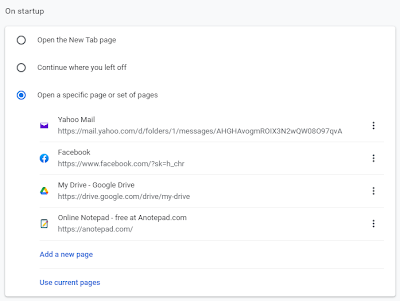
Chrome Startup Setting


Type this in the address bar of Chrome

chrome://settings/onStartup

Or open Menu (three dots) > Settings > On startup

Create encrypted documents with Crypto Notepad
Storing sensitive data in plain text documents is never a good idea. You never know what could happen if it falls in the wrong hands. Crypto Notepad is a text editor that can encrypt your documents, and protect them from unauthorized access.
https://tinyurl.com/y3gwd673

SafeHouse Explorer
One password to open each safehouse safe. You create the safes.
SafeHouse Explorer is a software that requires less storage space than most programs in the category Security software. It's very heavily used in some countries such as Brazil, United Kingdom, and United States.Since we added this program to our catalog in 2011, it has already reached 30,036 downloads, and last week it achieved 4 downloads.SafeHouse Explorer is available for users with the operating system Windows 2000 and previous versions, and you can get it in English. Its current version is 3.01 and was updated on 6/27/201
https://safehouse-explorer.en.softonic.com/

Scan multiple photos at once with AutoSplitter photo scanning software
This multiple photo scanning software will automatically crop your scan of several images. Place as many photos on your flatbed scanner as you can fit and scan - this software will automatically detect individual photos from the scan and will divide the image. Photos will be straightened and saved into separate image files. Scan all your family photos quickly. Multiple baseball cards, postcards, and other rectangular prints can also be scanned efficiently at once.
https://tinyurl.com/yyh2yhhp

Your PHONE is an awesome WEBCAM!
iVCam turns your Phone/Pad into an HD webcam for Windows PC, which has much better quality than most webcams and is compatible with all webcam-enabled applications. Replace your USB webcam or integrated webcam now with your Phone/Pad! It’s also a perfect baby monitor, spy-cam, security camera, and pet-cam.
Download the software https://tinyurl.com/y3ace5hj
Connect vis USB https://tinyurl.com/yyhcerds
Use with Zoom https://tinyurl.com/y6yuwcvx
Video explaining how to set up and use https://youtu.be/SNEYrWH3sME 


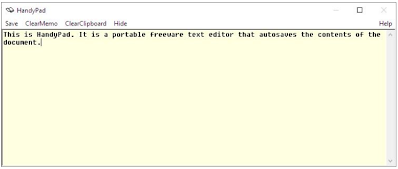
Handypad Is A Freeware Text Editor
HandyPad is a freeware offline text editor that autosaves the content of the document as you type. It has a very minimal design with the interface just having an editor pane and a menu bar. To start using HandyPad, just type the text in the editor pane.
https://tinyurl.com/y76cj78l


Anotepad
aNotepad is exactly the way a notepad should be. It’s fast, hassle-free and has a built-in rich text editor for more advanced formatting needs. It’s completely free and even allows you to create an account just in case you’d like to save your notes or keep them private on the cloud.
https://anotepad.com/

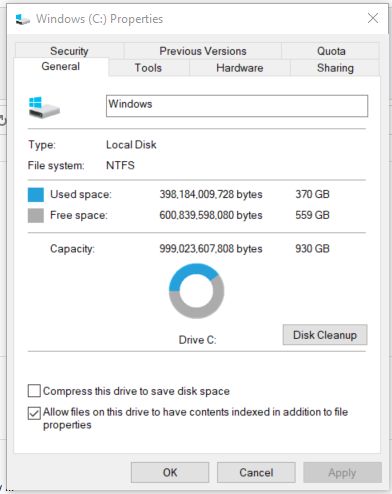
Stop The Indexing Of Files To Search
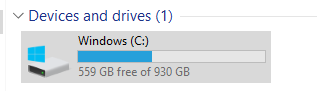
This is useful on older computers to stop indexing and speed up your computer by not running this in the background.

Win+E to open File Explorer > This PC


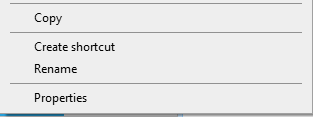
Right-click


Click Properties


Uncheck “Allow files on…” to stop indexing

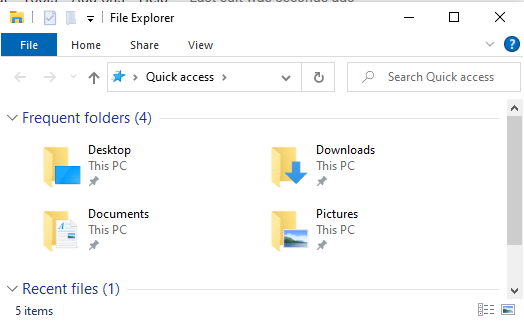
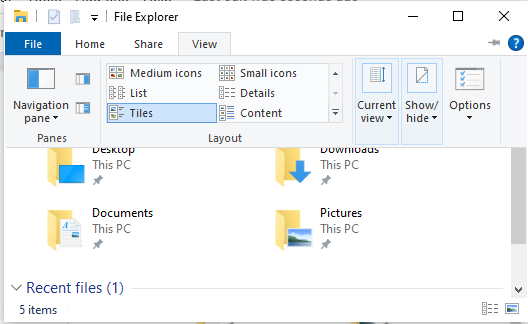
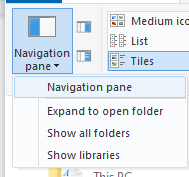
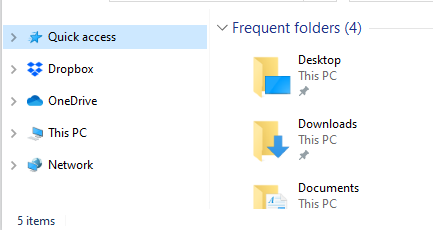
File Explorer Navigation Pane Missing


Click the View tab


Click Navigation pane


Click “Navigation pane”


The Navigation pane appears to the left of the Frequent folders list

Friday, December 18, 2020

Computer Class Notes 12-17-2020

Watch Video here: https://tinyurl.com/y8fokkq7


A QR code is a type of matrix barcode first designed in 1994 for the automotive industry in Japan. To read the contents of a QR code you need to have a QR reader app on your cell phone.



A barcode is a machine-readable optical label that contains information about the item to which it is attached. Like with the QR co.de, you need an app on your cell phone to read the barcode. The Sam’s Club and the Walmart apps each include bar code readers.

IrfanView
IrfanView is an image viewer, editor, organizer, and converter program for Microsoft Windows. It can also play video and audio files and has some image creation and painting capabilities. This is a freeware image editor and viewer. I have used it to display a series of pictures as a looping slideshow. You can use it to resize those large pictures as well. It has many features including editing your image by cutting, enhancing the color, converting to B&W, and more. Even a way to resize one or a group of images. It is available on the Ninite list of programs.

Paint To Add Captions
You can use IrfanView to add captions to a picture. However, I find the simplest way is to use Microsoft Paint.

Win+R > Paint

Use the A in the Tools group. Draw a box where you would like to see a caption and type away. You can change the font, size, and color.



I like to increase the size of the background (the white box) so I have an area below the image and use it to show the caption.

Some Windows 10 updates will soon be force installed
Later this month, Microsoft will begin to forcibly install Windows 10 updates on devices running certain outdated versions of the operating system. In light of the fact, Windows 10 version 1903 has already reached the end of service, the remaining users will be automatically updated to version 1909, whether they like it or not.
https://tinyurl.com/y42ogxaw

How to Use the Built-In Stocks Feature in Microsoft Excel
If you need stock market data for your spreadsheet, you can save time and get up-to-date information with the built-in Stocks data type in Microsoft Excel. Here’s how to populate your sheet with details like ticker symbols, market caps, previous close, and more.
https://tinyurl.com/y4g2n2nz
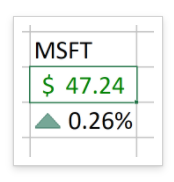

Stock Connector add in to Excel
Stock Connector lets you link stocks, ETFs, mutual funds, currencies, and cryptocurrencies to cells in your spreadsheets and refreshes them automatically.
https://tinyurl.com/y8puf325

Extract an Icon from a Windows EXE File
Sometimes you’re working on a project and need access to a high-quality version of a Windows 10 application icon, but you can’t find one on the internet. Luckily, a free utility called IconViewer makes it easy to extract a high-quality icon from an application’s EXE file. Here’s how.
https://tinyurl.com/y5wg9bfg 

Windows PowerToys
  • PowerToys for Windows 10 includes the following utilities:
  • Color Picker is a tool for HEX and RGB color identification.
  • FancyZones creates a window manager that makes it easier to build complex window layouts.
  • File Explorer Preview adds Scalable Vector Graphics and Markdown previews to File Explorer.
  • Image Resizer puts an image-resizing option into the File Explorer context menus.
  • Keyboard Manager adds options for remapping keys and shortcuts.
  • PowerRename is a tool for bulk file renaming in File Explorer via search-and-replace or regular expressions.
  • PowerToys Run is a powerful search tool. Use it to find folders, files, applications, and other items.
  • Shortcut Guide pops up an overlay screen of Windows-key shortcuts for as long as the Winkey is pressed and held.
https://tinyurl.com/yykw2yd3

About Passwords
On my iPhone, all I have to do is ask Siri to “Show me my passwords” and a list of all saved passwords appears after I answer the security question.

In Google Chrome, on my Android phone, or my computer, I open the menu (three dots) and select Settings > Passwords to view a list of saved passwords