Sunday, November 6, 2016

Class Summary 11-3-2016

What does sync mean?
It is short for synchronize and is used in programs like OneDrive, Mozy and Dropbox (among others) to mean copies are made the same on your computer and in the cloud. Also happens when you have your cell phone set to send all pictures you take to Google Photos. What is on your phone is synced to your cloud account.

To use your OneDrive account you must have a Microsoft Live account. If you are on Windows 10 you probably already have one as the normal installation of 10 had you create it and that is what you login to your PC with. What you store in your PC’s OneDrive folder or subfolders will be uploaded to your OneDrive cloud. Everyone gets a free account with 5gb of space. When you change that file on your PC, it is changed in the cloud. If you sign into your Live account and make a change from another computer, when you log back on your PC, the new file is sent to your PC. The files are kept in sync.

This is true with Dropbox as well. Save to the Dropbox folder and it is save in the cloud. Mozy is a backup that keeps what has been uploaded to the Mozy cloud current by syncing from your PC to the cloud two or more times a day. Both have a free amount of storage (2+gb) and you can purchase more.

If you are still on Windows 7, you will have to download and install OneDrive. Mozy and Dropbox do not come with Windows and must be downloaded and installed. Here are some links:

Mozy Backup http://www.mozy.com/free (use code GFBU22)
Drop Box http://tinyurl.com/b87mha8
OneDrive http://microsoft-onedrive.en.softonic.com/

Why do we have to create a boot disk when making an image backup?
There are two image backup programs we have been using. Both are free. They are EaseUS and Macrium. Instructions for using Macrium Reflect are on the club site at www.cccgc.net. These programs allow us to make an image or a complete copy of our PC; data, programs, settings, favorites, the operating system, etc to an external disk drive. We do this as insurance. If or when our PC fails, we can use this image file to rebuild our hard drive back to what it looked like the day we created the image. However, to be able to restore the system we have to be able to boot the dead PC. We do this by inserting a boot disk or USB flash drive that contains a mini-operating system and the software to rebuild the PC from the image file on the external drive. When we run the image creation program one of the options in that program is to make a boot disk. This is an important step. Without it, you cannot recover from an image. Details on how to make it in Reflect can be found on the club site.

What are these .ini files on my desktop?
These are informational files used by programs to remember options you have taken when running them. They are hidden files and need to be there. However, there is no good reason for you to be displaying hidden files. Although it is fine to delete them, it is better if you leave them alone as they contain information you will only have to enter again when you run the program that create them.



Better to open File Manager (Win+E) and the View ribbon. Uncheck Hidden items to no longer see those pesky .ini files.

Bookmarks and Favorites
These are terms used by browsers for saved links to websites. When you frequently access certain sites or are on one you would like to easily get back to, click the star to the right of the address bar and you can save that link. If you were using IE and have elected to switch to Chrome (my favorite browser), you can easily import your favorites from one browser to the other.

Open chrome://settings/importData
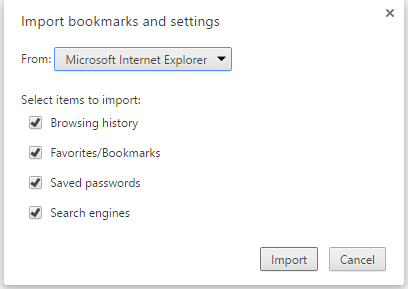


Click Import and the items will be copied from IE to Chrome. This can be done in any browser. So if you are starting to use Edge, you can import your items from any other browser into Edge. Importing does not remove them from the other browser.

CCleaner
I mentioned that this popular cleaning program is now available on your cell phone. Both for iPhone and Android. Just find it in Apps or the Play Store. Works great.

Should I Remove It?
We have lot’s of programs on our PCs. Some are questionable and we may wonder if we really need them. This programs scans your PC and lists the programs you have (non-microsoft) and gives you information about them and what other users have decided to do--keep or install them. Tried it in class and it looks good.
http://www.shouldiremoveit.com/


Saturday, October 29, 2016

Hangouts Summary 10-27-2016

There were five of us this week and I was able to get on with my cell phone for a hot spot and my Chromebook for Hangouts. I did not have anything planned this week--a lot going on her in KY and I am not on the Internet all the time here to poke around. But we did touch on a number of things as we all shared.

One of the members has had a strange event. Windows reset itself back to the way it was on March 15th. All files were also brought back to that date. Because of backups of files in the last few weeks recovery was possible, but the reason for the anomaly is unknown. Anybody have any thoughts? I was at a loss.

Part of that problem was the way to download pictures that had been stored in Google Photos. We were told that they all came down as tiny thumbnails and not as the original files. I logged on to Photos and tried it. Right-clicking on the pictures that show on the screen is not the answer. Those are just thumbnails. You must open the picture by clicking on it or select the group you want to download, then click the three dots in the upper right and chose Download. The original pictures will come down to your computer.

Another member was experiencing slow internet access. He ran speedtest.net and found out that he was only getting 3 mbps instead of the 10mbps he is paying for. He called his provider so they would fix the problem. Good idea to run that once in a while to make sure you are getting what you are paying for. And BTW don’t let the provider sell you on a really fast connection speed. I am getting 5 mbps on my cell phone hot spot and can stream movies without any issues. 6 mbps is plenty fast enough, but they want to sell you 60-75 mbps.

I mentioned what I am using for backup once again. I do a Macrium Reflect image about once a month. And I put all my new photos in Google Photos as I take them on my cell phone. Someday I will upload all my older ones. They are backed up in my image files.

Then I let Mozy.com back up my data folders automatically. When connected to the internet, it looked for any files that have changed or are new and puts a copy in the cloud. The first 2gb are free and you get .25gb more if you use my code (below). If you are using Google Photos there is no need to let Mozy back those folders up. For most home users the free 2.25gb should be plenty to backup the other documents. And for $5.99/mo you can purchase 50gb more space.

Mozy Backup; use code GFBU22 to get the extra .25gb
http://www.mozy.com/free

Saturday, October 22, 2016

Hangout Summary 10-20-2016

The hangout this week was short. I did not have too much to offer and the questions were pretty light. I was on my cell phone the internet connection is spotty and eats up my data pretty quickly. Here are the things we talked a little about. Another hangout next week so get your questions ready…

Cumulative Windows 10 Update installation issues

Some members have been having issues installing the updates from Microsoft after the 1607 update. I am one of those that has a problem. I left if running all day while was out and nothing seemed to be happening. Update 100% done screen. I powered down and restarted. Gave me the same 100% screen, then it finally went to a black screen with a cursor and stayed that way for a long time finally getting me to the login screen. Has been fine ever since. So I guess the magic word is patience.

Comcast new Terabyte Plan

Our cable company has finally done it. They have put a cap on our data usage limiting us to 1tb of bandwidth per month. Go over that in a month and there is a big penalty to pay. They sent me an email telling me what my monthly average has been over the past 3 months. They did say they 99% of users fall ways beneath that 1tb ceiling, so few should have a real concern. So just like the data cap on your cell phone, you will now have on on your cable.

Snipaste Screen Capture Utility

This is another screen capture utility. I have not used it, but there seems to be some nice features. Someone try it out and report back on it, please.
http://www.snipaste.com

Thursday, October 6, 2016

Class Summary 10-6-2016

Good class today with both in house members and hangouts.

HDMI to VGA. The newer laptops do not have a VGA connection to connect an older external monitor or projector. They do have an HDMI port which new devices and your TV has. But what to do with that old monitor you want to connect? Here is a converter that plugs into an HDMI port and allows you to connect that VGA monitor.
http://tinyurl.com/jn4s3zs

Quick Assist is a new way to help someone (or get help) using Windows 10 AU (1607).
http://tinyurl.com/h7xcdrf

Google Photos. We reviewed accessing them at photos.google.com and downloading the app for WIndows so all pictures are automatically uploaded. We looked at editing pictures in google photos and how to “Show facial Recognition” by going to Albums > People > and the click the photo of the person you want to find pictures of.

Giveaway of the day
https://www.giveawayoftheday.com/

How to disable non-system hotkeys on Windows
http://tinyurl.com/hpfkl8h

Boot to safe mode is not as easy as it used to be. If you are logged in you can simply hold the shift key down while clicking Restart. Otherwise it is complicated as this article points out:
http://tinyurl.com/6q6kk9f

How to create a desktop shortcut. It used to be pretty simple. We woul right clicked on a program icon and choose create desktop shortcut. That option is no longer available. Now we can add it to our start menu or our taskbar, but no desktop option. However, if you search under program files or program files (x86) and locate the .exe you can right-click and send a shortcut to the desktop.

Killer keyboard shortcuts to help you master Windows. Many you may already know about, but this is a good article listing some great ones to add to your toolbox,
http://tinyurl.com/jg4rncm

Dropbox is a great free repository for any type of file and a great way to share files with others as well. Like OneDrive you can install it on your PC. Any files you place in your PC dropbox folder will be synced to your dropbox in the cloud. You only get a couple of gb of space, but can purchase 1tb for $99 a year. Here is a link to create your free dropbox:
http://tinyurl.com/b87mha8

There are many other useful links at: http://www.rwevans.com/cccgc/Useful%20Links.htm

Friday, September 30, 2016

Class Summary 9-29-2016

Speedtest.net Is what I use to test my Internet speeds. You should be getting what you pay for. Here is a test of my home system:


Ping is how long it takes for a signal to leave my computer, go to the server, and return. Download is the speed I am downloading at in million bits per second. Upload is the speed at which I am sending up to the server. I am paying for 15 Mbps so this reading is pretty good. If you are getting much less than you are paying for, complain.

Insert hyperlink into a Facebook post by including the full URL in the post. Th, is works in a browser: rwevans.com. That is because the browser fills in the first part for you. To use it in a post on Facebook include the rest of the address: http://rwevans.com

When you are running Glary Utilities on your system, the default settings will cause a popup to the right of the taskbar when programs you have installed need updates. It is OK to click the popup and do the installs. Just be careful that you do not let the installs add additional programs to your PC. You can turn the notification off by opening Glary > Overview tab > uncheck the bottom box (Check for software updates automatically).

Maintenance software we suggest includes Ccleaner, Malwarebytes, Superantispyware, and Glary Utilities. However the fact that you have them on your computer does not do anything for you. You also have to run each on a regular basis, like once a week or more often, to get any benefit from them. AND you must update the software it the associated data base as well or you will be missing on checking for all the latest potential issues.

Backup to external drive using a program that will create an image of your total hard drive. Acronis (pay), EaseUS (free), and Reflect (free) are some of the ones used by club members. There are classes a couple of times a month at the club on how to use Reflect. You will need an external hard drive. A Portable 1gb or larger drive will work fine.

How to find Reflect backup: there are links right on the club site at cccgc.inf


Do I use lastpass? No I use locknote.ext and keep a simple notepad program called Locknote to keep a password protected note. I use it for my passwords so they are all in one place and protected instead of being in a Word file called passwords! Here is a link to download that program: http://sourceforge.net/projects/locknote/

Center click on mouse = new tab. Most of the time we use the left mouse button to take a link from a page in the browser. This typically opens the link on top of the current page. Use the center button (scroll wheel) instead and the link will open in a new tab. Right click and there are a number of different options to take.

Duckduckgo.com is a browser said to be better than Google.

Friday, September 16, 2016

Class Summary 9-15-2016

Talked about a couple of cell phone tips I picked up this week. When taking a selfie use the volume control button to take the picture instead of reaching for the button on the screen. Also, do not use the zoom feature of the camera. Take the full picture and then edit it to crop it down to the size you desire. This gives you more pixels to work with and you can always revert to the original one.

I was asked about voice to text. There are a number of ways to use this feature. In Windows 10 Cortana let’s you speak your request and will find things for you using Edge. Microsoft Word has a voice to text feature that lets you train it to your voice. You can also use our voice to control your actions in Windows 10 by turning on that feature. But what I like best is what Google offers. Firstly when you open google.com, in the search box you will find a picture of a microphone over to the right. Click it and you can speak your request into the browser search. The second is when using google docs, you can speak your words and it types them for you. Cool feature that I use when composing written works. When in the document window, Ctrl+Shift+S will turn it on.

Then we talked about the difference between a full and a quick scan when using maintenance programs like superantispyware and the antivirus that comes with Windows - - Defender. Quickscan takes a look at those folders on your C drive that's typically are used to store malicious software and viruses. However although this is a quick way to get through the maintenance it does not search through your entire drive for potential errors that may have been there for a long time. So I suggest you take the time once in awhile to allow those programs to do a full scan.

We talk more about Google photos. you can access your photos add photos.google.com. If you download the app to your smartphone every time you take a picture it will be uploaded using Wi-Fi to your Google account. your account is free and you have unlimited storage for photos. When on your PC you can either download and install a program to automatically upload photos from your PC to Google photos. Instead of installing a program you can also open up the photos.google.com page and click the picture of a cloud with an arrow in it appearing at the top of the page to manually upload your photos.

Somebody asked what a PNG file. It is an image file similar to a JPG. it is a format created by Microsoft and is a higher quality than a jpeg file. The program that come with Windows that you use to open a JPG should also open a PNG file. You can also open a browser and drag that file into the browser window to view it.

We talked about scanning photos into the computer and the fact that they would all have today's date. There is no way in Windows to change the creation date do something that would be more realistic for those scan photos. We did find a way to change the date and time in Google photos. I found a utility online it will allow you to modify the date and times right on your PC. I have not actually downloaded it and run it yet but if you want to play with it you can find it here : http://tinyurl.com/2utcbo4

Then I was asked if there was any way to check the recovery disk that the backup program Reflect or EaseUS had you create. The answer is yes. Insert that recovery disk into your CD drive or if you used a USB flash drive plug it in and then restart your computer booting to that external device. You may have to go into setup and change the order in which the operating system looks for a device that is bootable. Make the CD or the USB first on the list. You will know it worked because Windows won't start . Instead you will see the backup software screen. If that appears your recovery disc is ready to go.

The 4 maintenance programs that I use on a regular basis are Glary utilities, Malwarebytes, Superantispyware, and CCleaner. All but the last can be downloaded the ninite.com site. To find CCleaner goto piriform.com and click the download link.

Another backup question. How do I know my backup is any good? First, when you make the backup be sure to turn on verify option. See the white papers on the club site at cccgc.net for step by step instructions. And to check the image or to recovery 1 or more files from it without doing a complete restore, see the last white paper.


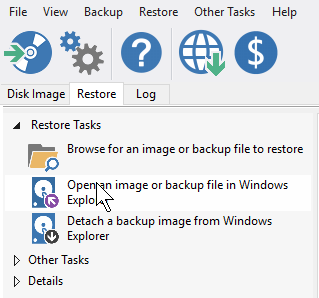
In a nutshell, you open Reflect on your PC, plug in your external drive, Click the Restore tab, and then Open and image… in Windows Explorer. Then you can view all the files, open one or two, or even copy one or more to your PC.

Create a shortcut on the desktop for any file including an executable program simply locate the file, right click on it, and select create shortcut.

We took a look at some searching techniques using your browser. although we used Google Chrome work the same in most other browsers. as an example we typing a couple of words and found millions of results. By putting a plus sign in front of the words it narrowed our search down because we were telling the search engine to include the first word plus the ssecond word plus the third word etcetera. Putting quotes around multiple words forces the search engine to look for that exact configuration. We located a useful website explaining a number of these browser tips. you can check it out at http://tinyurl.com/ncdmmuk

BTW (by the way) I typed most of this document using Google speech to text in Google Docs.

Wednesday, September 14, 2016

Class Summary 9-8-2016

Sorry this took a while to get to. Been busy since I got back to Port Charlotte. We had a good group in class and a group online using Google Hangouts. A little communications issue with the Hangout connection. Hope to have that worked out for this week.

We talked about using MS Word to merge a list of names and addresses with a document using the MailMerge feature. This is a nice way to personalize a letter being sent to a group of people. They all get the same letter but with their name in the letter. This is what those advertisements you get with your name printed right in the ad are using.

We talked about cloud storage. Amazon gives you unlimited storage for pictures and a limited storage for documents with a Prime account. Without Prime you just have document storage with your free account. Google, on the other hand, gives you 15gb of storage for anything with your free account. And you get unlimited image storage with aps to automatically upload photos taken with your smartphone. And a desktop app for your PC that uploads any pictures stored on your hard drive. We also looked at OneDrive which comes with Windows 10. Whatever you save in your OneDrive folder on your PC automatically saves in the cloud in your Microsoft account. New accounts limited to 5gb. You can purchase more storage with any of these clouds.

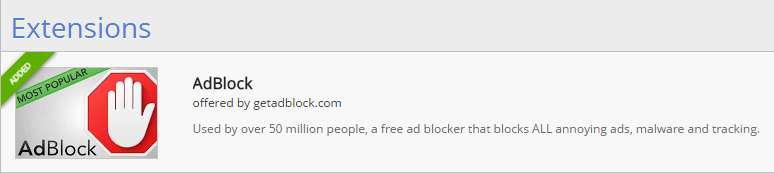
Talked about extensions in Google Chrome and specifically how to get thee adblocker exterinoit to limit the number of ads appearing on website.

In the address bar in chrome, type “chrome://extensions/” and hit the Enter key.

Scroll the bottom and click Get more extensions

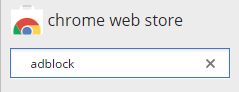
Type adblock and hit Enter

Click + ADD TO CHROME

Then we tested out the new extension by opening Speedtest.net. A number of ads were blocked. We talked about running this speed test when you internet seems to be slow. Make sure you are getting the speed you are paying for. If you speed is good and you are still running slowly, perhaps it is time to run those maintenance programs to clean you PC.