This was our first class this year using Google Hangout. All went well and I wa able to see everyone that joined the group. However, since I am using my phone as a hotspot I ate up all of my hotspot allocation of data. I was under the assumption that unlimited 4g data meant unlimited for using as a hotspot as well. It does not. I get 8gb of free hotspot data after which it drops down to 128 kbps. Later that day I was streaming a movie and found that it was rescanning every minute or two. I checked the phone and found out I was over my free 4g limit. So next week I will hangout using my phone and see how that works. I can always show you my screen if necessary. Let’s see how that works out.
Link to the Hangout is http://tinyurl.com/dickevans
We talked about where downloads go. If you are in Google Chrome they go to your downloads folder. If you are in Firefox or Internet Explorer you can access downloads using Ctrl+J.
I was asked how to change Windows 10 so you do not need to enter a password. It is very simple. Open the Run dialog box by pressing Win + R. Type NETPLWIZ. At the top of the next screen you should see a checkbox that is checked to require a password be entered. Uncheck the box and click Apply. A second window will appear. Enter your current password twice to show that you are the owner of this system. Click OK and the next time you turn your computer on it will skip asking for a password.
Find my device allows you to locate devices on your network. Start > Settings > Find my device to access it. BTW Win+I will open the Settings window.
We talked a little about Google Docs. You can share any of the files in your Google Drive with someone else and both be able to work on the file. Your edits are instantly made as long as you are signed on to the Internet. Your free Google drive has 15gb of space. It is used for your Gmail, your documents, and your photos.
We took a look at the following articles:
Geek Uninstaller
http://tinyurl.com/gqsp4ma
UltraSearch 2.1 with file content search
http://tinyurl.com/h952l67
Fix Windows 10 Start Menu problems
http://tinyurl.com/z9ce6tb
Hiding the webcam
http://tinyurl.com/zfxlse3
Install & Play Classic Windows 7 Games on Windows 10/8.1/8
http://tinyurl.com/gl6drc4
A great set of card games and all online and all free
https://cardgames.io
Monday, June 27, 2016

Thursday, June 16, 2016
Class Summary 6-16-2016
Free Phone Service? All you need is an old AT&T or T-Mobile phone. 200 minutes talk, 500 min text and 500mb of data. Not too much, but it is free. All you need is to spend $5 for a SIMM card.
http://tinyurl.com/gtf5qpf
Install & Play Classic Windows 7 Games on Windows 10/8.1/8. This is a third party program that puts all those games you liked in 7 that went away with the upgrades.
http://tinyurl.com/gl6drc4
Netflix Secret Categories lets you choose the categories of films to watch and it displays them for you in pictures. This is a free site: not part of Netflix
http://netflixcodes.me/
Hangout with me during the summer months while you (and me for a few weeks) are away from the Club. You will need a Google account and will be prompted for your username (email you signed up with) and password. If you do not have an account you can set up one. You do not need a gmail address to open a Google account. Just use your normal email address and assign a password to it to sign in to Google. This account is more than a way into hangouts. It also give you 15gb of cloud space, access to Google Docs, access to unlimited storage of your photos on Google Photos, and more.
http://tinyurl.com/dickevans
Another great shortcut to remember in Windows 10 and more
Win+I opens the Settings Window
Win+E opens a new instance of File Explorer
Win+L locks the screen
Win+D clears the desktop of running programs without closing them
Win+M clears the desktop of running programs that have a minimize button
Win+R opens the run dialog box
A great set of card games and all online and all free
https://cardgames.io
How to Extend Windows 10’s 30-Day Limit for Rolling Back to Windows 7 or 8.1
http://tinyurl.com/h93e46e
Type NETPLWIZ in the run dialog box to remove the need to enter a password when Windows starts. Also WINVER will display the current version of the OS running.
CCleaner includes in the tools section a Drive Wiper which can be use to totally clear data off a disk drive. You choose the level of cleaning.
http://tinyurl.com/gtf5qpf
Install & Play Classic Windows 7 Games on Windows 10/8.1/8. This is a third party program that puts all those games you liked in 7 that went away with the upgrades.
http://tinyurl.com/gl6drc4
Netflix Secret Categories lets you choose the categories of films to watch and it displays them for you in pictures. This is a free site: not part of Netflix
http://netflixcodes.me/
Hangout with me during the summer months while you (and me for a few weeks) are away from the Club. You will need a Google account and will be prompted for your username (email you signed up with) and password. If you do not have an account you can set up one. You do not need a gmail address to open a Google account. Just use your normal email address and assign a password to it to sign in to Google. This account is more than a way into hangouts. It also give you 15gb of cloud space, access to Google Docs, access to unlimited storage of your photos on Google Photos, and more.
http://tinyurl.com/dickevans
Another great shortcut to remember in Windows 10 and more
Win+I opens the Settings Window
Win+E opens a new instance of File Explorer
Win+L locks the screen
Win+D clears the desktop of running programs without closing them
Win+M clears the desktop of running programs that have a minimize button
Win+R opens the run dialog box
A great set of card games and all online and all free
https://cardgames.io
How to Extend Windows 10’s 30-Day Limit for Rolling Back to Windows 7 or 8.1
http://tinyurl.com/h93e46e
Type NETPLWIZ in the run dialog box to remove the need to enter a password when Windows starts. Also WINVER will display the current version of the OS running.
CCleaner includes in the tools section a Drive Wiper which can be use to totally clear data off a disk drive. You choose the level of cleaning.
Friday, June 10, 2016
Class Summary 6-9-2016
We began with a walk through how to obtain and easily update the maintenance programs I use to keep a PC clean. The following is a white paper is a white paper I wrote on that subject:
White Paper on Maintenance
http://www.rwevans.com/ComputerMaintenance.pdf
We ran ninite.com to download safely the mainenance programs and put the ninite installer on the desktop for easy access. Then we talked in detail about glary utilities walking through how to use it on a daily basis to clean things up and shutdown your PC.
We have gone over this in the past and have written other summaries on glary. Here is a what to type into the address bar of your browser to locate those notes:
glary site:dickevanstraining.blogspot.com
The word “glary” is what we are searching for. The word “site:” tells the browser to limit the search to the website that follows the colon.
Then we talked more about the use of OneDrive and Google Photos to insure you have your important documents and your photos in the cloud for safekeeping. Search this blog site for more summaries on these topics. Also the summary of this month's presentation at the general meeting. You can find that at http://cccgc.info/wp-content/uploads/ComputerClubMeeting6-7-2016.pdf
Watched a couple of funny video on YouTube:
Trunk Monkey
https://www.youtube.com/watch?v=Rx6WB5YJia8&index=4&list=RDl8oPVVGYQ40
Remember
https://www.youtube.com/watch?v=9yN-6PbqAPM
If you are taking a road trip and staying at motels you might want to use this site: Checking for Bedbugs before you book a hotel
http://bedbugregistry.com
We have talked a bit about disabling programs from starting when your PC boots. This reduces the startup time and stops unnecessary programs from constantly running in the background. This article explains how to make a program autostart on bootup. For example, you might want to help someone who does not know much about computers have their PC automatically open their email when they turn on the computer.
http://tinyurl.com/zvfjusm
We also used spokeo.com to search for someone by their phone number and then using their name or their email address. You get enough information to determine if this is the person you are looking for, but have to pay to get everything about them.
White Paper on Maintenance
http://www.rwevans.com/ComputerMaintenance.pdf
We ran ninite.com to download safely the mainenance programs and put the ninite installer on the desktop for easy access. Then we talked in detail about glary utilities walking through how to use it on a daily basis to clean things up and shutdown your PC.
We have gone over this in the past and have written other summaries on glary. Here is a what to type into the address bar of your browser to locate those notes:
glary site:dickevanstraining.blogspot.com
The word “glary” is what we are searching for. The word “site:” tells the browser to limit the search to the website that follows the colon.
Then we talked more about the use of OneDrive and Google Photos to insure you have your important documents and your photos in the cloud for safekeeping. Search this blog site for more summaries on these topics. Also the summary of this month's presentation at the general meeting. You can find that at http://cccgc.info/wp-content/uploads/ComputerClubMeeting6-7-2016.pdf
Watched a couple of funny video on YouTube:
Trunk Monkey
https://www.youtube.com/watch?v=Rx6WB5YJia8&index=4&list=RDl8oPVVGYQ40
Remember
https://www.youtube.com/watch?v=9yN-6PbqAPM
If you are taking a road trip and staying at motels you might want to use this site: Checking for Bedbugs before you book a hotel
http://bedbugregistry.com
We have talked a bit about disabling programs from starting when your PC boots. This reduces the startup time and stops unnecessary programs from constantly running in the background. This article explains how to make a program autostart on bootup. For example, you might want to help someone who does not know much about computers have their PC automatically open their email when they turn on the computer.
http://tinyurl.com/zvfjusm
We also used spokeo.com to search for someone by their phone number and then using their name or their email address. You get enough information to determine if this is the person you are looking for, but have to pay to get everything about them.
Friday, May 27, 2016
Class Summary 5-26-2016
Windows 10 Custom Guide
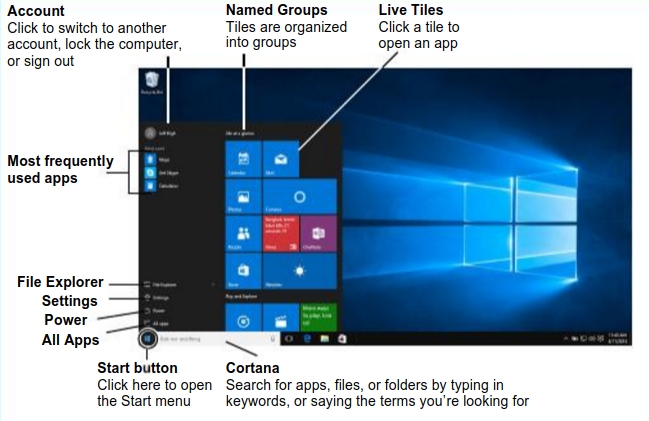
Get the full guide here: http://tinyurl.com/h74sqls
How To Password Protect Files. We have talked before on how to password protect Word and Excel files right at the Save As screen. This program will give you the capability of password protecting any file on your computer.
http://tinyurl.com/zskzvfr
How to go back to Window 7 and how to stop the 10 upgrade. Some have gotten Windows 10 forced onto their computer and really do not want it. I do not understand why, but they can get rid 10 and roll back to their previous OS as long as they do it within 30 days of the 10 upgrade. This article explains how.
http://tinyurl.com/h9hqdgy
How To Mount ISO Files In Windows 10/8.x. Most do not know what an ISO file is, so if that is you, this is not an article you need to look at. But those that use ISO files will find this useful.
http://tinyurl.com/zfnjuga
How To Speed Up Your PC. We have talked about the free maintenance programs I use to clean my computer (ccleaner, glary utilities, malwarebytes, and superantispyware). This article talks about some of them and others.
http://tinyurl.com/hn3wytq
Printing an email is not just pressing Ctrl+P. In Yahoo you press P on the keyboard and your email prints without showing everything else on your screen. In Gmail you click the tiny icon of a printer in the upper right of the email on the screen. You can also select the portion you want to print and then press Ctrl+P. Make sure the checkbox on the left side of the window after pressing Ctrl+P is checked for Selection. In all cases a preview window shows in Chrome.
Separating tabs from a browser. You do not have to open a second browser to look at two views at the same time. Open the second window in another tab, then drag the tab down and it will disconnect from the browser and show a second browser window. You can then resize each and see them both on the screen at the same time. To put them back into one window, drag the tab to the tab area on the other browser window. They are not back together as one window.
MailChimp is a great way to send multiple emails. If you send them using your normal email like comcast, embarque, yahoo, gmail, or whatever you can send multiple emails by inserting more than one email address in the TO, CC, or BCC boxes. However, each email service has a maximum number of emails you can send in a month without being considered spamming. Using a free service like MailChimp lets you maintain a database of names and email addresses and when you send using their service everyone gets an individual email. You can even write it now and schedule it to be sent in the future. After it is sent you can check the reporting feature to see how many were actually read and even who read it.
Phonevite is another free online application that will make phone calls for you. You set up a database of phone numbers, record your message, and tell phonevite when to make the calls. Everyone on your list gets a phone call with your messsage. Great way to invite people to a meeting or a party and then again to remind them.
Get the full guide here: http://tinyurl.com/h74sqls
How To Password Protect Files. We have talked before on how to password protect Word and Excel files right at the Save As screen. This program will give you the capability of password protecting any file on your computer.
http://tinyurl.com/zskzvfr
How to go back to Window 7 and how to stop the 10 upgrade. Some have gotten Windows 10 forced onto their computer and really do not want it. I do not understand why, but they can get rid 10 and roll back to their previous OS as long as they do it within 30 days of the 10 upgrade. This article explains how.
http://tinyurl.com/h9hqdgy
How To Mount ISO Files In Windows 10/8.x. Most do not know what an ISO file is, so if that is you, this is not an article you need to look at. But those that use ISO files will find this useful.
http://tinyurl.com/zfnjuga
How To Speed Up Your PC. We have talked about the free maintenance programs I use to clean my computer (ccleaner, glary utilities, malwarebytes, and superantispyware). This article talks about some of them and others.
http://tinyurl.com/hn3wytq
Printing an email is not just pressing Ctrl+P. In Yahoo you press P on the keyboard and your email prints without showing everything else on your screen. In Gmail you click the tiny icon of a printer in the upper right of the email on the screen. You can also select the portion you want to print and then press Ctrl+P. Make sure the checkbox on the left side of the window after pressing Ctrl+P is checked for Selection. In all cases a preview window shows in Chrome.
Separating tabs from a browser. You do not have to open a second browser to look at two views at the same time. Open the second window in another tab, then drag the tab down and it will disconnect from the browser and show a second browser window. You can then resize each and see them both on the screen at the same time. To put them back into one window, drag the tab to the tab area on the other browser window. They are not back together as one window.
MailChimp is a great way to send multiple emails. If you send them using your normal email like comcast, embarque, yahoo, gmail, or whatever you can send multiple emails by inserting more than one email address in the TO, CC, or BCC boxes. However, each email service has a maximum number of emails you can send in a month without being considered spamming. Using a free service like MailChimp lets you maintain a database of names and email addresses and when you send using their service everyone gets an individual email. You can even write it now and schedule it to be sent in the future. After it is sent you can check the reporting feature to see how many were actually read and even who read it.
Phonevite is another free online application that will make phone calls for you. You set up a database of phone numbers, record your message, and tell phonevite when to make the calls. Everyone on your list gets a phone call with your messsage. Great way to invite people to a meeting or a party and then again to remind them.
Friday, May 20, 2016
Class Summary 5-19-2016
Most of the class was all about Google Docs. Here is the link to the white paper I wrote:
http://tinyurl.com/zrju7yt
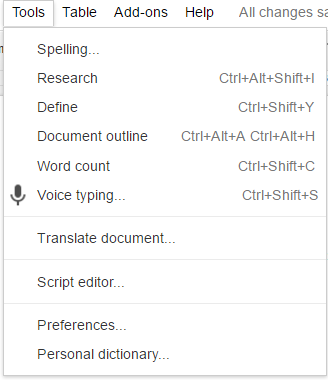
Not in the white paper is what we demonstrated about using your voice to type a document and being able to translate a document from one language to another. To turn on voice click Tools > Voice typing. Then you choose the language you want to type in and click the microphone. As you talk your words appear on the screen with no need to use the keyboard!
Have a letter or email from someone in another language? Copy and paste into a blank Google document and choose Tools > Translate document… Pick the from and to languages and in seconds the document will be translated.
Then a question came up about translating a web page. Easy to do with the Google Translate extension. Then it is as simple as opening the page and then clicking the Translate button in the toolbar:
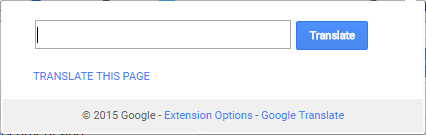
Click Translate This Page
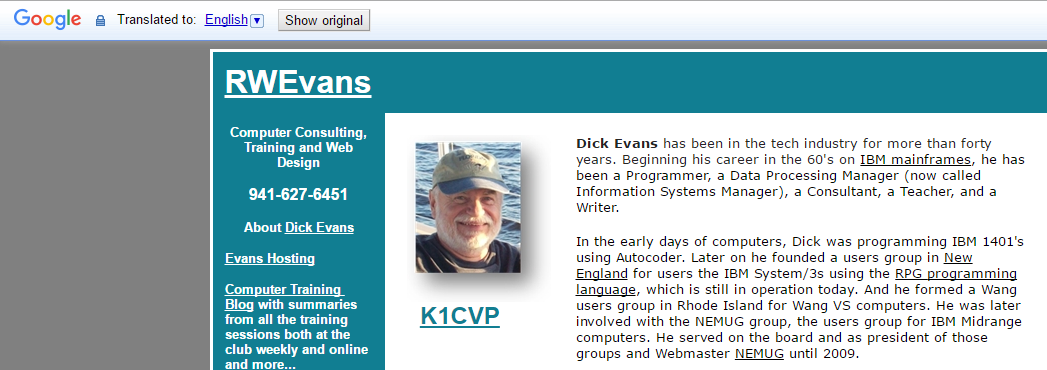
Choose the language
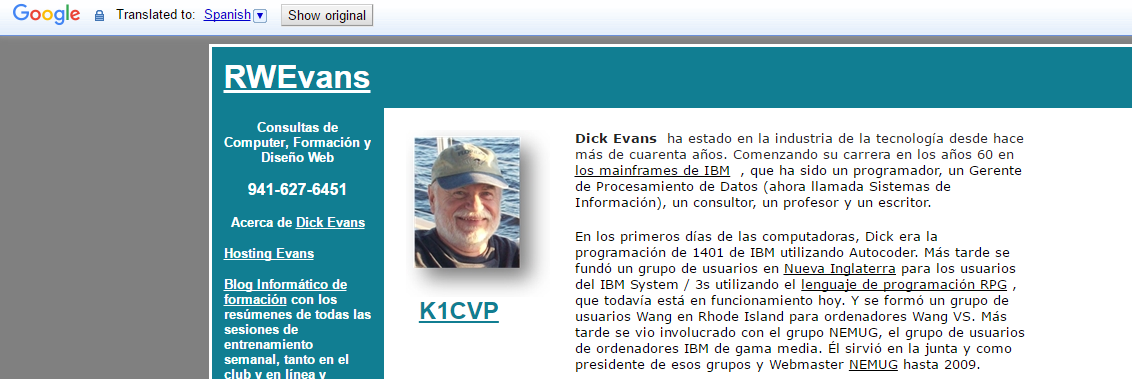
Instantly the page appears in the language chosen.
Revolver extension for Google Chrome
Turns your Tabs into a slide show as it displays them one at a time every few seconds
http://tinyurl.com/pdz2pbe
A new Notepad in the cloudGreat for viewing entries across PC’s and for using on Chromebooks
http://notepad.pw/
Safe Forwarding
Be careful when forwarding emails. Here is the bottom of the page I forwarded recently:
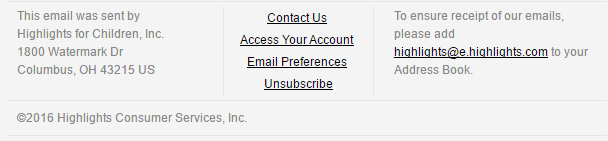
Notice the links that go to areas like Unsubscribe? If I forward this email as is, then then the person this is being sent to can unsubscribe me from an email list I enjoy receiving. And I will not even know it. This is how some have been dropped from my email list for the class.
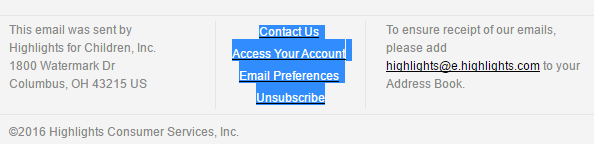
So before sending the forwarded email, I select the items that link back to my account and press the Delete key to remove them. Now they cannot change my email standing.

Facebook Scam Alert
Don’t accept a friend request from someone you are already friends with
http://tinyurl.com/jr5mrvx
Chrome Hits #1
Last month Chrome took over with 42% of users. IE dropped to 41% and Firefox dropped to 10%
http://tinyurl.com/jtytseb
Act NOW to Keep Your Windows 10 Upgrade Free After July 29
http://tinyurl.com/jo8xf5s
http://tinyurl.com/zrju7yt
Not in the white paper is what we demonstrated about using your voice to type a document and being able to translate a document from one language to another. To turn on voice click Tools > Voice typing. Then you choose the language you want to type in and click the microphone. As you talk your words appear on the screen with no need to use the keyboard!
Have a letter or email from someone in another language? Copy and paste into a blank Google document and choose Tools > Translate document… Pick the from and to languages and in seconds the document will be translated.
Then a question came up about translating a web page. Easy to do with the Google Translate extension. Then it is as simple as opening the page and then clicking the Translate button in the toolbar:
Click Translate This Page
Choose the language
Instantly the page appears in the language chosen.
Revolver extension for Google Chrome
Turns your Tabs into a slide show as it displays them one at a time every few seconds
http://tinyurl.com/pdz2pbe
A new Notepad in the cloudGreat for viewing entries across PC’s and for using on Chromebooks
http://notepad.pw/
Safe Forwarding
Be careful when forwarding emails. Here is the bottom of the page I forwarded recently:
Notice the links that go to areas like Unsubscribe? If I forward this email as is, then then the person this is being sent to can unsubscribe me from an email list I enjoy receiving. And I will not even know it. This is how some have been dropped from my email list for the class.
So before sending the forwarded email, I select the items that link back to my account and press the Delete key to remove them. Now they cannot change my email standing.
Facebook Scam Alert
Don’t accept a friend request from someone you are already friends with
http://tinyurl.com/jr5mrvx
Chrome Hits #1
Last month Chrome took over with 42% of users. IE dropped to 41% and Firefox dropped to 10%
http://tinyurl.com/jtytseb
Act NOW to Keep Your Windows 10 Upgrade Free After July 29
http://tinyurl.com/jo8xf5s
Friday, May 13, 2016
Class Summary 5-12-2017
We spent some time on OneDrive again. Remember that OneDrive is a folder on your PC. The difference between the OneDrive folder and your Documents folder is that anything saved on OneDrive is synced to your cloud storage on Microsoft Live. Both your Document folder and your OneDrive folder exist on your hard drive. Only OneDrive is synced to the cloud.
We talked about ransomware and the need to do an image backup often. In between images your OneDrive keeps all your data backed up in the cloud. And your Google photos keeps all your images with its unlimited free cloud service. A system crash or attack that leaves you PC useless can be restored from the image. Then your OneDrive will sync all your data back to the restored drive. The only thing missing will be the program and updates that occurred after the image was made.
Obvibase makes creating an online database as easy and fast as creating a spreadsheet. A good online database to keep track of address books and more.
https://www.obvibase.com/
We downloaded and demonstrated slimbrowser. It appeared to work well and faster than Chrome. And it works with Windows XP. It uses very little memory. A light, fast, and free web browser. Faster startup, faster web browsing, 10x faster file & video download, 20x faster photo upload.
http://www.slimbrowser.net/
Understanding Copy and Paste
First let’s define some key concepts:
Right-click means to point at something on the screen with the mouse pointer and
then clicking the right button on the mouse. Click means to click the left button
on the mouse.
Drag means to point at something with the mouse pointer and then, while holding
down the left button on the mouse, moving the mouse. This is generally used move
what is being pointed to or to select what is dragged over. Right-drag means to use
the right button instead of the left.
Select means to drag across a series of words or objects on the screen. This action
causes what is dragged over to change color indicating it has been selected.
Copy and Paste is such a simple but misunderstood concept. Your computer has a
hidden from view area called the clipboard. To copy something, select it—words in a
document, an image, the URL of a Web site, or even text on a Web page. Then right-click
on the selected piece and select Copy. You can also use the keyboard command
that has been around since the beginning; Ctrl+C. To use it, hold down the Ctrl
key, tap C, and then release both keys. Do not attempt to press both keys at the
same time.
What you had selected is now in the clipboard. You cannot see it, but just take it
on faith. It is there and will stay there until you either copy something else
which replaces the content of the clipboard or you turn off your computer which
clears memory.
Open the app you wish to copy the material to, like Word. Click to place the
insertion point (that vertical line indicating where your next keystroke will
appear) where you want the pasted material to be located, and then right-click and
select Paste. You can also Ctrl+V to paste from the clipboard.
This same method can be used to copy a file to another location on your computer.
The Shift+Click Method
This method works whenever you want to select multiple items. It could be file
names in a list of files, a series of sentences or paragraphs in a document, or
even a part of a Web page to use in a document.
Locate the first word in the section to be copied and mouse over it to select it.
Without touching any button on the mouse, bring the pointer down to the end of the
section to be copied.
The key is to hold down the shift key, point to the ending position, and then click
the mouse and all between the first selected entry and the place you last clicked
have been selected.
Now that you have selected all of it, you can right-click and select Copy or simply
Ctrl+C to copy it to the clipboard for pasting in another application.
Copying from a Web Page
When copying from a Web page even the behind the scenes coding is copied. You
cannot see this information, but when you paste the selection into another app,
like a Word Processor, the results are not just the text. Included are all the
formatting, links, images, and often other things we may not understand.
To avoid this “mess”, I suggest pasting first into a pure text app like NOTEPAD.
This app accepts only the raw text dropping any other coding and images. Then
select all the new data. Another shortcut is Ctrl+A which selects all data in the
window having focus. Then right-click and copy to place that text data into the
clipboard for pasting elsewhere.
And we learned we can drag photos from Facebook to a folder on your PC. The name is a long strange one so you might want to rename it to something making sense to you after the copy.
We talked about ransomware and the need to do an image backup often. In between images your OneDrive keeps all your data backed up in the cloud. And your Google photos keeps all your images with its unlimited free cloud service. A system crash or attack that leaves you PC useless can be restored from the image. Then your OneDrive will sync all your data back to the restored drive. The only thing missing will be the program and updates that occurred after the image was made.
Obvibase makes creating an online database as easy and fast as creating a spreadsheet. A good online database to keep track of address books and more.
https://www.obvibase.com/
We downloaded and demonstrated slimbrowser. It appeared to work well and faster than Chrome. And it works with Windows XP. It uses very little memory. A light, fast, and free web browser. Faster startup, faster web browsing, 10x faster file & video download, 20x faster photo upload.
http://www.slimbrowser.net/
Understanding Copy and Paste
First let’s define some key concepts:
Right-click means to point at something on the screen with the mouse pointer and
then clicking the right button on the mouse. Click means to click the left button
on the mouse.
Drag means to point at something with the mouse pointer and then, while holding
down the left button on the mouse, moving the mouse. This is generally used move
what is being pointed to or to select what is dragged over. Right-drag means to use
the right button instead of the left.
Select means to drag across a series of words or objects on the screen. This action
causes what is dragged over to change color indicating it has been selected.
Copy and Paste is such a simple but misunderstood concept. Your computer has a
hidden from view area called the clipboard. To copy something, select it—words in a
document, an image, the URL of a Web site, or even text on a Web page. Then right-click
on the selected piece and select Copy. You can also use the keyboard command
that has been around since the beginning; Ctrl+C. To use it, hold down the Ctrl
key, tap C, and then release both keys. Do not attempt to press both keys at the
same time.
What you had selected is now in the clipboard. You cannot see it, but just take it
on faith. It is there and will stay there until you either copy something else
which replaces the content of the clipboard or you turn off your computer which
clears memory.
Open the app you wish to copy the material to, like Word. Click to place the
insertion point (that vertical line indicating where your next keystroke will
appear) where you want the pasted material to be located, and then right-click and
select Paste. You can also Ctrl+V to paste from the clipboard.
This same method can be used to copy a file to another location on your computer.
The Shift+Click Method
This method works whenever you want to select multiple items. It could be file
names in a list of files, a series of sentences or paragraphs in a document, or
even a part of a Web page to use in a document.
Locate the first word in the section to be copied and mouse over it to select it.
Without touching any button on the mouse, bring the pointer down to the end of the
section to be copied.
The key is to hold down the shift key, point to the ending position, and then click
the mouse and all between the first selected entry and the place you last clicked
have been selected.
Now that you have selected all of it, you can right-click and select Copy or simply
Ctrl+C to copy it to the clipboard for pasting in another application.
Copying from a Web Page
When copying from a Web page even the behind the scenes coding is copied. You
cannot see this information, but when you paste the selection into another app,
like a Word Processor, the results are not just the text. Included are all the
formatting, links, images, and often other things we may not understand.
To avoid this “mess”, I suggest pasting first into a pure text app like NOTEPAD.
This app accepts only the raw text dropping any other coding and images. Then
select all the new data. Another shortcut is Ctrl+A which selects all data in the
window having focus. Then right-click and copy to place that text data into the
clipboard for pasting elsewhere.
And we learned we can drag photos from Facebook to a folder on your PC. The name is a long strange one so you might want to rename it to something making sense to you after the copy.
Thursday, May 5, 2016
Class Summary 5-5-2016
The mouse pointer sometimes referred to as the cursor is white and very small by default. By opening the Control Panel and Mouse, you can change the size, color and other attributes.
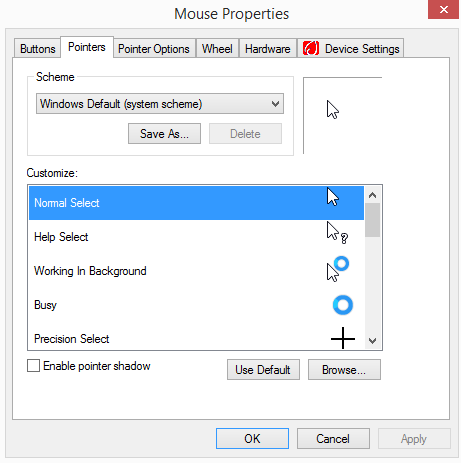
On the Pointers tab, pull down the Scheme list
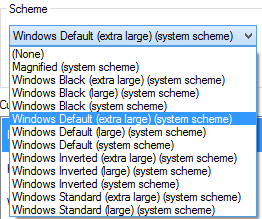
Choose the desired size and color, then click Apply.
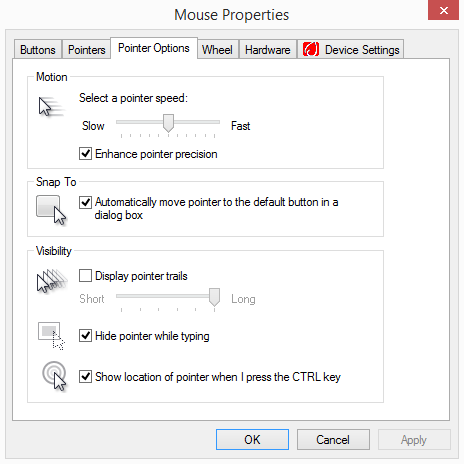
Under the Pointer Options tab, you can change other options. I check the bottom one so that when I have “lost” the pointer I can press CTRL and and easily find it.
Startup Files are executed when windows is starting, before you can have control of it. Access them from the Task Manager. Open it by right clicking on the task bar and selecting Task Manager.
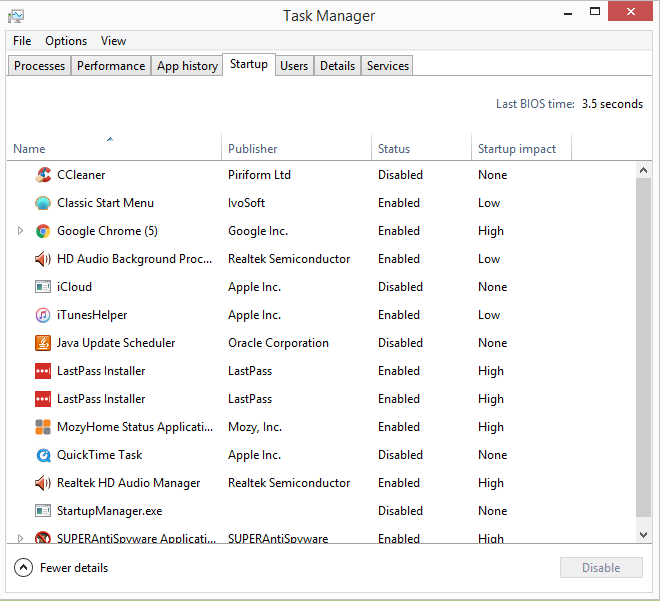
Click the Startup tab to see a list of all programs that start first. To disable one, click it and then click Disable.
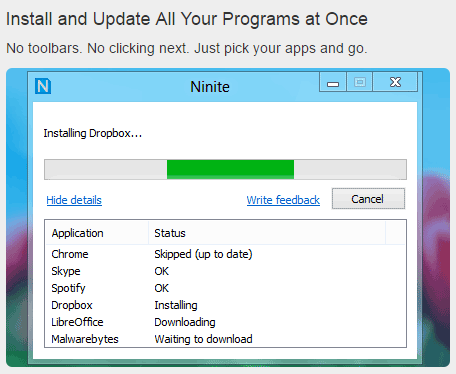
Ninite is a great website to use to install a number of useful programs without having to worry about getting unwanted programs or browser toolbars installed as well. Simply access ninite.com and check off the programs you want to install or update and then click the Get Your Ninite button to download and run the installer.
Can we capture a video? This was asked of a member who is a participant in an online discussion. He would like to capture the video of the streamed event so he can review it later. The simple answer is yes.
Auctions50.net is a loal auction site hwere you can bid on items for sale or even post an item to sell.
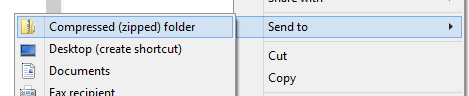
Zip Files are found with the extension ZIP. They can be created by selecting one or more files, right-clicking and selecting Send To > Compressed… The file or group of files will be placed in a container with the ZIP extension. The size of the zipped file is usually less than the sum of the sizes of the files being compressed. To see files inside a zipped file, double click the file and the list of its contents appears. In the ribbon above select Extract Files to create a new folder containing all the files in their original form.
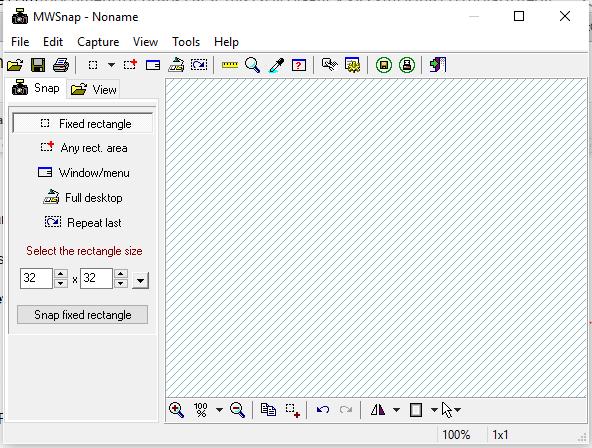
MWsnap does a much better job of capturing something from the screen than the Snipping Tool.
http://tinyurl.com/mhvg
On the Pointers tab, pull down the Scheme list
Choose the desired size and color, then click Apply.
Under the Pointer Options tab, you can change other options. I check the bottom one so that when I have “lost” the pointer I can press CTRL and and easily find it.
Startup Files are executed when windows is starting, before you can have control of it. Access them from the Task Manager. Open it by right clicking on the task bar and selecting Task Manager.
Click the Startup tab to see a list of all programs that start first. To disable one, click it and then click Disable.
Ninite is a great website to use to install a number of useful programs without having to worry about getting unwanted programs or browser toolbars installed as well. Simply access ninite.com and check off the programs you want to install or update and then click the Get Your Ninite button to download and run the installer.
Can we capture a video? This was asked of a member who is a participant in an online discussion. He would like to capture the video of the streamed event so he can review it later. The simple answer is yes.
Auctions50.net is a loal auction site hwere you can bid on items for sale or even post an item to sell.
Zip Files are found with the extension ZIP. They can be created by selecting one or more files, right-clicking and selecting Send To > Compressed… The file or group of files will be placed in a container with the ZIP extension. The size of the zipped file is usually less than the sum of the sizes of the files being compressed. To see files inside a zipped file, double click the file and the list of its contents appears. In the ribbon above select Extract Files to create a new folder containing all the files in their original form.
MWsnap does a much better job of capturing something from the screen than the Snipping Tool.
http://tinyurl.com/mhvg
Subscribe to:
Posts (Atom)